
How to make the most of the Photo Mosaic Feature
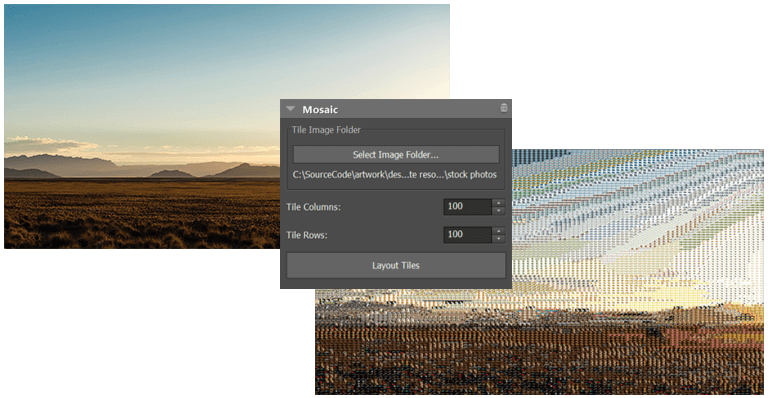
The latest update of PhotoPad introduces a powerful new creative tool: Photo Mosaic. This feature makes it easy to transform any image into a visually rich mosaic built from your own photo collection.
With just a few clicks, a single picture can become a detailed composition made up of many smaller images, creating a striking effect that works equally well for personal projects and professional designs.
How to create a Photo Mosaic from your image
The Photo Mosaic tool allows you to build an image from a grid of smaller photos. Instead of editing each tile manually, the software automatically arranges your images to match the structure of your chosen base picture.
You simply:
- Select a main image
- Choose a folder of photos to use as tiles
- Define the number of rows and columns
- Generate the mosaic automatically
The result is a seamless composition where your selected images combine to recreate the original photo.


Fine-Tune Your Photo Mosaic for More Detail or Artistic Effects
The feature includes simple but effective controls that allow users to adjust the final output:
- Grid size control: Increase or decrease the number of tiles per row and column to adjust detail levels
- Image folder selection: Use any collection of photos stored on your device
- Automatic arrangement: The software handles placement and blending for you

Higher tile counts produce more detailed mosaics, while lower counts create a more abstract, artistic effect.

From Simple Photos to Creative Mosaics in Just Seconds
The Photo Mosaic tool takes something that usually requires time, manual work, and specialist tools and reduces it to a simple, automated process. Instead of spending time placing individual images one by one, the software does the heavy lifting and builds the mosaic for you in seconds.
What makes it especially useful is how quickly it turns a personal photo collection into something new and unexpected. A simple portrait, landscape, or memory image can become a detailed composition made up of many smaller moments, giving the final result a more personal and creative feel. The possibilities are endless!

Try it Yourself- Generate Photo Mosaics from Your Photos
If you already have a folder of photos, you can see the result almost instantly, which often surprises first-time users in a good way. For some more detailed information, watch this short tutorial how to use the feature.
Download PhotoPad and try it free to see how your own images can be turned into something more expressive and visually unique.
And most importantly: Have fun with the new feature!
The PhotoPad Team


No comments:
Post a Comment