Showing posts with label multimedia. Show all posts

Friday, September 27, 2013

Express Points: A New Free PowerPoint Alternative from NCH

Need to give a report? Presenting a paper or results? Making a sales pitch? PowerPoint has been the standard for creating slide presentations for all these uses and more, but for many, it has also become a crutch. The Internet is littered with advice and the Dos and Don'ts of making effective presentations. Audiences have become numb and turned off to excessive use of standard templates and poorly planned presentations.

Hands down, no matter what program you use, thinking out the presentation, and what media, elements, and ideas you need to support and enhance what you have to say will make a world of difference more than the actual application used to make it. Like a calculator only being as smart as its user, adding slides won't make a presentation better just because they are there. That being said, if you are looking for an alternative program, we hope you will try the new Express Points Presentation Software.

As with all of our software, we have approached this application with the goal of making everything as easy as possible, so you can focus on what you want to say and do instead of how to get it done. We hope you will give Express Points a try when working on your next presentation, and give us your feedback on how we can improve it in future releases to make it even more effective.

Tuesday, August 27, 2013

New Mac Digital Photo Slideshow Software

New Mac version of PhotoStage slideshow maker software One of our most popular programs, PhotoStage Slideshow Maker is now not only the best slideshow software for Windows but also an easy way to make slideshows with music, photos, video clips, narration and more on Mac OS X. Slideshows are a great way to keep your memories alive and creating dynamic video slideshows couldn't be easier. From Camera to DVD or posting online to share with friends and family follow the easy steps to add your media, enhance your photos and add effects for a professional touch in minutes. Download PhotoStage today to start making your own video picture slideshows and see how easy it is for yourself.

Thursday, July 11, 2013

Royalty-Free Music Library

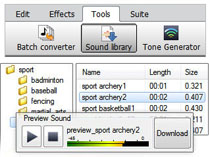
Royalty-Free SFX and Music Library When you purchase products like MixPad audio mixer, WavePad audio editor or VideoPad video editor from NCH Software, you get more than just high-quality audio and video software. You also get hundreds of dollars worth of royalty-free music and sound effects that you can use in your productions.

Your purchase entitles you to download, at no additional cost, a wide array of music clips in genres such as blues, dance, and rock. You can also download lots of sound effects including animals, alarms, office sounds, sports and many others.

Music and sound effects libraries can cost you hundreds or even thousands of dollars to purchase and use in your audio and video productions. But with products like VideoPad, WavePad and MixPad you won't spend an extra cent for all those music clips and sound effects.

The term royalty-free, if you're not familiar with it, means that you can use this copyrighted material without paying royalties or license fees for each use. The reason you don't have to pay is that NCH Software purchased this library of music and sound effects and negotiated to allow our customers' free use of the library. Even if you are creating a project for which you're getting paid you can use the music and sound effects library for your production.

If you have wondered if the sound effects in the sound library can be used for your projects. The answer is that the library can be used in a wide range of productions:

You have the right to synchronize the audio content with audio and/or visual productions or applications such as:
  • film, video, DVD & TV productions
  • training, marketing and trade show presentations
  • corporate videos & educational applications
  • on hold messages & advertising
  • radio presentations & commercials
  • television presentations & commercials
  • live performances
  • speech & audio book products
  • Web pages & multimedia presentations
  • PowerPoint & Flash productions
  • interactive programs & computer games
  • AV & computer generated displays, podcasts
    (all such applications hereinafter referred to as "the Production")
You may create copies of the Production. If you sell, lease, give away or otherwise distribute copies of the Production, the rights and limitations to synchronized audio content as outlined are in effect for the life of the Production and pass automatically to the End User of the Production. All rights not expressly granted herein are reserved.

So, the next time you create an audio or video project, be sure to take advantage of the bonus royalty-free music and sound effects library included with your editing software.

Monday, November 5, 2012

Do More with Video - Blog Carnival November 5, 2012

do more with video To continue in the footsteps of the Do More with Audio blog carnival that we have been hosting for the last two years we have decided to add a Do More with Video blog carnival giving people the chance to share any video filming, recording, editing, production, projects, tips and more. To get things started I did some online to find some interesting posts to share in this first edition, and we hope you will submit your own video posts for the next edition.

So with our further ado here is the first edition of Do More with Video:

Teaching Video Storytelling. If a picture is worth a thousand words, what must a video be worth? Read about one professor's formula for video storytelling.

2012 CamcorderInfo Best of Year Awards. If you are looking for equipment here is what the professionals at camcorderinfo.com would recommend to family, friends and you.

Can I Edit Video from a DVD? An interesting post about the possible compression problems that can arise from extracting video from DVD and then compressing it again.

How to Create 3D Videos. A post about both converting 2D videos into 3D and filming with 3D in mind for better results.

10 Most Popular Types of Viral Videos. If you are hoping to make your own viral video it might help to know what the top are viral video categories.

Music and Video in Windows 8: a work in progress. Promising first steps, but latest offerings don't always play well with others.

What Filmmakers Need To Know About Video on Demand. Traditional theatrical and DVD film distribution models are being replaced by video on demand platforms which will forever alter the ways movies are seen and sold.

Optimizing Videos Embedded on Your Site for Search Engines. When you are putting a video online you want people to find it, and that is where SEO comes in to play to help make sure your video is found and viewed.

You might also be interested in: That concludes the first edition of Do More with Video. If you have a video story to share from home movies to video production submit your video blog posts for the next edition.

Monday, December 12, 2011

Make A Seasonal Slideshow

Make Holiday Slideshows with PhotoStage slide show softwareThere is something nostalgic about this time of year. Shopping for gifts, making holiday plans, going to parties. And between the parties, presents, and traditions—like sitting on Santa's lap, cutting a Christmas tree, decking the halls, or cooking the special family recipes that only come out once a year—there are also a lot of photos to share.

But what if this year, instead of posting hundreds of individual pictures to Facebook, you combined all your favorites into a slideshow that will warm the heart? PhotoStage Slideshow Creator, rated the best slideshow software by TopTenReviews, makes it easy to combine your memories into a truly magical movie slideshow starring none other than your family. TopTenReviews recently posted an article that runs down how to make a personalized winter slideshow with PhotoStage. With its easy-to-use interface, the most important thing is just to come to the table with your imagination, ready to play with and perfect your slideshow.

Whether you want set your photos to your favorite holiday songs, record the family caroling, or add captions or narrations, you have complete creative control to tell the story of any memorable holiday, moment or event. If a picture is worth a thousand words, a slideshow is easily worth ten thousand, and with easy sharing options, lots of transitions, and dynamic features, there is no better way to create a slideshow than with PhotoStage Slideshow Maker.

Friday, October 7, 2011

Burn and Label CD and DVDs on Windows or Mac

CD DVD Label Software for Mac or WindowsNCH Software provides a wide range of multimedia software allowing you to record, edit, convert and combine digital photos, audio and video files. And what comes after your digital remastering? You can take advantage of the Upload to YouTube feature built into many of our software programs, but another great option is to burn your projects to CD or DVD. With Express Burn Disc Burning Software you can burn audio, video and data to CDs, DVDs and even Blue-Ray discs in a variety of file formats. Simply drag, drop and burn and in minutes you have a finished disc. You could stop there, or maybe scribble something on the disc with a sharpie, but if you want to really make your burned discs stand out you can create customized CD and DVD labels and cases with Disketch Disc Label Software for that finishing touch and to help keep your discs organized.

Disketch Labeling Software was recently released for the Mac for the first time, making it easy for anyone to create personalized labels and cases by adding text, color and images.

Wednesday, August 24, 2011

Bringing A Comic To Life With Photo Slideshow Software

Guest post by Jessica Warner "Tomoyo Ichijouji"

At the heart of everything, what I want to do the most is to bring great stories to life. I'm primarily a writer, so that usually has to do with the techniques of prose on the page, of which I'm pretty comfortable with already. But, in the past year or two, as a result of getting involved in amateur voice-acting (I'm now a moderator of the forum I participate in, VoiceActingAlliance), as a lot of voice-actors there also put together their own media to voice, I've discovered many resources that could bring a story from simple text to a full blown multimedia production. I had sound effects to mix anything from a walk in the park to an epic battle of giant robots, and voice actors with professional-grade talent who I had at hand to recruit to make characters all that more real to the audience. Even better, I even had a few composers I could collaborate with to make a totally immersive, original work you could listen to. Really, what more could you ask for?

However...I have always been a visual person. While you can do a lot with just sound alone, characters and stories don't really feel complete to me unless you can really "see" them. In writing, these come in the form of prose descriptions, whereas for multimedia, pictures are a necessity. There are people in my online community with the artistic talent, patience, time, and resources to actually make full motion animations, buuuuuut...let's just say that I lack enough of each category for that to really be feasible for me, haha.

I had a project in mind that when I first learned enough to take a crack at these productions myself, I wanted to try to bring to the screen. It wasn't my own; it was an online webcomic called No Rest for the Wicked, as of yet unpublished and unfinished, that I saw a lot of potential in to be a lot more than simply a webcomic. It was presented in a way that I could see it practically coming alive in a cinematic form in my head. The art in the webcomic was characteristically stylistic and pleasing to the eye -- couldn't there be some way to present those same images in a way that allows that cinematic nature to be evident, and to combine it with all those resources I had to make something that was barely a few steps away from being like an actual "motion picture". And so I thought, "...Why not?!"

I was remembering from photo slideshows I'd seen, how they had different panning and zooming effects along with transitions, and I thought, perhaps if I could do the same for the images from the webcomic, that would simulate the panning and zooming techniques used in actual animated features usually with a lower budget to be able to make the most out of a single image, as well as to establish action shots with fast shifts and flashes.

After all, I already had the images in front of me -- it was a matter of how to have them displayed to make them come alive. It sounded like a very interesting endeavor indeed, and really played to my general life creed of "make the most possible out of the least amount possible". That said, how would I do it?

I started to research on what programs I could use to do this. I got recommendations of the widely-used programs that could do everything under the sun -- but when I looked at the licenses for those programs, it made me bang my head on my desk. I can't afford $500+ for a program license! I could probably better use that money to upgrade my computer equipment so that I could even USE such complex programs without crashing my hard drive after an hour of working with it. I wondered, did you really need to pay that much to have a slideshow program with customizable transitions and effects? Surely there was something else that people simply hadn't bothered to look into that would serve just as well?

After some careful searching, I came across the NCH Software programs, one of which was PhotoStage Slideshow Producer. I thought, sure, sounds like what could work. Seemed pretty simple in both structure and interface (it was a tiny download, I was amazed what functions you could pack into a few megabytes), straightforward, yet flexible. Downloading the trial version, but being the skeptic I have always been about good deals (why hadn't anyone heard of it before if it was so useful?), I wondered how much I'd be able to tell from a trial program that usually only lasted long enough for me to use it once or twice at most.

However, I found that PhotoStage let me use it for well beyond its suggested trial period, even keeping ALL of its features except for some file formats that weren't crucial to the functionality of the program. I have a lot of respect therefore for programs that will in fact trust that if you find you really like the program, eventually you'll support the programmers and publishers by paying for a shiny license for it that shows that you are in fact legit without having a swimming pool of money in your backyard.

And eventually, that's exactly what happened. I was actually well into working on the project, having done several clips already that I showed my staff as I'd been well into getting in the lines and mixing all the stuff together, and finding a special on licenses going on, I thought it was the right time to get one -- and I knew already, having been able to actually DO something with it, that I was getting my money's worth.

Here's a few of the test clips I've done so far of the production so far, from various parts of the webcomic (some of the voices and music are just placeholders and will be different in the finished production):


This test clip shows a more cinematic setting-establishing scene, where the panning and zooming is put to full use. Source reference: Ch 2, pg 1-3


This test clip has more narration, but I made little illustrative panels come to life by erasing out various objects and phrases, having them fade or pop back into view depending on the context. Source reference: Ch 1, pg 1


This test clip shows the control of comedic timing between the visuals and dialogue. Source reference: Ch 1, pg 12


This test clip integrates a lot of the things above, using both panning, zooming, and fades at various speeds for a comedic, almost cartoon-like effect. Source reference: Ch 2, pg 42-43


I'm still working away on the production and it's not anywhere near finished, but I'm getting there! (See, again, why I don't like programs with ticking fuses, because my working pace in general is tortoise slow) If you're curious as to more detailed progress info, here's my production blog, and there's a few additional test clips up at my Youtube production channel, Videocaptor Productions. (Tomoyo Ichijouji is my online alias, a little more unique than my real life name, haha)

I'm not sure at this point what future projects I'll use PhotoStage for next, but I've been pointing others at my community who want to do comic dubs like mine to PhotoStage as an easy, elegant way to bring some motion to the images to go with the voices and sound. It seems like the ones who've tried it liked it, so who knows? Considering nobody else in my forum seemed to know about it before I started mentioning it to people, maybe it'll start catching on. In the end, for me, it's all about making the most of what you've got. PhotoStage was definitely one of the programs that let me do that, so I'm sure I'll continue using it for creative purposes in the future.