Be Your Own Professional Wedding Planner With DreamPlan
Planning your own wedding should be more fun than it is nerve-racking. A good wedding planning software is a great way to start exploring ideas and marking things off of your wedding planning checklist. With an easy to use 3D design software such as
DreamPlan, you can create and visualize just about every important detail of your wedding. That way when your big day is finally here, you have nothing to worry about because you will have it all planned out.
The DreamPlan Wedding Content Package
 |
| Add Content Tab |
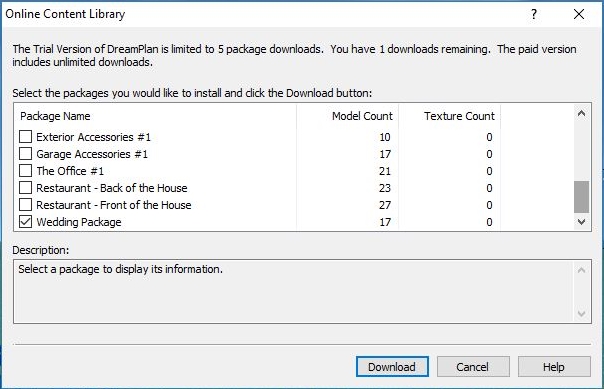
With DreamPlan, you have access to an entire online library of content to add to your models and plans. The wedding package is just one of many new additions to the online content library. The Wedding Content Package contains everything you need for wedding planning. Items such as wedding cakes, candles, floral arrangements, tables and wedding arches are included for planning your perfect wedding. To download the wedding content package, just click on the "Add Content" tab in the menu. Check the box that says "Wedding Package" and click download.
 |
| Download The Wedding Package From The Online Content Library |
Planning A Wedding Ceremony
The wedding ceremony is perhaps the most important preparation for your wedding. You can quickly plan out the ceremony layout for your wedding venue with this easy-to-use software. Add and arrange benches and then decorate the isle with flowers. Decide if you want to have wedding arches or a gazebo. Then paint it all exactly the way it will be on your special day.
 |
| Outdoor Wedding Ceremony |
Planning A Wedding Reception
The wedding reception oftentimes takes more preparation than the wedding ceremony. A wedding reception needs catering, entertainment, table settings, a dance floor and much much more. Create your ideal wedding reception layout in DreamPlan to make a reception that you and your guests will never forget. Plan a stage or booth for your wedding band or DJ. Create a dance floor for the bride and groom's first dance. Arrange your tables and then make a seating chart. Create the reception that is perfect for your wedding venue.
 |
| Outdoor Wedding Reception |
Making Wedding Seating Arrangements
 |
| Wedding Table Arrangements |
Create the perfect seating arrangement for your wedding ceremony, reception, rehearsal dinner and after party. Whether you are having an indoor wedding or an outdoor wedding, you can arrange your tables and chairs to fit any accommodation and layout.
 |
| Wedding Seating Chart |
Be as detailed as you want with the
Text Label Tool. With this tool you can make the perfect wedding seating chart, so that there is no confusion on the big day.
Choosing Wedding Colors
 |
| Wedding Color Schemes |
The colors you choose for your wedding will set the mood for the entire day. DreamPlan has a full palette of colors for experimenting with your wedding color scheme. Use the
color sampler tool to match exact colors and then try them out on your wedding decorations. You can change the color of any object in DreamPlan!
Set the Tables
 |
| Wedding Table Settings |
Create the perfect table arrangements for your wedding with a wide variety of table decorations. Add wine bottles, salt and pepper, candles and flowers to every table. You can adjust the size of your tables to fit more people as needed and add as many chairs for your guests as you would like.
Plan Every Detail
 |
| Wedding Guest Book |
Planning your wedding with a 3D software like DreamPlan will help you make sure that you have thought of everything. Cakes, flowers and even a wedding guestbook, are just some of the items that you can add to your virtual wedding. This software will quickly have you checking items off of your wedding planning guide so that you can focus on enjoying your celebration.