Showing posts with label buying trends. Show all posts

Thursday, October 15, 2020

5 Things To Consider When Choosing a YouTube Video Editor


Once just a job for Hollywood or video professionals, video editing can now be achieved by anyone who wants to post a video on YouTube. However with over 30,000 hours of video content uploaded to YouTube every hour, you know in order to stand out from the crowd and keep your viewers on the edge of their seats, you need to deliver engaging high-quality YouTube videos. 


However, with so many video editors available, picking the right video editor for YouTube can be overwhelming. You want to make sure you make the right decision. Below are 5 factors to consider when choosing a YouTube video editor:


How to choose a video editor for YouTube?

1. Ease of Use 

A good place to start is to consider how easy and intuitive the YouTube video editing software is. You do not want to pick a video editor that makes you refer to the user-guide each time you need to edit the video or apply an effect.


Some video software are complicated and take forever for you to even load the video. Since it is likely you will be recording and editing a lot of YouTube videos, you want to make sure your video post-production is as easy and enjoyable as possible. 


If you are looking to learn more about video editing, a good YouTube video editor should include lots of video tutorials so you can learn each feature and maximize your editing capabilities. In summary, ensure your video editor for YouTube has an intuitive workflow and puts all the tools at your fingertips.  


2. Video Format Support

Import

Before buying your video editing software for YouTube, make sure it supports the video format captured by your camera or recorder. This is especially important if you want to edit videos from 360 cameras, Stereoscopic cameras, 4K action cameras, drones, and more. 


Export

Imagine if you spent hours importing your video clips, trimming, adding effects, voice-overs, and video effects, only to realize that your exported video is low-definition or not in a video format supported by YouTube.


As an added bonus to save time, you also want to ensure your edited video can directly be uploaded to YouTube so you don’t have to waste time exporting the video onto your machine and then logging into YouTube and uploading the video. 


3. Advanced Editing Features

While most video editors have basic editing features that allow you to slice and dice videos, you know in order for your video to stand out on YouTube, you need to take your video to the next level! Some of the advanced video editing features for YouTubers to consider include:


  • Color correction

  • Video stabilization

  • External plugin support

  • Chroma key green screen

  • 3D and 360 video editing

  • Fast video rendering


4. Audio Tools

Often an overlooked key feature, make sure your YouTube video editor software has good audio editing capabilities. Things to consider include whether the audio is included in the timeline and the video editor has the ability to separate audio from video.


Most professional YouTube videos will need background music and depending on your video editor, this can be an added cost to either purchase the music and/or buy an expensive audio editing software/plugin. 


Ensure your video editor for YouTube has a royalty-free stock sound library and advanced audio features including:


  • Volume adjustments

  • Voice over recording

  • Noise removal

  • Surround sound

  • VST plugin support


5. Budget 

It is very easy to be overwhelmed by a list of features and fancy marketing videos, but an important consideration for picking a YouTube video editor is to assess how much you are willing to pay? There is a range of paid and free YouTube video editors available, some that even that cost a couple of thousand dollars. Depending on the range of features you require, performance, and ease of use, make a decision.


It is also a good opportunity to consider YouTube video editors that include free trials so you can test out all the features you require, performance, and ease of use, before making a purchase decision. 


Recommended YouTube Video Editor 

That’s all the key information you need in choosing a video editor for YouTube. If there’s one video editor we would recommend you try out, it’s VideoPad.

Not only is it easy-to-use and intuitive, it includes all the video and audio features listed in this article, supports all video formats including direct export to YouTube, and not going to cost you an arm and a leg. You have access to all the tools you need to edit videos for YouTube and make professional-looking videos in a matter of minutes.


With incredible reviews and having been voted as one of the best video editing software from leading review sites such as PC World, Top Ten Reviews, Tom's Guide and TechRadar VideoPad is one of the best options when it comes to YouTube video editing. But don’t take our word for it, download VideoPad for free and try it out yourself! Happy editing! 


Wednesday, January 23, 2013

Where You Download From Matters

download Software download sites are a dime a dozen. As a software publisher we want our programs available on download sites to make them as easy to find as possible, but people should know that all download sites are not created equal. It has become an increasingly common trend for download sites to wrap their own extras around the products that you download. These extras could offer you other applications to try, or install toolbars to create revenue for the site.

Some software download sites have been more open about if they are including anything else with a download than others. For example CNET, one of the largest download sites, has posted information about their download.com installer which has met mixed reviews.(1) (2) (3)

CNET is has been a bit more up front about what they are adding than some providers. However, as a whole this trend has caused a great deal of confusion for users. NCH offers an toolbar in our standard installers which is optional, but if a download site installs a toolbar of their own and then a user opts out of the toolbar NCH has offered there is an incorrect perception that the opt-out decision was ignored.

With Google controlling 90% of worldwide search traffic,(4) they are in a position make difference and in the interest of computer users they have been updating their software principles. The changes going into effect in February are designed to address some of the problems related to toolbar, but especially with some rules only applying to advertisers it is still important for users to realize that where you get your software from matters. Going directly to the source and downloading program like WavePad audio editor and VideoPad video editor from NCH Software directly will ensure you won't get any unwanted extras from the third party download site.

Friday, July 8, 2011

Localization Efforts Pay Off in NCH International Offerings

It has been about a year and a half since NCH Software put in place a localization initiative in order to offer our most popular software applications in French, German, Japanese and Spanish. The challenges have been many but we now provide numerous applications, including WavePad Sound Editor, VideoPad Video Editor, Prism Video Converter, and several more, in the 4 languages mentioned.

Working in cooperation with NCH developers, the localization specialists at NCH translate the general user interface (GUI), test functionality for country-specific appropriateness, suggest changes to implement to better adapt NCH applications to non-English speaking markets. They also translate a significant number of web-based material to make sure that French, German, Japanese or Spanish-speaking Internet users can find relevant information, download and purchase products securely in their own languages.
Logiciels en Français
Deutsche Programme
日本のソフトウェア
Software en Español

Bucking the current trend of outsourcing translation and localization and relying instead on "in-house" linguists allows NCH to leverage a valuable internal product knowledge and capitalize on direct interdepartmental relationships to produce more accurate translations, faster.

Please click on the language of your choice to find out more about NCH Software's localized software applications.

Wednesday, January 5, 2011

Hitting the Software Nail on the Head

Usability affecting software salesHow many shirts do you need to try on before you find one you want to buy? How many cars do take for a test drive when shopping for a new car? And how many pieces of software do you download and try before you find one to solve your problem? Results from a study of software vendors show only about 1 sale is made for every hundred trials that are downloaded, which is a remarkably low number when you think how many programs people must end up trying or how often they just give up without finding what they want. In the blog post Why Hammers Sell Better Than Your Software, Bob Walsh concludes that the reason there are so many people walking away is that it is simply too hard to figure out how to use the program and they give up.

His suggestion to software companies is something that NCH has been striving for for years - make users immediately comfortable with your applications. Simplify things: provide quick start guides and tutorials or screenscasts to help get the user get through the first few minutes of uncertainty when they don't know what to do with the software they have just downloaded. We have long focused on the first three minutes of a user's experience when using our software, trying to remove as many road blocks as possible so that you can start using the program immediately. Our range of video tutorials and documentation resources helps those who prefer to see how it all works before they dive in. We are doing our best to make sure that when you download our software you will find that the shoe fits and you don't need to worry about breaking it in.

Sunday, December 5, 2010

Software-Buying Decisions

organic search results for softwareThis article on Organic Search Driving Software-Buying Decisions caught my eye since I have a continuing interest in Software Buying Trends. Some of the key findings from the research done by iPrsopect in their study on the effects of organic search, paid search and online display advertising were:
  • 37% increased likelihood of visiting a website
  • 30% increased likelihood of purchasing a software product
  • 14% lift in brand recall with exposures to both organic and paid search results
  • No change was seen in brand favorability based on organic results
Familiarity with a brand name has long been looked as important when making purchasing decisions. People tend to select things they are more familiar with, associating familiarity with reliability, so I have to agree that it is interesting that increased exposure didn't seem to have any impact on brand favorability. For a closer look at the research and findings see the full report on iProspect,Real Branding Implications of Digital Media - an SEM, SEO, & Online Display Advertising Study .

Thursday, July 29, 2010

Software Buying Trends

Earlier this year, LifeHacker posted a wonderful info graphic depicting data from the US Census Bureau comparing how many sales are being made online versus in retail stores across a number of categories.

Online versus instore buying trends

I found the results of What People Buy Online vs. in Stores fascinating. I'd love to see something that showed trending over time, so I'll have to keep my eyes open for results in years to come. As the world becomes increasingly more connected online, I imagine these numbers will continue to shift in favor of making purchases online.

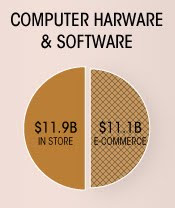
Software purchasing in-store versus onlineI did find the software results a little surprising. There is nearly a 50/50 split between computer hardware and software purchased online and at retail stores. I would have expected a larger percentage of purchases in this category to be made online, similar to what is seen with other electronics.

I imagine consumers perceive software products as more legitimate or reliable when seen inside retail stores because they fear online products come from fly-by-night businesses that will be gone tomorrow, or maybe consumers don’t feel comfortable buying something so intangible. On the other hand, consumers who do buy online recognize the ease and immediacy of being able to download an application and have a solution instantly. For example, the software utilities we provide at NCH Software download and install, in most cases, in under a minute. That means you can install a program like Prism Video Converter to convert a troublesome movie file that won’t play on your computer before you could so much as make it out your driveway to go to the store in search of a solution.

Until late last year, 100% of NCH Software sales were made online. We are still new to the retail market and our retail presence is still actively growing, so I am curious to see where the split will be in our overall software sales once we are more firmly established in retail stores. Shoppers in the U.S. can currently find Golden Records, Express Invoice as well as software suites of our audio, video and burning software utilities in stores, with additional products including dictation/transcription software, Inventoria, WavePad, VideoPad, and FlexiServer also being added to the mix. Will we eventually see half our sales being made through retail stores, or will retail sales settle at a lower percentage as more customers migrate to online purchasing? I guess only time will tell.