Showing posts with label FlexiServer. Show all posts

Wednesday, March 6, 2013

Do You Think Employees Working From Home Are Productive?

work from home employee tracking software What do you think about Yahoo's new position on banning working from home?

Yahoo has made headlines all week, and there has been a flurry of articles, responses and reactions to the Marissa Mayer's announcement. As CEO Mayer is implementing a policy that asks all current remote employees to come in the office or quit because of the cultural assumptions that those remote employees get less work done.

Do you agree? Do you think employees aren't as productive if they are working from home?

NCH Software actually makes a software program designed to be a bit of a compromise allowing employers to monitor hours and tasks remotely. FlexiServer employee monitoring and attendance software is meant to help give the employer peace of mind that employees are being productive. And as you can see in the reactions online, there are a lot of remote workers crying out that face-time doesn't equate with productivity.

What are your thoughts? Monitoring software may be one possible compromise, are there any others? or do you agree with Mayer that all employees need to come into the office?

Wednesday, November 7, 2012

Help Managing Remote Workers

Guest post by Tony Stokes of Contracting Solutions (New Media)

We are a software solutions provider specializing in Digital Media and Customer Flow Management software employing around 65 staff based here in the UK and Hong Kong.

While tracking staff members and timekeeping in our main offices is not normally an issue we are seeing an increase in the number of coders that prefer to work flexible hours from home. We started the home working scheme over 3 years ago and in general most staff members worked the required hours and were generally productive but we really had no way of recording the hours being worked by each employee. Looking around the market place we found many solutions but most were very expensive or required an on-going monthly payment dependent on the number of staff using the software.

After more searching we came across Flexi-Server Employee Attendance Software which initially we thought was quite cheap in comparison and perhaps would not fit our requirements. Nerveless we downloaded the trial and were amazed that we had it up and running in about ten minutes. Initially we only wanted to record the times that each employee was working and allow them to take breaks and work flexible hours that suited them. We found this initial requirement was very easy to configure and the web dashboard produced all of the statistics we needed.


The new CSMN office in India
During the period of setting up the initial Flexi-Server installation we were in the process of opening a new Office in India to outsource some of our extra coding requirements. We found an existing company and that fitted our requirements and asked them if they would be willing to use Flexi-Server to record each team member's hours to which they agreed. Having put this in place we then looked into the other features offered and found the most invaluable capability of recording screen shots and having them uploaded to our server, this has not only helped us monitor progress remotely but has also allowed us to spot issues and help to get them resolved.

Since then we have we have purchased a majority stake in the Indian company and have made considerable investment in a new office, extra staff and upgrades to the IT equipment. We would not have had the faith to do this remotely had we not had the monitoring, reporting and added peace of mind that Flexi-Server Productivity & Attendance Software provides.

CSMN logoTony Stokes is Technical Director of Contracting Solutions (New Media), Innovators of Digital Signage, enhanced visual communications and multimedia solutions.

Friday, May 25, 2012

FlexiServer in the Spotlight

smart computing software spotlightCheck out the June issue of Smart Computing, a US magazine covering smart computing and consumer electronics in plain English. One of the software programs they chose to spotlight in this issue is our very own FlexiServer Productivity and Attendance Software: a "no more time-cards" business solution that tracks employee check-in and out times, whether they are working in the office or from home.

Friday, May 6, 2011

Make Employees Happy with Flexibility and FlexiServer

FlexiServer for attendance tracking and remote employee management - make employees happier by allowing flexible schedulesI recently read a study on BNet looking at What makes people happy at work. The first thing on the list? Flexible work schedules. When I think about it this seems like an obvious answer. Being able to easily accommodate appointments, or working around class schedules or kids activities; I can quickly come up with a long list of reasons why a rigid 9-5 schedule just isn't the best solution for many employees out there.

So why aren't more offices allowing their employees a flexible work schedule? There are some where it might be difficult, like at a bank, a teller really can only work banking hours when the doors are open for customers to come in. But in an office environment it is more likely that there is resistance from management because having everyone at their desks at the same time makes it easier to ensure that work is getting done and everyone is putting in their hours. If that is the only thing holding managers back from letting someone work, say, Sunday through Thursday instead on the typical Monday through Friday, then there is an easy solution. Using a software program like FlexiServer attendance software for logging information about computer activity and monitoring hours worked based on computer logon and logoff times, managers can more confidently allow employees to work flexible schedules or from remote locations. FlexiServer also provides reports to help management gauge productivity without needing to be a first hand witness to an employee's time spent at their desk. So why not let a software program monitor employee hours for you instead of watching the clock and filling out timesheets?

Friday, January 28, 2011

FlexiServer Creates a More Efficient Work Environment

The Center for Pain Control business manager Peter Graf was having difficulty managing his employees’ computer usage. The Center, which makes it possible for patients to avoid a hospital stay for surgical procedures while helping them to manage pain, has just over twenty employees. Graf wanted to ensure that each employee was using their computer systems efficiently. This is a very real concern for businesses considering how much money businesses are losing due to non-work related internet browsing.

Graf immediately turned to NCH Software, since he had successfully used products of theirs in the past. He came across FlexiServer employee computer usage monitoring software, which he now uses to double-check hours worked, view application use by staff, and to restrict programs and internet sites on necessary computers. “FlexiServer is easy to use and set up,” said Graf.

Using FlexiServer to monitor employees has finally given him the opportunity to get some real work done. “I run a report once a month to see where employees spend most of their time. This freed up more time for actual work,” said Graf. Before FlexiServer, Graf manually entered the hours of every employee into an Excel spreadsheet.

Graf’s favorite feature is the ability to prohibit employees from using programs and internet sites that they shouldn’t be using during work hours. He can also pinpoint which sites viruses were picked up on, and generate reports on employees’ start and end times.

FlexiServer software automatically logs employee time and attendance. It features tools for quality assurance monitoring and reporting, and works with home or remote employees. FlexiServer gives managers the confidence they need to know that work is getting done without needing to micro-manage. The monitoring features are non-invasive and respect the employees' need for privacy, allowing them to enter private mode when necessary, while creating a paper trail that can be referenced if needed.

Friday, October 29, 2010

Employee, Interruped - Internet use in Today's Workplace

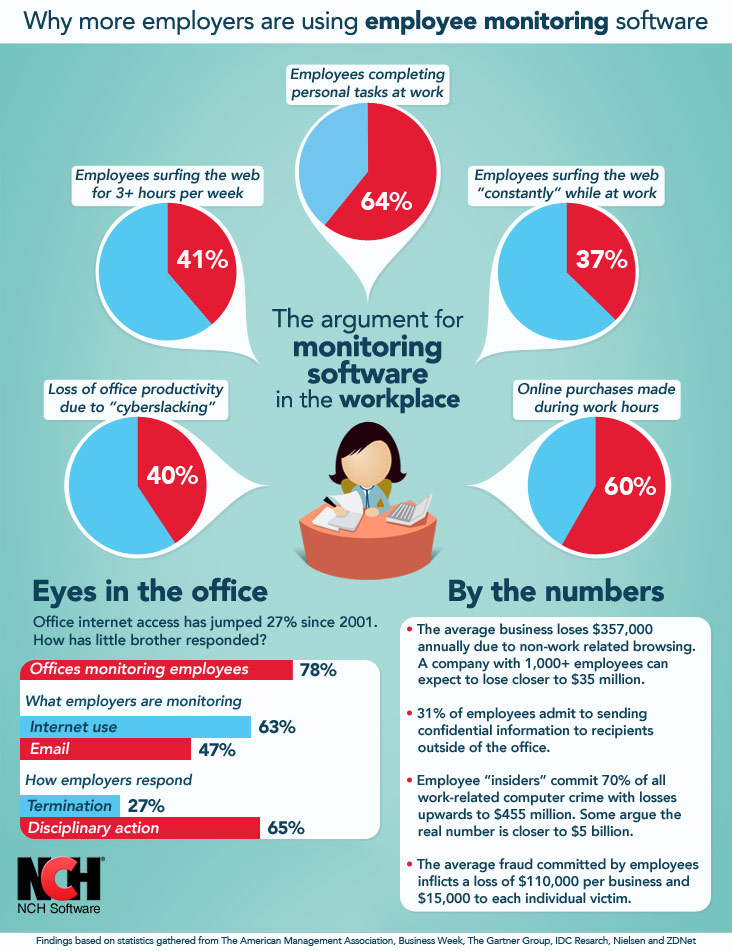
Employee Internet Use in the office, why more companies are using computer monitoring software

Are you reading this blog at work? It's a fair question when you look at the statistics of how many "cyberslackers" there are out there: a new breed of employees who use company internet connections for personal use.

The internet has completely changed the business landscape over the last 10 years, and with it, the day-to-day roles of employees. As more and more of us have begun engaging with the internet’s information playground on a daily basis, there is the increasing temptation to get your Facebook fix before you hit those spreadsheets. With all the benefits the internet affords businesses, the trade-off is a loss in employee productivity which, in turn, can result in a loss of company profit. To combat this potential downturn, many businesses are taking measures to keep tabs of their employees on the clock, monitoring computer usage, emails, phone calls, and even keystrokes, all in the name of retaining employee productivity. When you think about the potential losses (upwards of $350,00 per business), it begins to make sense, even though if you listen closely enough, you can hear George Orwell crying somewhere far, far away.

In the interest of putting employee internet usage into perspective, we've put together the above infographic. If you're interested in the potential benefits of monitoring your employee's computer use, then take a look at FlexiServer attendance software and download the free trial to test drive the computer-use monitoring features.

Now get back to work!

Saturday, June 5, 2010

Where does the time go?

I listen to a local radio station in the mornings when I am getting up and getting ready to go into the office, and I often catch their daily trivia question. The other day the question was about what the average person spends 14 hours a day doing? The answer? Sitting. We spend most of our days sitting. Sitting on the coach, in our cars, at our desk.

Employee time tracking softwareThis is a crazy statistic, and it reminded me of a conversation we had in our office recently about how much time we spend doing different things. We use one of program, FlexiServer Productivity & Attendance Software, to track the hours of everyone at NCH whether they work in one of our two main offices, or are remote testers or support personnel. And one of the things that you can see with Flexi is the percentage of your time spent in various applications. I don't remember how the topic came up but one day most of us took a look at our personal; stats to see where our time was going. Not surprising most everyone in the rest of the office had one predominant application like Visual Basic for programming. While over in marketing I personally had no application getting more than twenty percent of my time but it was fascinating to see a breakdown of where I spending time. From Outlook for email to Internet browsers and graphics applications and notepad, and lots of NCH products to boot, it was readily apparent that my days are in no way monotonous. I would have a hard time explaining my typical work day to anyone since there are almost never two days alike on my side of the business, and personally I relish that degree of unpredictability and new hurdles to overcome.

What about you? What are your days spent doing? Does one application dominate your computer usage as you spend a large chunk of those 14 hours sitting at your desk? Where does all of that time go?

Monday, February 22, 2010

Making a Case for Telecommuting

I am currently working towards my MBA, and this semester I'm taking an information systems class online. As with all the classes I've taken I try to find a way to relate what we're discussing in class to my life and my job to help make the lessons both more interesting and more useful.

Making a Case for Telecommuting Last week the connection between what we were talking about and work was immediately apparent. We were given a group assignment to develop a plan for a group of employees trying to convince management to allow telecommuting, a request they had flatly refused in the past. FlexiServer Team Management Software is one of our business applications that is designed to track the attendance and computer usage of employees, making it an ideal solution for managing remote employees, so naturally it immediately jumped to mind as a potential solution to overcome management objections. FlexiServer would allow for telecommuting while addressing answering one of the large concerns management might have, how to accurately track the hours and productivity of the telecommuters.

Managers don't want to end up paying an employee for surfing the internet all day and not getting anything done. And there is a concern that this is what will happen when the manager can't see what an employee is doing. Fortunately real-time technology tools for employee tracking not only open the door for telecommuting, but can offer a solution for this concern as well. Using software like FlexiServer allows managers to see reports on employee hours, application use, or optionally screenshots of the employee's computer; giving managers greater peace of mind that work is still getting done.

Also important for the telecommuter, who might be using a personal computer, is the ability to log in and out of work-mode. This allows the employee to log-on when they are doing work related activities to have their hours tracked, and then log-off during non-business hours and not need to worry about their personal computer use being tracked. Similarly, in an office an employee can switch to a private-mode during a break to do something like checking their bank account without worrying about the session being recorded by Flexi or seen by management.

For the assignment, my group chose to use an interrogatories technique. What that boils down to is compiling a comprehensive list of all the possible questions management might have about allowing telecommuting. Questions, such as why the staff wants it to what other companies have in place, to how it could be achieved. Then when you have the list you go through and answer them all in order to help persuade management that telecommuting is a viable business plan despite their initial misgivings. I think that FlexiServer Attendance Software is an answer to one of these big questions, how to manage and track hours of remote and telecommuting staff.


Wednesday, June 3, 2009

Do we use our own software?

In one word... Yes.

NCH SoftwareNCH Software has two office locations, one in Denver Colorado and the other in Canberra, Australia. Both locations are set up with the Axon Virtual PBx and the IVM Call Attendant. In some cases employees have extensions on both PBx systems. This allows us to call between the offices on IP Phones for no cost at all.

Someone in the Australian office can just pick up their phone and dial and extension allocated to me in the Denver office, the same if we were only located on different floors of the same building.

If I need to make a call to another business in Australia I can pick up my phone, press my Australian extension and dial a number in Australia and the call we be charged at local call rates instead of international call rates.

FastFox Text Expander is an application that nearly all staff have installed on their PCs and Macs. Our support and marketing teams use it for common responses, signatures, URLs, phone numbers and addresses.

FlexiStation is installed on all computers and we can track our work hours, log leave requests and generally see how our time is spent at work.

Our finance department works with Express Accounts to keep track of incoming and outgoing cash flow for the companies and our sales department uses Express Invoice to create quotes and invoices.

I personally use Debut Video Capture to record webcasts and KeyBlaze Typing Tutor typing tutor because sometimes two fingers for a keyboard just doesn't quite cut it. In one way or another we all use some of the software at home and in the office. Even though we have a testing department sometimes the best way to find a hidden problem, or the best suggestion, when it comes to software is to use it on a day to day level.