Showing posts with label audio file converter. Show all posts

Monday, March 20, 2017

File Converters 101 - Convert Images, Audio, Video, Documents, 3D and more

File Converters 101: Convert Images, Audio, Video, Documents, 3D projects and more!


File converters help you convert a file in one format to another format. There are many different types of file converters available in the market designed for specific purposes, such as:

The converters help you convert from one file to another whilst maintaining the integrity of the source file.

Why do we need file converters?

In today’s ever advancing tech sphere, a number of new platforms, devices, and versions flood the market every single day. It’s a necessity to be able to convert and update files to more compatible versions. The need could be as small as the ability to share a particular file with a friend (if you have Windows on your laptop and your friend has a MAC) or between devices (phone, computer, tablet). Finally, you may just want a more practical solution such as making your music more portable by converting Flac to mp3.

Things to keep in mind before downloading a file converter

  1. First and most important is the type of software you need. What do you need to convert? Is it an audio, video, image or document file?
  2. Does it support the most commonly used file formats, including,
    a. Video converters – MOV, AVI, FLV, WMV, MP4
    b. Audio converter – MP3, WAV, FLAC
    c. Image/Photo converters – JPEG, TIFF, PNG, GIF, BMP
    d. Document converters – DOC, PPT, PDF, XLS,
    e. 3D mesh converters – 3DS, STL, 3DP
    f. Archive file converters – RAR, ZIP, TAR, GZ
  3. Ability to batch convert – You really don’t want to convert one song at a time when your playlist is 100 songs long or one image at a time when your vacation album has some 1000 photos.
  4. The provider of the file converter software is stable and in sync with the changing technology environment so as to provide regular updates and support.

Why download a file converter when there are plenty of online options available?

There are a number of valid reasons. The most important are:
  • Converting files from your desktop is safer, more secure and keeps your privacy in your own hands.
  • Desktop converters provide more options and higher quality than their online counterparts. This saves you time and effort by getting it right the first time.
  • Is your file the size of Mount Fiji or the Strait of Gibraltar? Online converters restrict the file size for conversion. The size of your file becomes an important factor.
  • Some free online file converters add a watermark to your converted file as a form of advertising. Nobody likes that.

Combine all of the above factors and you will have a compelling reason to use a desktop converter instead of an online converter.


Friday, July 8, 2016

How to Change WAV to MP3 files with Switch WAV Converter

How to Change WAV to MP3 Files with Switch WAV Converter


Audio files exist in a wide variety of formats, each with its own benefits and potential drawbacks. When editing or playing audio tracks, you may need to convert from one format to another to suit your distribution needs.

What are WAV Audio Files?

WAVE files are uncompressed, lossless CD-quality music files. Though they are popularly known by their file extension, .wav, WAVE stands for Waveform Audio File Format. WAV files can contain compressed audio, however, they are more often used to take advantage of uncompressed audio. 

 When Should You Use WAV Audio Files?

Due to their uncompressed nature, .wav files are the best choice for radio, TV, DVDs, and other projects that require uncompromised high-quality audio tracks. As a result, it is uncommon to share WAV files on the internet because uncompressed audio files are often very large files and result in slow file transfer. WAV files are favorable for keeping archived versions of original recordings as they will retain original audio quality.

What are MP3 Audio Files?

MP3 is a compressed, lossy format that is widely used for audio tracks on the internet in web pages, web videos, audio sharing, and more. MP3 audio files are extremely popular because they take up very little disk space due to being compressed to roughly one-tenth of their original size. 

When Should You Use MP3 Audio Files? 

MP3 audio files are able to load quickly while retaining high audio quality, which makes them favorable for use on web pages, in embedded videos, in audio sharing, and in multimedia presentations.  However, this popularity is a double-edged sword as compressed MP3 audio tracks retain less information and as a result, can be more difficult to edit.

How To Change WAV to MP3 Files

After editing an original audio recording in WAV format, you may want to compress your file for easy sharing on the internet. Switch Audio Converter is a simple audio converter that can accomplish WAV to MP3 conversion quickly and easily. Switch also has the option to batch convert audio files, which is efficient and effective for audiophiles who need to change hundreds of audio tracks in a short period of time. 

Step 1: Load WAV Files

In order to change WAV to MP3 with Switch, begin by loading the WAV files that you would like to convert. To do this, open Switch Audio Converter and click on the "Add File(s)" button.


Step 2: Select Audio Output Format 

Once you have added the WAV audio files that you would like to convert, select the audio output format that you would like from the "Output Format" selector at the bottom left of the Switch window. 


You can also select a specific folder where the converted file will be saved, or check the box to output to the same folder as the source file. 

Step 3: Change Audio Files

Now that your file has been added to Switch and you have selected MP3 as your desired output format, simply click the "Convert" button to change your files!


Once your file has been converted, a prompt will appear allowing you to be taken directly to the output folder you selected, or to open the file directly. 


Congratulations! Your new MP3 file is now ready to be shared with the world.


Download Switch Audio Converter to Get Started!


More Audio Posts from NCH Software: 


Tuesday, March 10, 2015

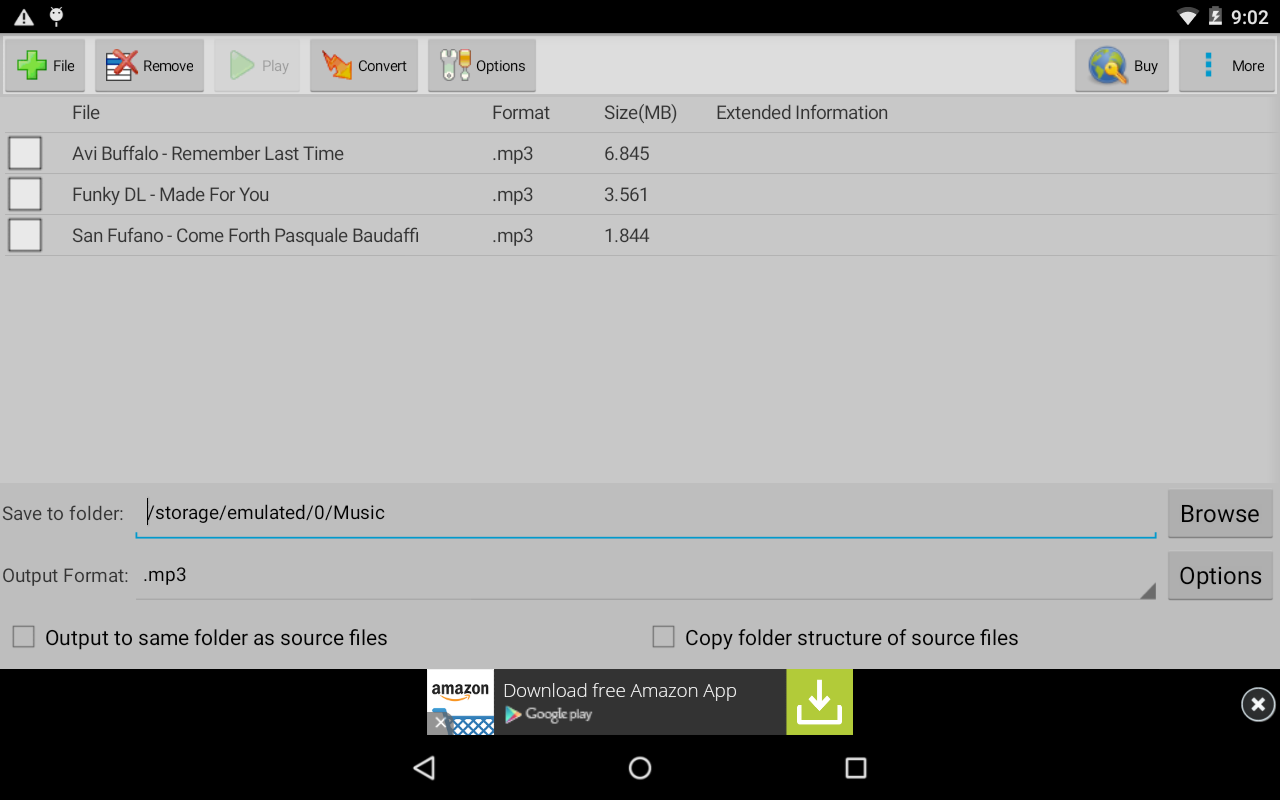
Now Available: Switch Audio Converter for Android

NCH Software is proud to announce that Switch Audio File Converter, one of our most popular audio programs, is now available on Android devices through the Google Play and Amazon App Stores.

If you need to convert a single file, or a whole batch of files, Switch Sound Converter gets the job done quickly and easily. It supports over 40 file types, including all popular audio formats and many specialty formats for amateurs and professionals alike. Whether you have a single song that you need to convert for iTunes, or have hundreds of files that need to be converted into a specialty format, Switch is the app you've been waiting for.

Switch Audio Converter Free - screenshot

Switch Audio Converter Released for AndroidOur desktop version of Switch Audio File Converter has won numerous awards, including the TopTenReviews.com Gold Award in the audio converter category for the second year in a row. Like the app, it is considered the most stable, comprehensive, and functional multiple format sound file converters available.

For Android, we made sure that Switch preserve's the metadata and tags on any song it converts so it can be easily identified after conversion. It can import entire playlists from any folder library on your phone/tablet, and produces fast results.

Switch Audio File Converter for Android will help you convert, organize, transform, and enhance the way you enjoy your favorite sound files. As always, we are happy to take any and all feedback from our wonderful customers to make this app even better in future versions, so if you want a new feature just let us know!

Get it for free from Google Play.