Showing posts with label compress files. Show all posts

Monday, March 20, 2017

File Converters 101 - Convert Images, Audio, Video, Documents, 3D and more

File Converters 101: Convert Images, Audio, Video, Documents, 3D projects and more!


File converters help you convert a file in one format to another format. There are many different types of file converters available in the market designed for specific purposes, such as:

The converters help you convert from one file to another whilst maintaining the integrity of the source file.

Why do we need file converters?

In today’s ever advancing tech sphere, a number of new platforms, devices, and versions flood the market every single day. It’s a necessity to be able to convert and update files to more compatible versions. The need could be as small as the ability to share a particular file with a friend (if you have Windows on your laptop and your friend has a MAC) or between devices (phone, computer, tablet). Finally, you may just want a more practical solution such as making your music more portable by converting Flac to mp3.

Things to keep in mind before downloading a file converter

  1. First and most important is the type of software you need. What do you need to convert? Is it an audio, video, image or document file?
  2. Does it support the most commonly used file formats, including,
    a. Video converters – MOV, AVI, FLV, WMV, MP4
    b. Audio converter – MP3, WAV, FLAC
    c. Image/Photo converters – JPEG, TIFF, PNG, GIF, BMP
    d. Document converters – DOC, PPT, PDF, XLS,
    e. 3D mesh converters – 3DS, STL, 3DP
    f. Archive file converters – RAR, ZIP, TAR, GZ
  3. Ability to batch convert – You really don’t want to convert one song at a time when your playlist is 100 songs long or one image at a time when your vacation album has some 1000 photos.
  4. The provider of the file converter software is stable and in sync with the changing technology environment so as to provide regular updates and support.

Why download a file converter when there are plenty of online options available?

There are a number of valid reasons. The most important are:
  • Converting files from your desktop is safer, more secure and keeps your privacy in your own hands.
  • Desktop converters provide more options and higher quality than their online counterparts. This saves you time and effort by getting it right the first time.
  • Is your file the size of Mount Fiji or the Strait of Gibraltar? Online converters restrict the file size for conversion. The size of your file becomes an important factor.
  • Some free online file converters add a watermark to your converted file as a form of advertising. Nobody likes that.

Combine all of the above factors and you will have a compelling reason to use a desktop converter instead of an online converter.


Friday, July 29, 2016

Send and Receive Multiple Files with Ease


Emails have become essential in daily life, both for professional and personal means. There can be several reasons to send emails with multiple files, whether it is work documents, family albums, vacation itineraries, receipts, etc... But most email servers contain a limit on the amount of data that can be sent in a single message. By properly using a program to zip files, organizing and sending attachments can become an easy procedure. Express Zip can increase email efficiency and provide tools to organizes files.


Send a Zip as an Email


Step #1
Download Express Zip, open the program and select "New Archive." At this point, select "Add Files" and choose all the files you wish to compress into an email. Once the files have been added, there are a few more options that can take place.

Step #2 
To email the zip file, find the newly created archive file in the chosen output folder. When writing an email this can simply be attached by either selecting, "Add Attachment," or dragging and dropping the folder into the body of text.

*Second Option*
Express Zip has the ability to send an email directly from the program. Simply click the "Email," button and after filling out the necessary information the email will be sent with the archived attached.


Open a Zip File Through Email


Step #1
Find the email with the zip file and save the file to a chosen folder. For accessibility, it is recommended save to the desktop. Now open Express Zip and select "Open Archive" under the File Menu or click the top left "Open" button.


*Second Option*
Right Click or CTRL Click on the the Zip File and select "Open With." Choose Express Zip and the program should enter, displaying the same materials.


Step #2
All the files that have been extracted will be visible. Now select the proper Output File, and finish the process by "Extract Selected" or "Extract All." All the files are now available to be viewed.

Express Zip is available for Free, Download Here.

Friday, July 15, 2016

Convert Videos of Family Moments from Phone or Tablet Device


Tablets and mobile devices have made it incredibly easy to capture videos and pictures of daily life. Precious moments can now be easily recorded without the hassle of developing; but what about transferring or sending these videos to others? With the addition of Prism, all will have the ability to easily convert media into physical or digital copies.

Follow These Easy Steps

Step 1: Transfer the videos from the mobile device to a local computer. This can be done with either a USB Connection, Email, or File Sharing Service.

Step 2: Download the free version of NCH Prism for non-commercial use. After the download is complete, click "Add Files," this will bring up the files of the computer. Select each video that is to be converted; Prism can convert multiple videos at once.


Step 3: With all the videos uploaded, select which format is most suitable. Prism provides conversions for avi, mpg, vob, asf, wmv, and mp4 video formats from digital and physical platforms. The videos can be matched to several mobile devices, tablets, gaming systems and mp4 players.


Step 4: Before finishing the conversion process, feel free to add any video effects and previewing before finalizing. Adjust colors, screen size, resolution, add captions or watermarks, bring more creativity to the videos with these easy edits.
Step 5: After choosing the videos, making the appropriate edits, selecting the output format and previewing the video for assurance. Finalize the conversion process to either a digital file or DVD. This ability to transfer and compress digital files makes it easier to send media to others through emails, phone messages or post on social media. There is even an option through Prism to directly share these new converted files directly onto social media.

Want to create a home movie? Place a blank disk into the computer, select it before the conversion by clicking, "Browse." Then select the blank disc for the targeted conversion.


Prism is available online and the Apple Store.


Friday, December 28, 2012

Z is for Zip

NCH Software ABCs Series

Z is for Zipping Software Whether you are compressing individual files to reduce their size, or compressing groups of files and folders into a single, tightly wrapped package, file compression is useful for both data storage and sharing files. Particularly when transferring large files the reduced file sizes from compression can make emailing and sending large amounts of content much more efficient.

The .zip file format was one of the first, and remains one of the most common, file compression formats. So common that "zip" has become synonymous with file compression. Even when other compression or archive formats are used people will still frequently refer to the process of extracting the contents of those file as "unzipping."

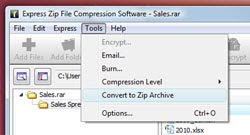
When it comes to Express Zip file compression software, part of what makes it great is allowing users to "unzip" those other archive formats. Express Zip only creates new .zip files, but it will open or "unzip" other compressed archive files, or even convert them into .zip files for greater compatibility with other you might pass the file onto in the future. So be sure to zip up your data in fast and functional way with Express Zip to help make your data storage and file sharing easy and worry free.

<<< Previous: Y is for YouTube

Thursday, November 15, 2012

Audiophiles Rejoice


Do you have a significant investment in audio equipment and want to get the most range from your music collection? Do you want the crisp highs and deep bass you’re used to from CD’s? Then stop listening to audio compressed in the outdated MP3 format! Anytime audio is compressed, even with 320kbps quality MP3s, some range is sacrificed to reduce the file size and sound artifacts can occur.

For true studio sound, lossless formats such as an uncompressed WAV (Waveform Audio File Format), or a compressed FLAC (Free Lossless Audio Codec), are the better option, even though they require more storage space. The smaller file size of the lossless FLAC is great for music collections, supports tagging for artist and album information, and is ideal for streaming audio because it is fast seeking. One note of caution if you’re straying away from your computer, while FLAC is a popular lossless audio format, not all devices, like car stereos, will support playback without modification.

Additionally, editing music in lossless formats, like with our WavePad Audio Editor Software, means you can exercise more control, on more sound data than with other formats. Starting with the highest quality possible source will result in the best final product. Use our other audio tools, like Switch Audio File Converter Software, to batch convert audio files between formats, for example if you don’t have room for your FLAC collection on your gym iPod.

Give your equipment and ears the quality they deserve!

Tuesday, October 23, 2012

U is for Utilities

NCH Software ABCs Series

Software Utilities Software utilities utilities might be less glamorous than our other software products, but this category includes all of the software titles that you need to get your computer working for you. We’ve got software that can help with anything, including all of the day-to-day and maintenance tasks that you might need accomplished. Our focus to bring you fast and easy-to-use software is even more important for programs that fit in this category, as you want these utilities to get the job done. Whether you are burning a disc, backing up files, or cleaning your windows registry, here is our complete list of utility software:
<<< Previous: T is for TypingNext: V is for Video >>>

Monday, July 23, 2012

Best File Compression Software: Express Zip

Express Zip Software Gold TopTenReviews AwardThe Olympics haven't started yet, but NCH Software has already won a Gold this summer. TopTenReviews just named Express Zip File Compression Software the best file compression software. We were thrilled to not only win the Gold, but to have the reviewers notice the easy-to-use features we have been working so hard on. Saying Express Zip's "simple, intuitive interface takes much of the guesswork out of compressing files," they go on to conclude:

"At the end of the day, compressing and extracting files isn't something you want occupying large portions of your brainpower. Express Zip by NCH Software does its level best to eliminate this task from your daily routine as much as possible. It accomplishes it by reducing the number of minutes and seconds it takes to perform the job."
TopTenReviews

You can read the complete review of Express Zip on the TopTenReviews website. Or, just install it on your PC or Mac today so it will be at the ready the next time you need a file compression tool.

Tuesday, April 24, 2012

Unzip To See What's Inside

Unzip to see what's insideToday's Google Doodle is a zipper in honor of Gideon Sundback, the creator of the modern day zipper. Today you can unzip the Google homepage to see search results. Not only is this another fun addition to the long line of Google Doodles but it actually made me pause to think about the zipper. When I’m getting dressed or putting on a coat I don't think about zippers; they are simply part of the garment.

Similarly, we have been discussing improvements to Express Zip, and I’ve never considered how zip files were named. Usually compression is the first thing that comes to mind when I start thinking about the software/file side of zipping. However, it is still a way to bring together two or more parts into one file, similar to bringing together two sides of your jacket with a zipper. When you unzip a file it is just like what Google is doing today - unzipping it to see what is inside. With Express Zip file compression software, we are making zipping and unzipping files as easy as using any other zipper.

Wednesday, February 8, 2012

UnZIP, UnRAR and More on a Mac or PC

Zip, UnZIP and UnRAR and more on Mac or PCZip and Rar archive formats might be particularly popular for compressing files on Windows, but that doesn't mean that Mac users shouldn't also be able to open those files. Express Zip is an easy way to open and extract files from many different archive formats, and we recently released it for OS X for the first time. Mac computers are more common than ever, which has helped with file compatibility issues that have been one of the biggest challenges between Macs and PCs. Express Zip joins our range of file converters that all help you open or convert file formats that might otherwise leave you helpless, making sure you never have a file you cannot open whether you're on a Mac or a PC.

Monday, October 3, 2011

Do More with Audio - Blog Carnival October 3, 2011


Here are this edition's entries to Do More with Audio:


HBAJAKE presents Should You Use Compression In Audio Recording? posted at Home Brew Audio

Martha presents Katy Perry Ties Michael Jackson's Record; Will She Break It?, saying, "Katy Perry is no one-hit wonder. This week, her latest single reached number one on Billboard’s Hot 100 chart. The track is her fifth number-one single off her latest album, which ties her for the most all-time off of one record. Michael Jackson was the only other artist to ever reach that number."

Danielle MacInnis presents Podcasting for small business posted at Flying Solo

Kelley Wilson presents 10 Reasons that iTunes is So Popular posted at MacApper.

Ken presents Top Audio Editor Even More Affordable In September posted at Pro PC Audio Recording on a Budget

bristolstudios presents Recording: Home Quality vs. Studio Quality posted at bristol recording and voice studios

Marie Kazalia presents Making Music From Everyday Objects, saying, "Sound artist R. Weis created his new Excitable Audible CD over a period of more than two years using recordings of many commonplace sounds found in his home."


You might also be interested in:That concludes this edition of Do More with Audio. Be sure to Submit your audio articles for the next edition.

Friday, September 16, 2011

Convert and Compress Files

Whether you're on a Mac or a PC, these conversion applications cover nearly every file type you'll run into, making them the most complete and reliable software for converting and compressing files out there.

Switch Audio File Converter

For your music, presentations, or audio projects, Switch Audio Converter lets you put your music anywhere at any time. Convert music for your iPod, PSP or phone. Compress audio to save hard drive space. Create a ringtone on your phone by converting the format, or even extract audio from video files.

Prism Video File Converter

Your computer might only be able to open certain video file types. Use Prism Video Converter to ensure you'll always be able to watch your videos. With Prism you have complete control over video settings such as compression and encoder rates, resolution, frame rate, and size output. You can also batch convert thousands of files at once and preview videos before conversion.

Pixillion Image File Converter

Pixillion isn't just image conversion software, there are many additional settings to make adjustments to your images while converting including adding watermarks, adjust the image quality, size or resolution, or even crop and rotate photos.

Express Zip File Compression Software

Express Zip is currently the only application on this list that is only available for Windows, but it is an extremely valuable compression tool. Use Express Zip archiving software to create, manage, and extract zipped files and folders. Plus extract files from a variety of other archive formats including rar, cab, iso, tar, and 7z or convert those archives into zip files. You can also easily email zipped files from the program or simply compress files to save disk space.

Tuesday, June 7, 2011

Open, Convert and Manage Archived Files

convert archives like rar to zip files with express zipCompressing and archiving files and folders is very useful thing to do when emailing and sharing information, or simply to save disk space. The zip format is one of the most widely used there are a large number of other archive file formats out there. Instead of getting a program for every archive file format out there Express Zip offers a more complete solution. With Express Zip not only can you create, edit and manage any zip file, you can also open, extract, or convert any of the following archive file types into a zip file, so files and data won't be out of reach, no matter if they are compressed as a rar, cab, tar, tgz, 7z, iso or img archive.

Tuesday, August 24, 2010

New Express Zip File Compression Software

New Express Zip File Compression SoftwareThe .zip file format is one of the most widely used file compression formats when you have large files or groups of files that you want to send to others. Its cross-platform support makes it ideal for not only data compression but file sharing as well. With zipping files being such a common and useful a task, we are pleased to welcome Express Zip File Compression Software to our software library.

Express Zip is an archiving and file compression tool to create, manage, and extract zipped files and folders, for fast and efficient file zipping and unzipping. It's perfect for compressing files for email transmission, archiving data to save disk space on your hard drive, or increasing the amount of data you can burn to disc.

If you are looking for an easy solution for compressing files, be sure to give Express Zip a try. We hope you will find it useful as well as a great complement to some of our other software utilities including FileFort Backup Software, MEO File Encryption Software and Express Burn Disc Burning Software.