Showing posts with label business card software. Show all posts

Thursday, August 25, 2016

Create and Design a Professional Business Card


create your own business card
"Go out of your way to make an outstanding first impression."

The professional world weighs heavy on first impressions, these can make or break any deal or job opportunity. Having a well-designed business card is similar to a sturdy handshake and welcoming smile, it shows others that the individual has a strong sense of organization and presentation. Creating and designing a business card is incredibly easy with the proper business card design software. NCH Cardworks provides several intuitive tools and free business card templates to use.

How to Design a Business Card

Step 1: Download NCH Cardworks and browse the several available templates. Start sketching and envisioning the layout of the card. Make sure to include all the most crucial information: name, image (logo or headshot), business phone, personal phone (optional), email (professional), website, LinkedIn, and more.

business card designs

Step 2: Make sure that the most important information is in, but not overcrowding the layout. Business cards should have a focal point that drives the eyes to the most crucial information. Whether that be the brand imagery or the contact information, this is where the eyes of the beholder need to fixate. 

Step 3: Do NOT forget about the back of the card, be sure to leave a lasting image on the reverse side. Preferably a slogan and brand image will create a lasting impression on the viewer. Leaving a blank back to a card makes it look rushed and cheap. Balance the imagery on the back and front.

Step 4: Once the card has been reviewed, begin the export or printing process. Feel free to print it if you have the necessary tools to make a quality business card. But, it may be easier to export the files and have them professionally printed. This is not a hasty decision, business cards can help make a new business deal, secure a new position or win a free sandwich.


Tuesday, June 18, 2013

Creative Business Card Ideas - Improve & Customize Templates

I love creative design and looking at articles showcasing interesting, effective and creative business cards and logos. Although often the ideas featured, while incredibly creative, aren't using techniques that a majority of companies would find feasible to implement. But, even if you are a one-man show just getting off the ground, doesn't mean that you can't be creative and add a little flair to your business cards that will make you stand out from the crowd. Here are a few ideas to start you thinking about the possibilities of what you can do even if you are making your own cards using a business card template instead of going to a high priced design firm:

Pick the Right Paper
Not all paper is created equal. The same design can have a different effect when printed on a different kind of paper. Heavier card stock will help create an impression of strength and stability. An interesting or unusual texture will stand out and grab a closer look. Use vellum or a transparency sheet to let the light shine through, or create an earthy feel with a natural paper. Small changes like the type of paper you pick can help support your brand and help your business card stand out.

Change bussiness card color schemes
Change the Color
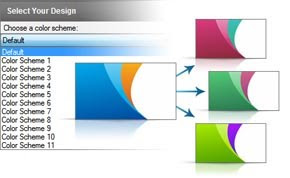
One of the fun features of CardWorks business card software is the option to change the color scheme of a template expanding the range of possibilities. This not only gives you more choices and flexibility in finding a single card design for business; this can be a fun way to add a little variety by printing several cards using the same layout but different color schemes.

Try a different business card size
Change the Cut
Even with a template, you can change the size of your business card. A fancy cut may not be reasonable, but with some designs taking a little more off one of the sides would only require moving a few items. Business cards have a very standard size, so changing the proportions will be a noticeable change that will help your card unique with little extra effort.

Add a call of action to your business card
Add Some Personality
Even the text on your business card is a place to spice things up. You have probably seen companies that use creative titles like "Sandwich Artist" or "Sales Ninja." In addition to the job title, you can also consider using the space that was designated for a company slogan or tagline to add a call to action or quote to make you more memorable.

Add A QR Code
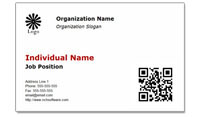
Add a coupon or a QR Code to business cards The templates available for CardWorks business card software have space for a photo. Adding your picture can make a business card feel more personable, but to change things up, you can also use that image space to add something else like a QR code that will open your website or go to a special offer. This will make your business car more engaging, and pique people's interest and curiosity.

Show where you are located with a map on your business card
Display Your Location
In The Tipping Point one idea Malcolm Gladwell discussed was how adding a map showing the location of the college health center on an immunization flier increased the number of students who came in the door, even though students would have already known where the health center was. A map can help people figure out how something fits into their lives/plans, and remind them where to go. Help people find you by changing the image on the back-side of your business card to be a map. Instead of using the default back-side of a template or leaving the back blank, load a map to be the background image to help customers remember where to find you.

Try PhotoPad photo editor to clean up your photo, crop a map or edit any other digital images before you place them on your business card in CardWorks, then have fun taking those business card templates to the next level and making them the right fit for you and your business.

Monday, August 27, 2012

New Business Card Templates for CardWorks

New Business Card Templates for CardWorks business card softwareIf you are looking for an easy option for creating business cards for yourself or your company, your options just grew. We just added several new free business cards templates that you can download and use with CardWorks Business Card Software, which is also completely free. Combined with the ability to change the color scheme of any template within the CardWorks program, the range of possibilities these templates provide is multiplied, making it easy to find that perfect business card design you've been looking for. Check out all of the additional free business card templates to see what might be right for you.

Monday, October 17, 2011

Show Personality With Your Business Cards & Win Business

Guest Post by Adam of SoloPress

Business cards are not only for the self contrived egomaniacs in the business environment, they are a much smoother and more efficient way of handing out your personal details without subjecting the target to having to disconnect from your attention whilst punching in your details on their phone.

The business card should represent who you are and give the recipient a fair understanding of what it was that made you stand out over the other people they may have picked up business cards from. If you are looking to stand out above the crowd then there are certain fundamentals that you should be meeting.

Be Creative and Original
Design a business card for yourself with CardWorks business card softwareToo many times an individual comes to us with a business card design straight out of word art or styled in Comic Sans, this may be all well and good if you are only trying to promote to parents or the elderly, but you can do a lot more even in the very limited space of a business card to make an impression about who you are and what you do. Having a polished design gives an added impression of credibility that will affect how people feel about you and your business.

So take the time to create a design, or invest in someone to carry out the task of designing you a business card, the money you will pay for a business card design will be steep, but when you consider that a good business card design can last you a lifetime, win you contacts, contracts and repeat business, the initial investment will recoup the costs in no time.

If you need a little bit of guidance or don't have the budget for a graphic designer try using CardWorks Free Business Card Software to customize a business card design to fit your business. You can achieve a very professional result with a software program to help you along the way.

Be Memorable Yourself
Often overlooked at a big networking event is aligning your business cards with the image you are portraying of yourself. One of the best ideas I have experienced in my years of business card printing is one customer who wanted his contact details in the shape of a black tie, when I questioned him as to the choice of his design, he enlightened me that he always wears a white shirt and black tie to all his networking events and business meetings. I doubted his tactic at first, but to this day I can remember his name, and would almost certainly be able to guess what he’ll be wearing if I meet him again.

You need to have a clear idea of how you wish to represent yourself before you start putting designs down. Brain storm words and attributes you would like to have people think about you, pick your favourite few and brainstorm the ideas from there and in no time at all you will have a rough idea of what you want your business card to look like.

Andy is an entrepreneur and has a lot of experience with business printers, flyer printing and leaflet printing, in design but in distribution and the strategy surrounding it. Comment below for any tactics you have found to work in flyer distribution.

Thursday, July 15, 2010

Software to put the “Free” back in Freelancer

freelancing software When you set out as a designer/writer/ artist/programmer on the freelancing path, you probably envisioned yourself working merrily at your home office desk. The word freelancing itself invokes thoughts of freedom—freedom from a boss, from a set schedule, from traffic jams and cranky coworkers. But you probably didn’t foresee all the details you would have to keep track of, and any freedom you may have hoped for was quickly squashed by the little things. The more successful you are as a freelancer, the more organized you need to be. Here are some software solutions that will put you back in control.

Timekeeper Software: HourGuard
Time is money, and your time is especially valuable. Not only will HourGuard track how much time you spend on work for each client, it’s easy to use, so your precious time won’t be spent trying to figure it all out. All you have to do is click the Start button when you begin a client’s work, and click Stop when the session is over. You can even set up a task schedule for large projects and track how much time you spend on each sub-task. When your billing period comes around, HourGuard will compile a time sheet, complete with what work you did, for how long, and when. You’ll wonder how you ever lived without this handy tool, especially after you download it for free.

Invoicing Software: Express Invoice
Stop using that sloppy-looking thing you call an invoice, and get organized with your finances. Express Invoice will not only generate professional looking invoices for you to send to your clients, it will help you keep track of how much money clients owe, past due payments, and how much money you’ve collected.

Customer Relationship Management Software: Reflect
If you’ve ever misplaced notes from your last phone conference, had trouble finding your client’s contact information, or lost the lead on a new job, you NEED this software! Use Reflect to create a complete customer record, complete with contact details, notes, event scheduling, and to advance your business. Reflect is free, so your ROI will be outstanding.

Business Card Creation Software: CardWorks
Getting new jobs is all about making great connections. Being caught without a business card is no excuse when creating your own business cards is this easy and free. CardWorks comes with a variety of pre-made templates for you to add your contact info to, then save to a pdf and take to the printer, or even print them out at home.

Depending on your line of work, you may find these other programs useful in your freelancing venture:

FTP File Transfer Software: Classic FTP For uploading your webpages, artwork, and code once your work is complete.
Disc Burning Software: Express Burn The easiest way to send your work, back up your work, or demo your work is still by creating a CD or DVD.
PDF Printer: Bolt PDF Sending professional PDFs of your resume, job bids, and other documents in PDF is the document sharing standard.

And be sure to check out our other Business Software to see all the business solutions we offer. Many of our business programs are scalable, so as your business grows, our software will grow with you.

Tuesday, May 11, 2010

New Free Business Card Designer Software

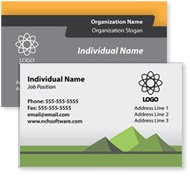
Business Card Design SoftwareWe are really excited to announce the newest addition to our software library, CardWorks, a completely free business card design application. CardWorks comes complete with a range of business card templates you can use to create the perfect business card for your every need. So whether you are a job-hunting grad doing networking rounds or a part-time freelancer working from home, you can easily select and customize a business card design to fit your personal or corporate brand, giving your clients, customers and business contacts easy access to all your pertinent contact information.

In addition to the templates that are built into the application we are working on creating a diverse business card template library that we will be continuing to add new designs to. These additional templates will also all be available completely free to download and use with CardWorks.

business card design software color schemesOne of the coolest features in this program is that not only can you select a template design for your business cards, but you can also change the color scheme on any one of the templates. This greatly multiplies the number of possibilities, giving you additional control over the final design, and making it that much easier for you to find a perfect fit for your business.

Learn more about this exciting new application at: www.nchsoftware.com/businesscard. We hope you will give it and our other business software products a try.