Showing posts with label soundtrack. Show all posts

Thursday, October 10, 2013

Music Mixing on Android

If you weren't already excited enough about having WavePad Audio Editor available for your Android tablet, being able to install WavePad's long time partner in audio crime, MixPad Music Mixer, on your Android too may just put you over the edge.


MixPad is a powerful multi-track mixer. Move from perfecting individual audio files with WavePad to mixing, remixing or mashing up multiple audio files into a full-fledged soundtrack or any other audio production project no matter the size. The app may be small, but the possibilities are huge. Download the MixPad Audio Mixing App from Google Play to have ready for the next time you want to put together some audio, whether you are hanging out in a waiting room, or recording on location.

Wednesday, May 8, 2013

Video Competition Tips & Advice

VideoPad Video Editing for Video Competitions Ready to take your videos beyond home movies? For VideoPad users who are ready to showcase their creativity and videographer skills, we've put together some advice and resources for getting your videos ready to compete.

There is a wide range of video contests out there, put on by all kinds of companies and products, in a variety of themes. The smaller contests will have smaller prizes, but they will also have less competition, so they are still worth considering. To find a contest that appeals to you here are a few sites to explore: Once you have a contest picked out the real work starts. Be sure to take your time and do your due diligence instead of jumping straight into filming.

Do Your Homework
Make sure that you read the rules and judging criteria carefully. Knowing how a winner will be chosen will help you make a video that will fit the bill.

Scripting and Story Line
Having a good story is key, so take the time to brainstorm until you have a story you are confident in. You want a moving story that fits in with the contest theme and connects with the viewer. Humor is often one way to draw people in, but it isn't always easy to pull off and certainly isn't the only option. You can tug at the heartstrings or appeal to people's sense of justice, etc. The goal is always to create a story people will want to watch through to the end.

Practice and Timing
Since you will almost always have a time limit, you need to make sure you can take your story from beginning to end in the time allowed. With a limited amount of time, subplots and tangents should be scrapped, and you need to grab your audience in the beginning. You want to start with a strong hook, and keep things moving through the conclusion. When reading through your script and practicing, you should not only make sure you are familiar with the dialogue, working on making it sound natural and animated, you should also be testing how long it takes to read through. Does it fit within the video time limitations? As you go through this process you should think about if there are any awkward phrases you should remove, or other edits to either cut down the length or help with the rhythm of your story and keep things moving forward.

Sponsors
Depending on who is sponsoring the contest you may want to try to work them into your video. Maybe use one of their products as a prop or have it in the background. If they are doing the judging this could earn you some brownie points, but don't force it if it really doesn't make sense with your story.

Dialogue and Audio
Audio quality in your video matters. It is an important part of a film as a whole, and poor audio can detract from a film and cause people to lose interest, so don't forget about the audio. Dialogue should sound natural and animated, which can be a challenge both in writing and performing, as well as in the recording. You should strongly consider using an external microphone for recording high-quality audio. You want the dialogue to be easy to hear and understand and have a consistent volume between shots.

If you do use the built-in microphone on your camcorder remember you can still separate the audio from the video so you clean the audio, remove background noise, normalize and make other adjustments. For a closer look at some important audio editing features, you may want to use, see our list of WavePad audio editing tips and tricks.

Adding Music
Adding music to your soundtrack can help draw the audience in, but be sure to balance the volume with any dialogue. And make sure that you either get permission before using copyrighted music from the publisher or steer clear of copy-protected music altogether and use royalty-free music and original works. You may be required to provide proof of copyright/permission for the audio in your video with your submission; using copyrighted music without permission can not only get your video disqualified, but it can also cause legal problems, so getting and sending proof of permission for a piece of music is in your best interests.

Filming and Editing
Important things to remember are that you want to maintain sharp focus and limit the amount of zooming and camera movement. Consider using a tripod during filming. Shaking can be removed from video using video stabilization, and if you are using handheld camcorders or cell phones this will be a necessary step, but using a tripod will eliminate the need for stabilization in editing.

For a closer look at some more VideoPad editing features you may want to use, see our post on video editing tips and tricks, but remember you want to entertain the audience, not to make them nauseous. Excessive camera movement or overdoing the effects can be distracting, and like everything else you want the transitions and movement to support the story, not draw attention to itself.

Double Check Everything
Before you send in your video be sure to double-check everything. Did you follow all of the guidelines? Is the movie saved in the correct format and does it meet the time requirements? After all of the work you put in it, you don't want to have your video thrown out because you forgot something. If you will be submitting your video on a DVD, do not include menus unless they were asked for. The judges will be watching hundreds of entries, so this is another case where time matters and they will want the video to start playing automatically.

Submit Your Video
When you're sure you have dotted all your i's and crossed all your t's send in your submission. If it is being judged by the community be sure to let your friends, family, and colleagues know to check it out and vote for you, otherwise it will now be out of your hands. But win or lose, you should have a video you are proud of.

If you have any more advice to share please comment, and Good Luck with your videos!

Monday, May 6, 2013

Do More with Video - Blog Carnival May 6, 2013

do more with video
Here are this edition's entries to Do More with Video:

Brian Green presents Five things Every New Filmmaker Should Know posted at Film Making Stuff, saying, "A few tips I learned while producing my first feature length movie that I think every first time film-maker should know."

Hal Robertson presents Diegetic Sound posted at Videomaker, saying, "Diegetic sounds are the sounds that on-screen characters are hearing. If you want to tell a story and make viewers care, diegetic sound can really help seal the deal and help draw in the audience. Sound is, after all, at least half of a film."

Lincoln Spector presents How to grab a freeze-frame from a video posted at PCWorld.

Kyle Cassidy presents Shooting Tips for Beginners posted at Videomaker, saying, "Everyone starts somewhere, and what might be second nature to an old pro can be confusing to someone just starting out, so here are some tips for the beginner."

Duncan Wright presents Lights, Camera, Action, SEO! posted at BSA Marketing, saying, "Video as a marketing tool is now within the reach of most businesses,making video SEO a vital part of any search marketing strategy."

Dave Johnson presents Shoot now, focus later: Change the focus after you take a photo posted at TechHive, saying, "Cameras like the Lytro have changed the idea of focusing entirely, allowing you to change the focus of Lytro photos after they’re taken. Here is how you cam simulate Lytro photos with your current camera."


You might also be interested in: That concludes the first edition of Do More with Video. If you have a video story to share from home movies to video production submit your blog posts about video for the next edition.

Tuesday, March 12, 2013

Adding an Audio Voice Over with WavePad

audio mixing If you want to record a your voice over a piece of music you have two choices in the NCH Software audio suite. MixPad recording and mixing software is the more advanced program, that will allow you to record multiple tracks, and fine tune the mixing of the music and vocal tracks, but you can also try the Paste Mix feature in WavePad audio editor for quickly combining to files.

WavePad doesn't allow you to record directly over another file, highlighting a file and clicking record will end up replacing the selection. Instead, use the Paste Mix feature to combine two audio files into a single track.

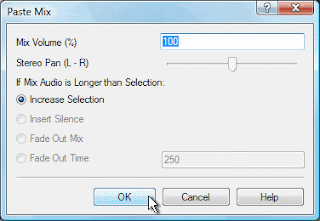
Copy the recorded voice over to the clipboard, then select all in the audio file you want to add that voice over to and click Paste Mix on the Edit Tab.This will open a window with options on what to do if your files are not the same length. If the Mix Audio—which is your voice recording on the clipboard—is the shorter of the two files, you can ignore the options and click OK. If the Mix Audio is longer, you need to decide what to do when the audio you are mixing into is finished. When you click OK the two pieces of audio will be combined and when you press Play you will hear both files.

Monday, December 6, 2010

Do More with Audio - Blog Carnival December 6, 2010


Audio is everywhere you look, or listen. Add a little time a dash of creativity and you will be surprised at what you can find out there to listen to. Take for example the discovery that you can get the Google translate tool to sound like a beat box. But be warned playing around with the different language combinations will suck away a chunk of your day before you know what happened.

Here are this edition's entries to Do More with Audio:


Nils J. Sandback presents Piano Humour: A Victor Borge Tribute posted at Piano Street's Classical Piano Blog, saying, "A tribute to the Danish pianist and humorist Victor Borge."

Bart Bryars presents First Time Success Making A Music Video, saying, "This is my first video, and the opening number the musical, Joey, that my wife and I have been working on."

Gregg Fine presents Getting Started in Advertising Music-The Video Reel Pt. 1 posted at Hidden Tiger Music Blog, saying, "This blog focuses on the art and craft of making music for advertising and television commercials. Additional topics include mixing, recording, audio engineering, composing, arranging."

You might also be interested in:That concludes this edition of "Do more with audio." Be sure to Submit your audio article, story or success to the next edition.

Monday, October 25, 2010

Scary Halloween Tutorial: Make a Howling and Haunting Halloween Soundtrack

5 easy steps for making your own Halloween soundtrack

Last week we showed you how to spookify your screen saver in 3 easy steps using VideoPad. This week we'll help you prepare for that Halloween party you have planned, or for setting a spooky atmosphere for your trick-or-treaters with a haunting halloween soundtrack.

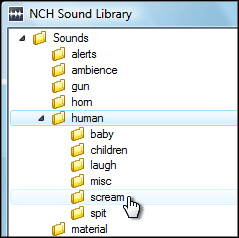
NCH Software Sound Effect Library1. Using WavePad audio editor, download three sounds from the sound effect library, found under the Tools menu. We recommend Ambience SciFi 1 for the background, and Nature Weather Lightning 3 and Human Scream 1 as accent sounds. Save them in a location you can remember. To download more than three sounds, upgrade to the WavePad Master's edition, or record more sounds of your own.

2. Open your downloaded sounds in WavePad. For the basics of using WavePad, view the WavePad tutorial series.

3. Copy your background sound and paste at the end of the file one or two times, so the length of your soundtrack becomes a few minutes long.

WavePad Audio Paste Mix 4. In this step, you are going to add your accent sounds to your background sound. Copy the entirety of one of your accent sounds, then go back to the window with your background sound. Place your cursor in a random location, then select Paste Mix from the Edit menu and click OK on the dialog that appears. The accent sound will be pasted over the background sound. Repeat this process as many times as you want for each accent sound throughout the duration of the background sound file.

5. Save your finished background file with the added accents to a format suitable for your CD player or portable device. When you play the soundtrack, make sure you loop it so the sounds play continually throughout your Halloween night.

With Christmas around the corner, you can get a head start on personalizing Christmas songs with reindeer noises, elves cheering, and bells ringing using the same steps given here. Feel free to share your creations, and we'll feature you on our blog!