Showing posts with label vinyl. Show all posts

Thursday, July 2, 2020

Best Method to Change Vinyl to MP3


Have you discovered grandpa’s old collection of vinyl records and are wondering how to digitize them? Or you need some samples for your new DJ mix? Or maybe you just want to preserve your beloved music collection into a format that is a bit more reliable and accessible. 


Either-way, converting your vinyl records, LPs or cassette tapes to MP3 or other digital formats can easily be done with the help of Golden Records Audio Converter, one of the easiest and most comprehensive vinyl to mp3 converter software available.
 

Hardware

To begin converting your vinyl to digital, there are a few tools you will require. First, you will need a PC/laptop with a USB port or a headphone/mic jack, a vinyl player, and the right cables to connect your PC and vinyl player. If your vinyl player has a USB port, grab a USB cable to connect the two devices. 


While this is the easiest method, if your player does not include a USB port, you can also use a stereo RCA to 3.5mm stereo cable, or a stereo RCA to stereo RCA cable with a stereo RCA to 3.5mm stereo adapter to connect the two devices. 


Recording Source

Install and open your copy of Golden Records Audio Converter. Open the Wizard guide by selecting the Wizard icon and select your recording source as vinyl records. 


The Wizard will then ask you to select a connection mode. If you are connecting your record player via an amp or pre-amp, select the appropriate option, if you’re connecting the record player directly with your PC, select the Direct phono to computer option. You will then be asked to select your audio recording speed. If you are unsure, leave it at the default option of 33/45/78 RPM.    


Volume Calibration

The next step is to test the recording volume. Start playing some music on your vinyl player and keep an eye out on the volume display bar to see where the volume is registered. If you do not see the green bars moving in the display bar, check that the correct Sound Record Device and Sound Input Channel options have been selected.  


Adjust the recording volume bar to change your sound quality level. Ideally, the volume should register in the Good range. 


Recording Vinyl

It is time to begin recording. Move the needle on the vinyl player to start playing and select Start Recording. Once side 1 of the record has finished playing, select Stop. You will then receive a prompt to record side 2, following the same steps.  


Split Recordings

Golden Records will automatically split your recordings into separate tracks. Play the tracks to check the splits have occurred in the right places. If these have been incorrectly split, you can join the digital files or click on the Re-Split button to get Golden Records to run the split process again. 


You can also adjust the background noise measure to have Golden Records measure the noise between tracks. Select the Current Noise Floor button, set the vinyl player’s needle to sit near the end of any track, and once the track has ended, select Measure Noise Floor. You can also manually specify the noise floor measurement. 


On the next step, you can select audio restoration options that may enhance your recording.


Output Format

The last step is to choose the output method for your recording. You can either burn the recording onto a CD, convert the recordings to mp3 or continue to work on the files later. Your chosen output file is now stored on your computer. Select the music folder icon to find your local files.


And there you have it, you have successfully converted your vinyl to mp3 using Golden Records. The only thing left to do is sit back and enjoy. If the audiophile in you wants to further edit or enhance your newly converted files, try out WavePad Audio Editing Software.


Saturday, August 31, 2013

The Compact Cassette Turns 50

Our more seasoned readers will all remember the days of compact audio cassettes—winding them with a pencil and all. Not to make those readers feel old, but today Philips is celebrating the 50th Birthday of the compact cassette.

"On this day in 1963 the Philips Pocket Recorder EL3300, also known as the compact cassette, was introduced to the world!"
   – Philips

While the heyday of the cassette is past us and it is now seen more as a retro and iconic image of those times, if you still have a collection of cassettes you may want to give them a digital makeover for their birthday. With Golden Records Analog Audio Converter you can not only digitize vinyl records but you can convert audio cassettes too. Guiding you from connecting your cassette deck to your computer through to saving MP3 files so you can bring your old favorites to your new devices and relive those fond memories.

Monday, July 25, 2011

From Vinyl to MP3 and iTunes

As we were reminded by Jesse Emspak of TechNewsDaily on Friday with her article Move Your Vinyl to CDs and iTunes, if you're looking for a way to not only digitize your vinyl records for iTunes but clean-up by removing the pops and clicks that are inherently a part of those well loved favorites, you should take a look at Golden Records Vinyl Converter for converting your albums to CDs, or MP3s for your iPod or other portable media player.

Vinyl to MP3 or iTunes Digitizing Software

With Golden Records you can convert, restore and protect your old vinyl LP records and cassette tapes with an easy-to-use interface and simple hardware connection wizard to guide you through the process.

Keep your old favorites sounding their best using the included audio restoration tools. Remove the pops, clicks and hissing that can be common on old tapes or scratched records, normalize the volume of recordings, and use other included tools to help you clean up damaged audio.

But maybe vinyl isn’t your problem, and you have other less common audio file formats? You can convert virtually any audio file to an MP3 file with Switch MP3 Converter Software.

Monday, April 4, 2011

Do More with Audio - Blog Carnival April 4, 2011


Here are this edition's entries to Do More with Audio:


Erik presents How Transcribing One Solo Can Entirely Change Your Approach To Improvising posted at Jazz Advice.

Stephen Fortune presents Making Automatic Music With The Audio Environment.

Cory Doctorow presents Measuring radio's penetration in 1936 posted at BoingBoing.

Bryan Keithley presents Guitar, Meet iPad posted at Finally Fast, saying, "Review of Apogee's new JAM plug in and play interface for the iPad. A great little interface device for folks looking to use their iPad as a portable studio."

Mr Audio Books presents The Essential Guide to Downloadable Audio Books posted at Audio Book Downloads.

U2TOURFANS presents On the road with U2 - U2 360 Tour News, U2 Videos, U2 Music, U2 Concerts, U2 Lyrics, Twitter, Facebook, Youtube posted at U2TOURFANS, saying, "On the road with U2 is dedicated to providing the best U2 experience from around the world. U2 Fans can follow via twitter, facebook, youtube channels and more."


You might also be interested in:That concludes this edition of Do More with Audio. Be sure to Submit your audio articles for the next edition.

Monday, March 28, 2011

Archival-quality Audio from Vinyl with Golden Records

4.5 Star CNet review for Golden Records Vinyl to CD, LP digitizing softwareGolden Records Vinyl to CD Converter is one of our more popular software programs, offering an easy step-by-step process for converting vinyl LP records and analog audio cassettes to CD or mp3 files. It seems the people at CNET agree, having recently given it high marks, saying, "We've tried many such tools, yet we've often gone back to [Golden Records], which also converts tapes and other analog audio sources." The reviewers went on to say:

"We transcribed several LP records ranging from audiophile quality to barely playable with Golden Records, achieving excellent, archival-quality results each time. The auto track splitter worked fine on scratchy old platters, though recording tracks in the highest possible quality and then splitting and converting them manually using a WAV editor proved the best method for better-quality discs. The sound files produced by Golden Records Vinyl to CD Converter sounded great, whatever the source."

CNET

You can read the complete review of Golden Records Analog to CD/MP3 Converter from CNET on download.com. Or, download today to take advantage of the free 14-day trial and easy wizard based process to start digitizing your vinyl record collection.

Friday, June 11, 2010

Digitize Your Vinyl Record Collection


Dust off those old albums and give new life to your vinyl record favorites. See how easy it is to convert analog recordings to digital using Golden Records Vinyl to MP3 Converter, and have a reunion with your music.

Saturday, February 20, 2010

Preserve Your Own Olympic Moments With Golden Videos and Golden Records

How many of us will ever step up on an Olympic podium, bow our heads down as a gold medal is slipped over our head, gracefully accept a wreath of laurels, and stand tall while our national anthem is being played in front of an audience the size of millions?

A very, very small percentage.

But that doesn’t mean we don’t have moments of our own. We each have our achievements, large and small, and often those achievements have been commemorated with plaques, trophies, certificates, or simple pats on the back. We can remember feeling proud or accomplished, the hard work it took to earn recognition, and the smiling faces of those sharing our victories with us.

Maybe your big moment was winning the big football game, track meet, or marching band competition. Maybe your big moment was watching your child succeed. Or was it a speech you gave for a cause you believe in, or an experience you don’t have every day: your wedding, your trip to Ireland, your surprise 40th birthday party.

Preserve Your Own Olympic Moments With Golden Videos and Golden RecordsWhatever the moment, it’s important to have access to these memories. The sensations we experienced at the time never completely go away, but too often we stash the home movies and the memory-inducing music in the dusty attic, a flood-prone basement, or in a cramped closet. How devastating would it be to lose them, and to not be able to recall the smaller details? We deserve to have a little bit of our own Olympic moments injected into our lives more often. Those memories deserve to be on hand.

During this Olympic season, bring a little gold back into your life and revisit your old memories. Converting your old home videos is easier than you think with Golden Videos VHS to DVD converter software, a USB capture device, and your old VHS player. And for those vinyl records and audio cassettes that bring those memories flooding back (for me it’s The Joker by the Steve Miller Band), use Golden Records Analog to MP3/CD converter software.

Enjoy watching your country in the Olympics this month, and remember to delight in your own golden achievements.

Tuesday, February 2, 2010

NCH Software Now In Retail Stores

We announced this week that our Audio Suite and Golden Records are now both for sale at Fry's Electronics, J&R and MicroCenter retail stores across the United States. Making our software available in retail stores in addition to selling them on-line has been a project a long time in the making and we hope that this is just the tip of the iceberg and that there will be both more stores and more of our software titles to coming to a location near you.

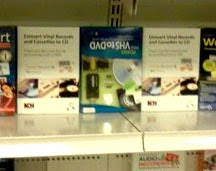
Golden Records Vinyl to CD or MP3 Software on the shelf at MicroCenterI have to admit that after having worked on this project for so long I couldn't help but take a little detour on my way home the other night to see then end result of an actual NCH Software boxed product on the shelf at the Denver MicroCenter. I couldn't help but take a picture even though I know that most stores frown on you taking photos. While this might not be as exciting to the rest of the world I couldn't help but be a little thrilled just to see those boxes sitting there amidst all of the other software.

The NCH Audio Suite includes five essential audio tools and NCH favorites WavePad Audio Editor, RecordPad Sound Recorder, MixPad Multi-track Mixer, Switch Audio File Converter and Zulu DJ Software in one package.

Golden Records is a vinyl to CD or MP3 converter that comes packaged with an RCA to 3.5mm converter cable to help you connect your old turntable to your computer for digitizing your albums.

If you live near one of these retail stores we hope you will go check them out, and if not you should still keep your eyes peeled and hopefully we will be at a store near you soon.