
As new features and operating systems come out, some things start to go away. You probably don't miss floppy drives much, but one thing that is getting harder on a Mac is an easy way to burn things like your home movies to DVD. If you have videos, music, or even data you want to burn to CD, DVD, or Blu-ray, take a look at this preview of how easy it is to create and copy disc with Express Burn.
Showing posts with label video blog. Show all posts
Showing posts with label video blog. Show all posts
Tuesday, June 11, 2013

Thursday, May 2, 2013
A WavePad Audio Editor Pre-Download Preview
Once again thanks to CNET you can take a short "video tour" of some of the wonderful features that make WavePad audio editor such a favorite for editing all kinds of audio. This is just a quick peek at the program, remember that you can also check out our list of audio editing tips and tricks to get started and watch our series of WavePad video tutorials for some more in depth instructions via video.
Friday, April 19, 2013
Preview Switch Audio Converting Software
CNET recently started making download preview videos to give you a quick taste of a program before you download. Take a look at the speedy Switch Sound Converter below. It really only takes seconds to convert audio and music files to mp3, aiff, wav, wma, or any one of the other audio formats—over 40 formats in all.
So now that you've had a peek, download Switch Audio Converter for your Mac or PC today for quick and easy audio converting whenever you need it.
So now that you've had a peek, download Switch Audio Converter for your Mac or PC today for quick and easy audio converting whenever you need it.
Tuesday, December 18, 2012
Speed Up Typing Using Keyboard Shortcut Software
FastFox text expander software used to insert your most commonly used text quickly and easily. Expand words, phrases, images, and more to avoid typing things repeatedly and improve your typing speed and productivity.
FastFox is perfect for everyone whether you are saving shortcuts for the correct spelling of complex terminology, storing email templates and answers to FAQs, or even save your address to fill in online forms more quickly. To help you get started we just put together a tutorial video to walk you through setting up your own keyboard shortcuts and introduce you to the autocomplete text suggestion tool.
Download the free trial today. Once you get started using FastFox shorthand text expander to speed up your typing, you'll wonder what you ever did without it.
FastFox is perfect for everyone whether you are saving shortcuts for the correct spelling of complex terminology, storing email templates and answers to FAQs, or even save your address to fill in online forms more quickly. To help you get started we just put together a tutorial video to walk you through setting up your own keyboard shortcuts and introduce you to the autocomplete text suggestion tool.
Download the free trial today. Once you get started using FastFox shorthand text expander to speed up your typing, you'll wonder what you ever did without it.
Monday, September 10, 2012
WavePad Recommended App for Students
Dakinane provides support for schools to integrate information and communications technology into their classes and programs through staff training, facilitation and consultation services. Last week Dakinane featured WavePad on their website, looking specifically at the iOS version, saying that "this app can enable students to take recordings in the field or whilst roving around the school, great for podcasting etc." And since the audio recordings and edited audio are easy to email and share with other applications, the WavePad Audio Editing App can also be a stepping stone for embedding audio in wikis, blogs, websites or other learning management systems.
Watch the short video tour/review from Dakinane of WavePad's simple, but feature-packed interface below, and be sure to visit www.nch.com.au/wavepad for the cross platform Windows and Mac versions of this wonderful audio recording and editing program.
Watch the short video tour/review from Dakinane of WavePad's simple, but feature-packed interface below, and be sure to visit www.nch.com.au/wavepad for the cross platform Windows and Mac versions of this wonderful audio recording and editing program.
Monday, June 11, 2012
Video Review of the Best Slideshow Software: PhotoStage
You may already know that TopTenReviews has honored our PhotoStage SlideShow Software, naming it The Best Slideshow Software. Now take a look at their video review, including a look at some of the very easy-to-use features that helped make it number one.
Wednesday, December 7, 2011
Lightning Fast PDF Creation
Bolt PDF Printer makes creating PDF files as easy as printing. See exactly how easy it is to print files to PDF in this short video introduction.
And if you need to convert a large number of documents to PDF, you will also want to try Doxillion Document Converter to batch convert thousands of files at once.
And if you need to convert a large number of documents to PDF, you will also want to try Doxillion Document Converter to batch convert thousands of files at once.
Thursday, October 27, 2011
Easy Chroma Key Video Overlays
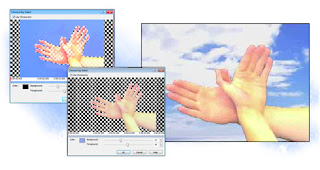 Often during editing you will want to remove the background from a video. This is commonly seen with television newscasts or interviews where the video of the person is overlaid onto a different video backdrop, or a logo animation is overlaid on a background. Chroma Key is also commonly referred to as green screen. Sometimes videos will have a transparency or alpha channel that you can adjust to remove the background, but more often than not, you will have to utilize Chroma Key tools in video editing software to remove the backgrounds.
Proper lighting makes using Chroma Keys far easier. Ensure the subject(s) and background are both well-lit. Solid color backdrops work the best. You can buy professional blue or green fabric backdrops or special Chroma Key paint. Avoid having shadows or hot spots on the background or unnecessary detail in the background as it will make it harder to “pull a key” later. Natural sunlight can often make the foreground subject bleed into the background when trying to key a color, so it’s best to use artificial lighting.
NCH Software’s VideoPad Video Editor has the ability to select a Chroma Key color with its Overlay feature. Add the video as an overlay track, and select the Use Chroma Key checkbox to bring up the Chroma Key preview window.
Select the Chroma Key color by clicking on the color you want to key out in the preview image. Then, using the preview image as a reference, adjust the Background and Foreground sliders until the desired transparency is achieved. Note you can click different positions on the timeline to see how the video will look. Click OK to apply changes.
If you would like to make changes later, first select the overlay in the list on the Overlay tab, and then click the Change button next to the Use Chroma Key checkbox.
Below is an example video we made using the Videopad Chroma Key feature. Download VideoPad for yourself to try this and the other easy video editing features for yourself.
Wednesday, August 24, 2011
Bringing A Comic To Life With Photo Slideshow Software
Guest post by Jessica Warner "Tomoyo Ichijouji"
At the heart of everything, what I want to do the most is to bring great stories to life. I'm primarily a writer, so that usually has to do with the techniques of prose on the page, of which I'm pretty comfortable with already. But, in the past year or two, as a result of getting involved in amateur voice-acting (I'm now a moderator of the forum I participate in, VoiceActingAlliance), as a lot of voice-actors there also put together their own media to voice, I've discovered many resources that could bring a story from simple text to a full blown multimedia production. I had sound effects to mix anything from a walk in the park to an epic battle of giant robots, and voice actors with professional-grade talent who I had at hand to recruit to make characters all that more real to the audience. Even better, I even had a few composers I could collaborate with to make a totally immersive, original work you could listen to. Really, what more could you ask for?
However...I have always been a visual person. While you can do a lot with just sound alone, characters and stories don't really feel complete to me unless you can really "see" them. In writing, these come in the form of prose descriptions, whereas for multimedia, pictures are a necessity. There are people in my online community with the artistic talent, patience, time, and resources to actually make full motion animations, buuuuuut...let's just say that I lack enough of each category for that to really be feasible for me, haha.
I had a project in mind that when I first learned enough to take a crack at these productions myself, I wanted to try to bring to the screen. It wasn't my own; it was an online webcomic called No Rest for the Wicked, as of yet unpublished and unfinished, that I saw a lot of potential in to be a lot more than simply a webcomic. It was presented in a way that I could see it practically coming alive in a cinematic form in my head. The art in the webcomic was characteristically stylistic and pleasing to the eye -- couldn't there be some way to present those same images in a way that allows that cinematic nature to be evident, and to combine it with all those resources I had to make something that was barely a few steps away from being like an actual "motion picture". And so I thought, "...Why not?!"
I was remembering from photo slideshows I'd seen, how they had different panning and zooming effects along with transitions, and I thought, perhaps if I could do the same for the images from the webcomic, that would simulate the panning and zooming techniques used in actual animated features usually with a lower budget to be able to make the most out of a single image, as well as to establish action shots with fast shifts and flashes.
After all, I already had the images in front of me -- it was a matter of how to have them displayed to make them come alive. It sounded like a very interesting endeavor indeed, and really played to my general life creed of "make the most possible out of the least amount possible". That said, how would I do it?
I started to research on what programs I could use to do this. I got recommendations of the widely-used programs that could do everything under the sun -- but when I looked at the licenses for those programs, it made me bang my head on my desk. I can't afford $500+ for a program license! I could probably better use that money to upgrade my computer equipment so that I could even USE such complex programs without crashing my hard drive after an hour of working with it. I wondered, did you really need to pay that much to have a slideshow program with customizable transitions and effects? Surely there was something else that people simply hadn't bothered to look into that would serve just as well?
After some careful searching, I came across the NCH Software programs, one of which was PhotoStage Slideshow Producer. I thought, sure, sounds like what could work. Seemed pretty simple in both structure and interface (it was a tiny download, I was amazed what functions you could pack into a few megabytes), straightforward, yet flexible. Downloading the trial version, but being the skeptic I have always been about good deals (why hadn't anyone heard of it before if it was so useful?), I wondered how much I'd be able to tell from a trial program that usually only lasted long enough for me to use it once or twice at most.
However, I found that PhotoStage let me use it for well beyond its suggested trial period, even keeping ALL of its features except for some file formats that weren't crucial to the functionality of the program. I have a lot of respect therefore for programs that will in fact trust that if you find you really like the program, eventually you'll support the programmers and publishers by paying for a shiny license for it that shows that you are in fact legit without having a swimming pool of money in your backyard.
And eventually, that's exactly what happened. I was actually well into working on the project, having done several clips already that I showed my staff as I'd been well into getting in the lines and mixing all the stuff together, and finding a special on licenses going on, I thought it was the right time to get one -- and I knew already, having been able to actually DO something with it, that I was getting my money's worth.
Here's a few of the test clips I've done so far of the production so far, from various parts of the webcomic (some of the voices and music are just placeholders and will be different in the finished production):
This test clip shows a more cinematic setting-establishing scene, where the panning and zooming is put to full use. Source reference: Ch 2, pg 1-3
This test clip has more narration, but I made little illustrative panels come to life by erasing out various objects and phrases, having them fade or pop back into view depending on the context. Source reference: Ch 1, pg 1
This test clip shows the control of comedic timing between the visuals and dialogue. Source reference: Ch 1, pg 12
This test clip integrates a lot of the things above, using both panning, zooming, and fades at various speeds for a comedic, almost cartoon-like effect. Source reference: Ch 2, pg 42-43
I'm still working away on the production and it's not anywhere near finished, but I'm getting there! (See, again, why I don't like programs with ticking fuses, because my working pace in general is tortoise slow) If you're curious as to more detailed progress info, here's my production blog, and there's a few additional test clips up at my Youtube production channel, Videocaptor Productions. (Tomoyo Ichijouji is my online alias, a little more unique than my real life name, haha)
I'm not sure at this point what future projects I'll use PhotoStage for next, but I've been pointing others at my community who want to do comic dubs like mine to PhotoStage as an easy, elegant way to bring some motion to the images to go with the voices and sound. It seems like the ones who've tried it liked it, so who knows? Considering nobody else in my forum seemed to know about it before I started mentioning it to people, maybe it'll start catching on. In the end, for me, it's all about making the most of what you've got. PhotoStage was definitely one of the programs that let me do that, so I'm sure I'll continue using it for creative purposes in the future.
At the heart of everything, what I want to do the most is to bring great stories to life. I'm primarily a writer, so that usually has to do with the techniques of prose on the page, of which I'm pretty comfortable with already. But, in the past year or two, as a result of getting involved in amateur voice-acting (I'm now a moderator of the forum I participate in, VoiceActingAlliance), as a lot of voice-actors there also put together their own media to voice, I've discovered many resources that could bring a story from simple text to a full blown multimedia production. I had sound effects to mix anything from a walk in the park to an epic battle of giant robots, and voice actors with professional-grade talent who I had at hand to recruit to make characters all that more real to the audience. Even better, I even had a few composers I could collaborate with to make a totally immersive, original work you could listen to. Really, what more could you ask for?
However...I have always been a visual person. While you can do a lot with just sound alone, characters and stories don't really feel complete to me unless you can really "see" them. In writing, these come in the form of prose descriptions, whereas for multimedia, pictures are a necessity. There are people in my online community with the artistic talent, patience, time, and resources to actually make full motion animations, buuuuuut...let's just say that I lack enough of each category for that to really be feasible for me, haha.
I had a project in mind that when I first learned enough to take a crack at these productions myself, I wanted to try to bring to the screen. It wasn't my own; it was an online webcomic called No Rest for the Wicked, as of yet unpublished and unfinished, that I saw a lot of potential in to be a lot more than simply a webcomic. It was presented in a way that I could see it practically coming alive in a cinematic form in my head. The art in the webcomic was characteristically stylistic and pleasing to the eye -- couldn't there be some way to present those same images in a way that allows that cinematic nature to be evident, and to combine it with all those resources I had to make something that was barely a few steps away from being like an actual "motion picture". And so I thought, "...Why not?!"
I was remembering from photo slideshows I'd seen, how they had different panning and zooming effects along with transitions, and I thought, perhaps if I could do the same for the images from the webcomic, that would simulate the panning and zooming techniques used in actual animated features usually with a lower budget to be able to make the most out of a single image, as well as to establish action shots with fast shifts and flashes.
After all, I already had the images in front of me -- it was a matter of how to have them displayed to make them come alive. It sounded like a very interesting endeavor indeed, and really played to my general life creed of "make the most possible out of the least amount possible". That said, how would I do it?
I started to research on what programs I could use to do this. I got recommendations of the widely-used programs that could do everything under the sun -- but when I looked at the licenses for those programs, it made me bang my head on my desk. I can't afford $500+ for a program license! I could probably better use that money to upgrade my computer equipment so that I could even USE such complex programs without crashing my hard drive after an hour of working with it. I wondered, did you really need to pay that much to have a slideshow program with customizable transitions and effects? Surely there was something else that people simply hadn't bothered to look into that would serve just as well?
After some careful searching, I came across the NCH Software programs, one of which was PhotoStage Slideshow Producer. I thought, sure, sounds like what could work. Seemed pretty simple in both structure and interface (it was a tiny download, I was amazed what functions you could pack into a few megabytes), straightforward, yet flexible. Downloading the trial version, but being the skeptic I have always been about good deals (why hadn't anyone heard of it before if it was so useful?), I wondered how much I'd be able to tell from a trial program that usually only lasted long enough for me to use it once or twice at most.
However, I found that PhotoStage let me use it for well beyond its suggested trial period, even keeping ALL of its features except for some file formats that weren't crucial to the functionality of the program. I have a lot of respect therefore for programs that will in fact trust that if you find you really like the program, eventually you'll support the programmers and publishers by paying for a shiny license for it that shows that you are in fact legit without having a swimming pool of money in your backyard.
And eventually, that's exactly what happened. I was actually well into working on the project, having done several clips already that I showed my staff as I'd been well into getting in the lines and mixing all the stuff together, and finding a special on licenses going on, I thought it was the right time to get one -- and I knew already, having been able to actually DO something with it, that I was getting my money's worth.
Here's a few of the test clips I've done so far of the production so far, from various parts of the webcomic (some of the voices and music are just placeholders and will be different in the finished production):
This test clip shows a more cinematic setting-establishing scene, where the panning and zooming is put to full use. Source reference: Ch 2, pg 1-3
This test clip has more narration, but I made little illustrative panels come to life by erasing out various objects and phrases, having them fade or pop back into view depending on the context. Source reference: Ch 1, pg 1
This test clip shows the control of comedic timing between the visuals and dialogue. Source reference: Ch 1, pg 12
This test clip integrates a lot of the things above, using both panning, zooming, and fades at various speeds for a comedic, almost cartoon-like effect. Source reference: Ch 2, pg 42-43
I'm still working away on the production and it's not anywhere near finished, but I'm getting there! (See, again, why I don't like programs with ticking fuses, because my working pace in general is tortoise slow) If you're curious as to more detailed progress info, here's my production blog, and there's a few additional test clips up at my Youtube production channel, Videocaptor Productions. (Tomoyo Ichijouji is my online alias, a little more unique than my real life name, haha)
I'm not sure at this point what future projects I'll use PhotoStage for next, but I've been pointing others at my community who want to do comic dubs like mine to PhotoStage as an easy, elegant way to bring some motion to the images to go with the voices and sound. It seems like the ones who've tried it liked it, so who knows? Considering nobody else in my forum seemed to know about it before I started mentioning it to people, maybe it'll start catching on. In the end, for me, it's all about making the most of what you've got. PhotoStage was definitely one of the programs that let me do that, so I'm sure I'll continue using it for creative purposes in the future.
Monday, May 9, 2011
Record Video from Anywhere
Debut Video Capture Software records and captures video from webcams, recording devices, and from your computer screen. It’s great for recording tutorials you can post to online sites such as YouTube, for making company messages, for recording streaming video, and more. See for yourself how easy it is to get started capturing and recording videos in this Debut video tutorial:
Monday, May 2, 2011
Axon Windows PBX Tutorial
Putting together a phone system can be a daunting task. When you need to figure out phone lines and extensions, plus extras like on-hold music, things can quickly spiral out of control, especially if aren't well versed in Linux—which many PBX systems require. Fortunately, there is another option. With Axon, a Windows PBX system, as with all of our telephony software, we have done our best to keep everything simple and straight forward. Plus we have just finished a new quick start video tutorial to further guide you through the process of setting up your new PBX telephone system.
So if you are looking for a way to manage telephone calls and extensions across your business, and you don't have an IT team to do the grunt work for you, take a look at Axon virtual Windows-based PBX software. It will make getting your phones up and running as painless as possible, and you don't even need to learn a new operating system.
So if you are looking for a way to manage telephone calls and extensions across your business, and you don't have an IT team to do the grunt work for you, take a look at Axon virtual Windows-based PBX software. It will make getting your phones up and running as painless as possible, and you don't even need to learn a new operating system.
Wednesday, April 13, 2011
Video Tutorial: Simple Slideshow Software in Action
See how easy it is to bring your digital photos to life and share your favorite memories with family and friends with PhotoStage slideshow creation software. Our recently finished PhotoStage video tutorial walks you through the process so you can see how easy it is to combine images, video clips, music and narration into a truly memorable slideshow movie.
Download PhotoStage slideshow software today to start making your own custom multimedia presentation to share with friends and family and preserve your memories.
Download PhotoStage slideshow software today to start making your own custom multimedia presentation to share with friends and family and preserve your memories.
Wednesday, March 9, 2011
Become a DJ: Learning the Software is Half the Battle
Zulu Virtual DJ Software is an easy-to-use dj software program for mixing track after track during live performances, or you can simply let Zulu be the DJ for you.
To make getting started even easier, we put together this introduction to Zulu DJ Software video tutorial to help aspiring DJs learn their way around the Zulu interface. The video covers the music list, auto play, using the deck, setting the beats per minute (BPM) and using auto-sync, the pitch slider and speed controls for smooth transitions between tracks. It also covers setting cue points, looping, applying effects, and using the headphone output.
Once you've learned some of the basics covered in this video, then all that's really left is picking out the songs to play and keep things moving at your next party.
To make getting started even easier, we put together this introduction to Zulu DJ Software video tutorial to help aspiring DJs learn their way around the Zulu interface. The video covers the music list, auto play, using the deck, setting the beats per minute (BPM) and using auto-sync, the pitch slider and speed controls for smooth transitions between tracks. It also covers setting cue points, looping, applying effects, and using the headphone output.
Once you've learned some of the basics covered in this video, then all that's really left is picking out the songs to play and keep things moving at your next party.
Thursday, February 17, 2011
Getting Started With Music Transcription
TwelveKeys Music Transcription Software is a unique tool for musicians who want to learn how to play a piece of recorded music without the sheet music. If you recorded a piece of music and want to turn it into a personal composition or improvisation, you can use TwelveKeys to pick out the notes, along with Crescendo Music Notation Software to write your transcription out. Or maybe there is song you've been listening to on your iPod that you would love to learn how to play on the piano, guitar or any other instrument. You can use TwelveKeys to create a visual representation of the notes in that song, pick out the notes using the TwelveKeys keyboard, and slow the music down and loop the phrases you want to learn while you play along.
Transcribing music can be a great way to both learn songs and improve your ear. Download TwelveKeys to help you learn your next song, and watch the tutorial below for tips and tricks to make your transcription process faster and more accurate.
Transcribing music can be a great way to both learn songs and improve your ear. Download TwelveKeys to help you learn your next song, and watch the tutorial below for tips and tricks to make your transcription process faster and more accurate.
Friday, October 22, 2010
User Spotlight: First Time Success Making A Music Video
Bart Bryars recently purchased PhotoStage Slideshow Software and put together his first video. The opening number for their musical, Joey, is a take on everything New York City.
As we've mentioned in the past we strive to make all of our software easy to use. So it is great to not only hear that we are doing a good job, but to see the results as well. We really enjoyed watching the musical number they put together with the help of PhotoStage Slideshow Creator and wanted to share it with all of you fine readers:
We hope you enjoy their video too. Maybe it will inspire you to put together your own musical video montage after seeing what couple of beginners were able to do.
"It turned out so good and has had such a positive response, I thought I'd send it to you so you could see what's possible for a first time novice like me, who has no training whatsoever in video arts or production. We don't even have a camcorder. The action parts were shot on a regular Sony digital camera that happens to have a basic recording feature.
Thank you so much for your product. Very simple and easy to use."
– Bart Bryars
As we've mentioned in the past we strive to make all of our software easy to use. So it is great to not only hear that we are doing a good job, but to see the results as well. We really enjoyed watching the musical number they put together with the help of PhotoStage Slideshow Creator and wanted to share it with all of you fine readers:
We hope you enjoy their video too. Maybe it will inspire you to put together your own musical video montage after seeing what couple of beginners were able to do.
Thursday, September 30, 2010
WavePad the Movie
Here is a quick look at the always popular WavePad audio editor
WavePad is an established leader in professional audio editing software. Its diverse editing, effects, and toolset make it well suited for a wide scope of audio projects. And for those of you new to the wonderful world of audio editing you can find three WavePad video tutorials to help you learn the ropes and get started using this NCH classic.
WavePad is an established leader in professional audio editing software. Its diverse editing, effects, and toolset make it well suited for a wide scope of audio projects. And for those of you new to the wonderful world of audio editing you can find three WavePad video tutorials to help you learn the ropes and get started using this NCH classic.
Tuesday, September 21, 2010
Dictation & Transcription Software–A Powerful Duo
If you are a lawyer where the law is on the line, or have any other reason why you just can't rely on an automated speech-to-text system guessing at your speech there are still ways you can use technology to help streamline and improve the dictation/transcription process in your office.
Choose from a variety of ways to record dictations: record straight into your computer, dock a portable digital recording device to your computer, or record dictations on the go from your iPhone, pocket PC or palm PDA and transfer completed dictations directly to your typist when you're done. See our complete range of dictation software options to find the solution that works best for you.
On the other side of the coin, we also provide Express Scribe free transcription software. Express Scribe allows transcriptionists to easily manage the files sent from any of the many dictation software options, and provides valuable time saving features for completing transcriptions efficiently, including variable speed playback and optional foot pedal control. Also be sure to check out our other software tools for typists.
Monday, August 30, 2010
Transform the Videos You've Been Recording into Amazing Home Movies
Are you using the videos you've been recording on your camcorder?
If you've been diligently recording special events, don't let all of that video simply sit on a memory card—turn your video footage into something memorable that you can share with friends and family for years to come. With VideoPad video editing software, you can quickly and easily transform your video footage into amazing home movies that will impress everyone you know. VideoPad is designed to be as intuitive to use as possible, so whether you're editing, adding effects or sharing with friends or online, after a quick installation, you’ll be making your own movie masterpiece within minutes.
Friday, August 20, 2010
Business Inventory Management Made Easy
Inventoria Stock Manager allows businesses of all sizes to efficiently track all their inventory processes, whether for one small retail outlet, or a chain of stores and warehouses across several locations. And Inventoria is only one piece of our business software suite, combine it with our other business applications for a low cost complete business management solution.
Monday, July 26, 2010
Showcase and Share Your Memories, Photos, Video Clips and More
Vividly recreate and preserve your memories with a multimedia slideshow you’ll be proud to share with friends and family with PhotoStage slideshow creator software.
There’s no better tool than PhotoStage for showcasing your favorite photographs, images and video clips. PhotoStage brings your pictures, images and video to life and lets you share your favorite memories with family and friends in an interesting and portable way. Creating a slideshow from your digital photos has never been easier.
There’s no better tool than PhotoStage for showcasing your favorite photographs, images and video clips. PhotoStage brings your pictures, images and video to life and lets you share your favorite memories with family and friends in an interesting and portable way. Creating a slideshow from your digital photos has never been easier.


