Showing posts with label SoundTap. Show all posts

Friday, September 21, 2018

Record Streaming Audio Easily with SoundTap

How to Record Streaming Audio


There are many different reasons why you may want to know how to record streaming audio on your computer. Learning how to record streamed audio will allow you to record and save audio from VoIP calls, videos, internet radio, and more. With a simple audio stream recording software such as SoundTap Streaming Audio Recorder, you can easily record any audio playing on your computer.


Install SoundTap

First, you will have to install SoundTap Streaming Audio Recorder onto your computer. This install requires that you restart your computer after downloading so that SoundTap can use your computer's audio driver to record audio playing on your computer. After your computer has rebooted, you will see SoundTap opened on your desktop.


Set the Output Destination & File Type

Click on the Options button in the program to open the SoundTap options window. Here you can select where you would like to save your streamed audio recordings. You can also set your desired output format for your audio files. Once you are finished adjusting your settings, click OK.


Find an Audio source to Record

Locate the streaming audio source that you would like to record on your computer. SoundTap can record a variety of internet streamed audio, such as internet radio, audio from videos and audio from Voice over IP programs such as Skype. Any audio that can be played on your computer can be recorded with Soundtap. Open the application or file that you would like to capture the audio from on your computer.
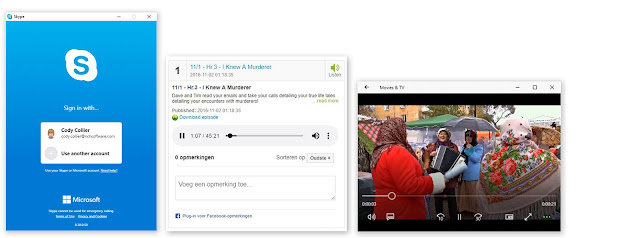


Record Streaming Audio

Click on the button that says Start Recording to begin recording streamed audio on your computer. While SoundTap is recording, the program will record any audio that is playing on your computer. If you would like to record audio from your computer's microphone in addition to the audio playing on your computer, simply check the box that says "Also record from microphone."


Export & Save

When you are finished recording your streamed audio, simply click the button that says Stop Recording. Your audio file will be saved in the default location that you set earlier. Click on the Find & Play button to launch the Find and Play Recordings window. From here you can listen to your recordings, see where they are saved, or save them to a new location by clicking the "Save As" button.



Wednesday, January 9, 2013

Speaker Recording Software for Windows and Mac

Speaker Recording Software to record audio from speakers Everyone knows you can use a microphone for recording audio, and a quality microphone is the best tool for a lot of different types of recording, but if you want to record something that you are listening to on your computer putting your mic next to your speakers is not going to get you the quality audio you can get with SoundTap Streaming Audio Recorder.

With SoundTap you can directly record audio from your computer, so you are capturing the same audio you hear being played through your speakers and saving it as an mp3 or wav file. So, with SoundTap installed on your PC or Mac you can record high quality digital audio from all kinds of places including:
  • Record internet radio streams
  • Convert formats with their own players to mp3
  • Record VoIP phone calls or conference calls
  • Save audio from streaming webcasts
  • Grab the audio in online videos
And the list continues, so download SoundTap today to record sound from your computer and happy recording!

Friday, November 2, 2012

Record Skype Calls - Easy Audio & Video Call Recording

call recording software We have posted before about recording phone calls through a TRX personal call recorder, recording multiple phone lines across a business network with VRS call recording software, or even saving conversations with the Express Talk softphone’s recording feature, but with the advent of internet technology like Skype, what if you want to record a phone conversation on your computer?

Record Skype Audio Calls
The solution to recording your voice-over-IP calls is our SoundTap streaming audio capture software. With SoundTap you can record any audio that is played on or through your PC or Mac, making it easy to record both sides of your conversation; instead of only your microphone input. It is akin to tapping your virtual phone and you can save the audio in .wav or .mp3 format.

Record Skype Video Calls
For video, we suggest you turn to Debut streaming video recording software. Debut is a powerful video capture program that can grab video from virtually any source, including your screen. Make sure your Debut options are enabled to record both video and audio, and then you can easily record your video calls, including Skype, to play back or edit later.

Saturday, October 20, 2012

Software for Radio

Radio SoftwareWe already past 'R' in our A to Z software tour, but as a honorable mention after recording, here are a number of professional radio programs designed for specific tasks to help the small or start up radio station or podcaster. So if you are interested in creating or hosting your own audio content be sure to check out these radio applications to help you along the way:

BroadWave is an audio streaming software program designed to broadcast any audio connected to the sound input on the PC. It will also stream audio recordings and all BroadWave streams will play directly from the default web browser on any modern Windows or Mac computer.

VRS is a professional voice recording application that can be used radio station logging, recording multiple audio channels simultaneously with digital signal processing, automatic level control and a continuous recording mode to easily save a copy of all your broadcasts.

From recording to editing and mixing your audio, interviews, music and voiceovers you won't want to be without our favorite duo, WavePad audio editor and MixPad multitrack mixer both are available for your Windows PC or Mac, and for recording and editing on the go you can also download Pocket WavePad on your iPhone or iPad, perfect for those coffee shop interviews and more.

Want to share a snippit of audio from something else online with your listeners? Save streaming audio as an mp3 or wav file on you computer with the use of SoundTap streaming audio recorder to rip the audio you hear playing on your computer. And you can always visit our full arsenal of radio software for additional radio tools and applications.

Monday, December 27, 2010

Streaming Audio Recorder Saves Time for Radio Producers

Izi Mann has been a radio personality and producer for decades, including work on the NPR show Voice of Israel, he now also produces Internet radio shows.

SoundTap Streaming Audio Recording SoftwareUsing a variety of audio files from different websites is key for an Internet radio show to offer a digest of varied, newsworthy content. When Mann found SoundTap streaming audio recorder, it saved him so much time he was able to do more shows than before while offering much better content.

Mann estimates that he spends at least 30% less time recording audio files with SoundTap than with other comparable programs he has tried. "I use SoundTap to 'catch' audio files from different websites. The software does this so cleanly and smoothly, and without the numerous time-consuming requirements that appear in some other programs, I have tried. Just one click!"

The challenge Izi Mann faced before finding NCH Software's SoundTap was that many software applications were time-consuming and demanding. He was searching for an efficient audio recorder but many of the other programs he tried did not actually work or asked so many questions before recording the audio he found them impractical for what he wanted to do. "When you have a show to produce, it is important that it’s done perfectly, but also immediately,” Mann said. “Actually, who does have time to waste?"

When his search was coming up dry, he suddenly remembered a colleague from the BBC had introduced him to NCH Software’s Switch Audio Converter software, and how smoothly it converted CD music files to Wav files. So he went to NCH looking for an equally capable solution for his audio recording problems. He found that solution in SoundTap Streaming Audio Recorder.

SoundTap saves Internet radio producers like Izi Mann time, creating high-quality audio files at the click of a button, and this is just one example of the many uses for this versatile streaming audio recorder. Download SoundTap to capture any audio playing through your computer and convert that audio to mp3 or Wav files. You may well find that like Izi Mann, after you have used SoundTap, you'll be willing to recommend it to anyone.

Monday, April 26, 2010

Record Audio Playing Through Your Speakers
An Easy Stereo Mix Alternative

record what your speakers are playing For those of you that have used the "Stereo Mix" feature of your sound card to record audio playing on your Windows computer in the past, you might be surprised to find that this feature isn't readily available on Windows 7. Several NCH customers have informed me that they have started using SoundTap Streaming Audio Recorder as an alternative to Stereo Mix on Windows 7, after experiencing frustration with this feature gap.

After doing a little research online it seems that the primary concern leading to Windows dropping Stereo Mix is concerns about maintaining DRM (Digital Rights Management) on copy-protected audio files. They seem to have forgotten that there are a large number of perfectly legal reasons you might want to record audio that is playing through your computer. Some soundcards do allow you to update your drivers online to regain this functionality, but not all, so what used to be an easy recording option can now be quite a headache to try and get up and running. So we are glad to offer SoundTap as an easy way to record audio playing through your computer to solve this problem.

SoundTap records audio through a virtual driver on your computer for high quality audio recording. There are DRM restrictions in place to protect rights-managed content, but SoundTap reopens the door to record high quality audio from a multitude of audio streams. So if you've been looking for a simple way to capture audio playing through your computer, NCH's SoundTap audio stream recorder may be exactly the software solution you need.