Showing posts with label fast. Show all posts

Thursday, March 24, 2016

How Text Expander Software Can Save You 100's of Hours a Year

How keyboard macro programs can increase productivity through typing shortcuts

If you work as a legal/medical transcriptionist, eBay reseller, customer relations manager, data entry clerk, programmer, or web designer - a simple text expander program can help you save many hours a week by creating text typing shortcuts to fill in common phrases or code strings in your workflow. Text expansion is a bit like auto-complete on a cell phone/Google — it allows you to enter a long string of text with a shorter string. When you’re using a text expansion app, it monitors your typing, and whenever you type a specific sequence of letters, it will replace those letters with a predefined piece of text. It could be your name, your address, or a full paragraph that you’ve saved.

Think of how many things you type over and over on a regular basis and the number of seconds it takes to write each phrase - text expansion allows me to type a few letters instead of that whole string of characters. Do the math - if you are in the medical transcription field, you are often typing long words that are hard to spell (and often don't register correctly with spell check). With a short setup period with the software, you can have several common diagnoses and descriptive sentences ready to go - a paragraph that would have taken a minute or two to type up can now be written in a few seconds!

With transcription usage covered, a couple of other examples:

eBay Seller:

Have a couple of different templates or common descriptions for your items? Save each one with a different string, and halve the time needed to make each listing and get more products up and running.

Customer Relations (CRM):

If you manage support emails or a business Facebook/Twitter account, you can have frequently used responses (Thank you for the comment, please leave us a review here; Sorry to hear about your issue with our product! For technical support, please go here; etc) saved and ready to go. It will certainly make qualifying for the Facebook Page Responsiveness Badge easier for your business page!

Data Entry/Programming/Web Design:

Have a particular formula, recursive loop, file location, or coding template that is referred to multiple times in your project? Text expanders don't just store letters, you can have common code snippets saved as well to save on development time.

Give our highly rated text expander a try: FastFox Text Expander for Windows and Mac

Features:

Text Expansion and Image Insertion
  • Expand keyboard shortcuts into words or phrases
  • Create an unlimited number of text shortcuts
  • No limit on expanded text length
  • Save plain text or formatted rich text expansions
  • Create a shortcut to insert images 
Shortcut and Macro Creation
  • Define macros for actions using special keys
    (i.e., Ctrl, Alt, and Shift)
  • Create shortcuts from multiple key commands
  • Use keyboard macros within any program
  • Utilize a shared shortcut file on a network to standardize stock text across your business
  • Back up and restore shortcut data and groups 
Intuitive Autocomplete
  • FastFox learns your most commonly typed phrases and suggests them to you as you type, so you can select and insert text on the fly.
For a quick lesson on using FastFox, read this tutorial from WikiHow

Click on the link to download or purchase:

Thursday, October 3, 2013

Video Editing On The Go - VideoPad For Android Is Here

In May 2013, YouTube celebrated its 8th anniversary announcing that 100 hours worth of video is uploaded every minute—that's four days worth of video every minute! And YouTube isn't the only place to upload videos, there are lots of other sites to upload videos of our children, pets, vacations or just about any aspect of our daily lives.

A lot of us shoot videos in all kinds of locations and don't want to wait to get home to our computers to edit that video. We want to share that video with our family and friends as soon as possible.

With VideoPad for Android, NCH Software has made it incredibly easy to edit and enhance videos while on-the-go. This new release for Android lets you take advantage of all the powerful video recording and editing tools you have come to love, from the convenience of your Kindle or Android tablet.

VideoPad Android Video Editing App

With VideoPad for Android it's easier than ever to create top-quality videos and have the instant gratification of sharing your videos in record time.

VideoPad Movie & Video Editor for Android lets you record or import video from your tablet and get straight to editing instead of waiting to get to a computer. VideoPad includes features to fine-tune the brightness and color of videos and add other visual effects. You can rotate videos that were recorded at different orientations so their perspectives match. You can trim videos down to size, zoom in on clips, add music, narration, video effects, transitions and complete all edits quickly and easily.

Even though VideoPad for Android has only just been released it's already getting four- and five-star reviews on the Google Play app store, and we are certain you will love it too. If you're already shooting and editing lots of video, or if you're just getting started, VideoPad for Android tablets is one app you won't want to miss. Install it today to create videos you'll be proud to share from wherever you are.

Friday, September 13, 2013

Do the Splits and See Where Your Money is Going

Managing your personal finances is much easier when you know exactly where your money is coming from and where it's going. MoneyLine Personal Finance Software helps you track your cash flow quickly and easily.

split transaction to see where your money goes with MoneyLine personal finance software One of the easiest ways to see what's happening with your money is to use the split transaction feature in MoneyLine. For example, let's say you go to a store like Target or Walmart to buy groceries. Along with your groceries, you stop off in the automotive section to pick up a couple of quarts of oil, then stop by the clothing section to pick up a few pairs of socks, and finally drop by the toy aisle to buy a birthday gift for a young relative.

Once you're home and have put away the groceries and the other items you bought, enter the purchase in MoneyLine. You can either record the total amount of the transaction and stop there, or take a few extra seconds and split the transaction into different categories. After entering the total amount spent at the store, break down exactly how much money you spent on food and allocate that to the Groceries category. Record the amount spent for the motor oil to Auto, put the socks under Clothing, and finally the toy can go under Gifts.

You can even add subcategories to track things in still finer detail. For example, if you have two cars, you could make a subcategory for each vehicle underneath Auto expenses.

Over time, as you continue to categorize and split transactions you will have a better picture of exactly where you are spending your money. This helps when you are trying to create or stick to a budget—another feature of MoneyLine. You may find areas where you can cut back, or maybe you will find a few extra dollars that you can use for vacation and entertainment expenses—that's when keeping track of your money becomes fun.

Keeping track of your personal finances can be a chore, but with MoneyLine Personal Finance Software you'll find that it's actually a lot quicker than you may have feared.

Monday, July 22, 2013

Are You A Typing Hero?

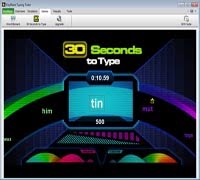
New typing hero game in KeyBlaze typing tutor We know that leaning to type is important. Touch typing is a skill you'll use throughout your life. And with the need to learn how tow to type at a younger age we are continuing to work on making learning to type more fun. Besides, whoever said practice had to be boring? To make learning to type more fun, we just added a new typing game to KeyBlaze typing tutorTyping Hero.

In the spirit of Guitar Hero, in Typing Hero, letters come down the screen and the player needs to type those letters as they cross the line. It starts out slow, but as the speed increases it starts to create a typing rhythm in addition to encouraging the use of the correct fingers which are color coded for you at the bottom of the screen.

Give Typing Hero and the other typing games in KeyBlaze typing tutor software a try and see if you don't enjoy improving your typing skills and speed just a little bit more. Then let us know, what’s your best score?

Tuesday, June 25, 2013

Stop Balancing Your Checkbook By Hand

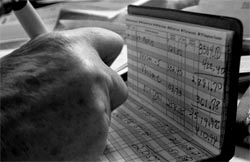
Checkbook Balancing The Old Way How do you track your spending? Did you learn how to balance a checkbook in school? Do you take the time to go through it by hand each month? Or, maybe the question should be if you balance your checkbook at all?

The good news is that there is no reason for your checkbook to stay analog in this digital world. You can track your spending and balance your checkbook easily with simple software like MoneyLine Personal Finance Software, which will even download statements directly from your bank. So save yourself the trouble and the time of doing things the old-fashioned way without letting the chore gets left on the side of the road.

Tuesday, June 11, 2013

Easy CD/DVD Copying and Burning

As new features and operating systems come out, some things start to go away. You probably don't miss floppy drives much, but one thing that is getting harder on a Mac is an easy way to burn things like your home movies to DVD. If you have videos, music, or even data you want to burn to CD, DVD, or Blu-ray, take a look at this preview of how easy it is to create and copy disc with Express Burn.

Tuesday, May 21, 2013

Bringing Fond Memories Back to Life

Guest post by John Albergo

My dad was an engineer and a shutterbug, which meant that our vacations were meticulously captured through the lens of his German Leica. This was both a blessing and a curse.

Up close and personal with a buffalo

First, the blessing: Our summer car trips covered the Dakotas, Wyoming, Colorado, Montana and Alberta, and Dad captured everything on film—35mm slides, to be specific. The engineer in him demanded perfection, which resulted in beautiful photos of incredible, indescribable landscapes that most people never see. Even as children, we were awestruck by the forces of nature that merged to create these scenes—Yellowstone Park, Old Faithful, Twin Falls, the Grand Tetons, Glacier Park, the Badlands, rivers, forests, plains, snow-capped mountains and, of course, wildlife.

John's brother Pat, at Badlands National Park. "Take just a few more steps back..."

Now the curse: Fast forward to 2012. I inherited more than 1,000 slides, all neatly organized into cartridges, that were taking up space in my basement. Suddenly, there was a renewed interest in slides that no one has seen in years; now everyone wanted to see them again. I had to figure out how to digitize and share them across several states. It would have taken me weeks to scan, edit and clean up all of the old slides, so I opted to have them professionally scanned. (Hint: Some photo and film digitizing services send their work overseas on container ships, which can take months, so I chose a company that does everything locally)

Rather than simply send everyone CDs with a bunch of images, I wanted to create a slide show in which they could identify what the photos were. I downloaded a trial of PhotoStage Slideshow Maker and created a show with a few scanned images; I was sold immediately. Creating and editing a slide show is simple. Once I created a slide show, altering the duration of each slide took only a few clicks, allowing me to time the music I added to the showdown to the second.

That was nice for starters, but the real test was when I got nearly 500 hi-res images back from the scanning service. I found that uploading even a high volume of images into PhotoStage is fast, and it allowed me the option of transferring everything in sub-folders that indicated where groups of photos were taken, such as "Glacier Park" and "Little Bighorn." The folders show up in the menu system of DVD players, allowing viewers to select sideshows by location or subject. Once I created and saved the show, it was just a matter of copying it to a CD or DVD.

Memories Preserved for Lifetime
Whether your family's cherished memories are sitting in boxes of photos, neatly arranged photo albums or encased in slide carousels, that's all they're doing—just sitting there. And they can fade over time or, heaven forbid, be destroyed by natural disasters. Once you digitize them, PhotoStage lets you recreate and preserve those memories and enhance them with music, titles and other effects. Everyone in my family can now view these photos as a reminder not only of our beautiful country but how truly fortunate we were to have a Dad who wanted us to see it.

John Albergo is a writer with more than 15 years of experience in business communications, spanning IT services, software licensing, health and safety programs, and general business. He's also a bit of a shutterbug and even had his own darkroom while in high school.

Friday, April 19, 2013

Preview Switch Audio Converting Software

CNET recently started making download preview videos to give you a quick taste of a program before you download. Take a look at the speedy Switch Sound Converter below. It really only takes seconds to convert audio and music files to mp3, aiff, wav, wma, or any one of the other audio formats—over 40 formats in all.


So now that you've had a peek, download Switch Audio Converter for your Mac or PC today for quick and easy audio converting whenever you need it.

Thursday, April 11, 2013

Express Invoice Now Available for Android

Express Invoice Android App Now Available
Adding to the NCH Android collection and giving you the ability to create invoices from anywhere, the popular, Express Invoice invoicing program is now available for Android tablets on both Google Play and on the Amazon app store. So business people who couldn't jump on the recent Express Invoice iPad release because they have an Android device don't need to feel left out anymore.

Take your billing on the road with you for easy, streamlined invoicing that is less of a chore. And for an even more comprehensive invoicing solution for multiple users, you can still use the popular desktop versions of Express Invoice invoicing software.

Friday, March 22, 2013

Smart Text Auto Complete Software

FastFox Smart Auto Complete Text Expander Software With FastFox instant text expander you can improve your typing speed and productivity not only with personalized keyboard shortcuts and shorthand abbreviations, but FastFox also learns what you type the most often and will make suggestions for completing phrases as you type with a popup alert in the corner of your screen. Just like the regular hotkey shortcuts, the auto complete feature will work while you type in any application, so you can select, insert and finish text phrases on the fly.

Bring the power of auto complete to all your typing with FastFox word expander software.

Friday, February 15, 2013

Everday Text Expansion

What do you type the most? your email address? your mailing address? maybe your phone number? or your web address? Are there any words you struggle to remember how to spell causing you to slow down and correct misspellings or typos? Or maybe you frequently browse to webpages just so you can copy and paste the links to make sure you get them correct.

Spring loaded text expansion for everyday use We are all constantly typing, from emails to forms online, and some of the things we are typing we have to type all of the time. FastFox text expansion software lets you save those words or phrases so you can not only enter them in faster, but also avoid typos. Think of it like auto complete that will work anywhere on your computer, or like a super powered clipboard that can save much more than just one snippet of text at a time. You pick your own shortcuts and what they are short for, then whenever you type the shortcut it will be automatically replaced. So, typing something like :em could be all you need to type to enter your email address, or you could just type :sig to add a signature to the end of an email, a comment you're making on a forum. Anywhere you type, if you enter one of your text shortcuts FastFox will automatically replace it with the expanded text.

The possibilities are endless, you don't need to be a typist or transcriptionist to find things that would make useful text shortcuts, just think, what do you type the most often? Once you've created shortcuts for those common items and phrases you will wonder what you ever did without them. Spend less time typing with this fast, everyday solution.

Thursday, January 17, 2013

Create Videos From Photos

Take photos from your camera or hard drive and transform those photos into videos in no time. With PhotoStage photo movie maker you can quickly bring new life to your digital photos.

Use the quick create option to add all the photos in a folder into a slideshow to get you started. Simply drag and drop to rearrange photos. Add effects, captions, music and narration for that little something extra to truly turn your photos into something special.

Monday, January 14, 2013

New iPad Express Invoice App

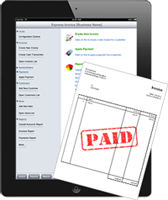
Now available in the iTunes store is the brand new iPad version of Express Invoice, providing a new portable and easy invoicing solution for business people on the go. Create and send invoices, quotes and estimates, automate recurring invoices and payment past due reminders, plus access up-to-the-minute statements and reports all from the convenience of your iPad.

Sales and business people who are always on the move and spend more time with customers than at their desk won't want to miss out on the convenience of the express invoice iPad app. And for a more comprehensive solution including support for multiple users, multiple businesses and remote access, be sure to check out the desktop versions of this popular invoicing software.