
 Most people are familiar with the movie Groundhog Day where Bill Murray gets trapped living the same day over and over again. While it is a funny film, I can't help but sympathize with his frustration and how hard he tries to break out of the routine and tedium of living the same thing over and over again. One thing I like about my job is that every day is different. It is nice to have different things to do to help keep things fresh, but even more dynamic jobs can have a hint of a repetitive undercurrent. On the bright side, using FastFox text expansion software helps reduce some of the monotony by helping you get through some of those tasks faster. By saving frequently used text such as answers to common questions, descriptions of the company or various products, or even phrases that you are bound to misspell or waste time correcting, you’ll get on to the next challenge quicker. And since Punxsutawney Phil forecast an early spring, using FastFox shorthand software also means you’ll get to enjoy spring sooner.
Wednesday, February 2, 2011
Break Free From The Groundhog Day Typing Tedium
Most people are familiar with the movie Groundhog Day where Bill Murray gets trapped living the same day over and over again. While it is a funny film, I can't help but sympathize with his frustration and how hard he tries to break out of the routine and tedium of living the same thing over and over again. One thing I like about my job is that every day is different. It is nice to have different things to do to help keep things fresh, but even more dynamic jobs can have a hint of a repetitive undercurrent. On the bright side, using FastFox text expansion software helps reduce some of the monotony by helping you get through some of those tasks faster. By saving frequently used text such as answers to common questions, descriptions of the company or various products, or even phrases that you are bound to misspell or waste time correcting, you’ll get on to the next challenge quicker. And since Punxsutawney Phil forecast an early spring, using FastFox shorthand software also means you’ll get to enjoy spring sooner.

Monday, January 31, 2011
File Converters Making Life Easy
 As a student in this day and age, most of my work is composed digitally. I rarely write essays with pen and paper and I even take class notes on my lap top computer. I also deal with a wide array of mixed file formats on a daily basis. From audio to document files, to videos and images, it can be difficult to manage the various file types involved in daily projects. This is especially difficult when I am transferring files back-and-forth from Mac to PC for my school labs and study groups. Not having conversion software on-hand can be the kill shot for any project or paper.
I like to be prepared with every type of conversion software I might need. Switch Audio File Converter is handy when downloading files from various places that may or may not be compatible with different types of computers.
I use Pixillion Image Converter to convert pictures, particularly when I am working with large RAW photos that are difficult to transport on USB devices or via e-mail.
Prism Video Conversion Software is excellent for converting video from PC friendly formats to ones that are more suitable for my Mac at home. It has compression tools and built-in batch conversion, so I can quickly convert multiple videos for large projects.
Converting documents is also quick and easy with Doxillion Document Converter. This is incredibly helpful when toggling between different versions of popular office applications and eliminates the wasted time spent communicating back and forth about difficulties opening and using documents.
For other time-saving software see our full range of software utilities for applications for disc burning, compressing, encryption and more.
Friday, January 28, 2011
FlexiServer Creates a More Efficient Work Environment
 The Center for Pain Control business manager Peter Graf was having difficulty managing his employees’ computer usage. The Center, which makes it possible for patients to avoid a hospital stay for surgical procedures while helping them to manage pain, has just over twenty employees. Graf wanted to ensure that each employee was using their computer systems efficiently. This is a very real concern for businesses considering how much money businesses are losing due to non-work related internet browsing.
Graf immediately turned to NCH Software, since he had successfully used products of theirs in the past. He came across FlexiServer employee computer usage monitoring software, which he now uses to double-check hours worked, view application use by staff, and to restrict programs and internet sites on necessary computers. “FlexiServer is easy to use and set up,” said Graf.
Using FlexiServer to monitor employees has finally given him the opportunity to get some real work done. “I run a report once a month to see where employees spend most of their time. This freed up more time for actual work,” said Graf. Before FlexiServer, Graf manually entered the hours of every employee into an Excel spreadsheet.
Graf’s favorite feature is the ability to prohibit employees from using programs and internet sites that they shouldn’t be using during work hours. He can also pinpoint which sites viruses were picked up on, and generate reports on employees’ start and end times.
FlexiServer software automatically logs employee time and attendance. It features tools for quality assurance monitoring and reporting, and works with home or remote employees. FlexiServer gives managers the confidence they need to know that work is getting done without needing to micro-manage. The monitoring features are non-invasive and respect the employees' need for privacy, allowing them to enter private mode when necessary, while creating a paper trail that can be referenced if needed.
Monday, January 24, 2011
Video Stabilization – A Quick Fix for Shaky Video Clips
One extremely cool feature in VideoPad Video Editor is video stabilization. If you've done much hand-held video recording without a tripod, then you have undoubtedly had videos turn out "shaky" because, despite your best efforts, it is near impossible to keep your hand steady. So if you aren't going for that Blair Witch Project feeling, you should give the video stabilization feature a try. This feature uses a deshaker filter to eliminate camera shakiness and makes panning, rotation and zooming smoother.
To show you the video stabilization feature in action, we put together the video below which is a split screen of a video clip showing the before and after results of the video stabilization filter:
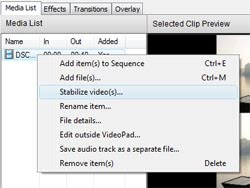 To apply video stabilization, right click on your video clip in the Media List and select "Stabilize video(s)...". This will allow you to select a location to save the new stabalized video clip, and once it has finish running the filter, VideoPad will give you the option to replace the original video clip in your project with the new stabilized version. You can adjust the advanced settings of video stabilizer by clicking "Configure Deshaker" button on the Plugin Filters tab of the Options dialog.
Video Stabilization is just one more thing that makes VideoPad such a wonderful video editor. So the next time you record a home movie that is a little shaky, remember that you can use VideoPad to help stabilize the final result, whether you are going to be doing more editing or just to polish the original video.
To show you the video stabilization feature in action, we put together the video below which is a split screen of a video clip showing the before and after results of the video stabilization filter:
To apply video stabilization, right click on your video clip in the Media List and select "Stabilize video(s)...". This will allow you to select a location to save the new stabalized video clip, and once it has finish running the filter, VideoPad will give you the option to replace the original video clip in your project with the new stabilized version. You can adjust the advanced settings of video stabilizer by clicking "Configure Deshaker" button on the Plugin Filters tab of the Options dialog.Video Stabilization is just one more thing that makes VideoPad such a wonderful video editor. So the next time you record a home movie that is a little shaky, remember that you can use VideoPad to help stabilize the final result, whether you are going to be doing more editing or just to polish the original video.
Friday, January 21, 2011
New Barillo Barcode Generation Software
 One of our most rapidly growing software areas is our business software suite. In the last year, we not only made significant improvements to our existing business software but also introduced several new business applications including Reflect CRM Software and Copper Point of Software. Now we're starting 2011 in the vein with our first new product of the year: Barillo Barcode Software.
Barillo is a free barcode generator that allows you to create graphic files for EAN-8, EAN-13, UPC-A and UPC-E barcodes. Barillo makes creating labels even easier by allowing users to set the image size needed and export to a variety of different graphic file formats.
The first barcodes were created to label railroad cars but after being introduced to grocery stores to use in the automatic checkout process, they became almost universal and are now being used by businesses everywhere to satisfy the need to accurately identify and track items. With barcodes being so widely used, we are excited to add Barillo to our range of business software utilities to help customers using products such as Inventoria Inventory Management Software since barcodes are so key to maintaining a successful inventory tracking system.
In the future we’ll be adding additional barcode types to Barillo, as well as directly integrating the Barillo Barcode Generator into related software including Inventoria and Copper for easy access to this vital feature when and where you need it.
Thursday, January 20, 2011
MIDI Support Coming to NCH Software
If you’ve ever gone rooting around for MIDI support in the feature lists of NCH Software audio products, you most likely didn’t find it—at the time. But soon you will. A myriad of MIDI features are being added throughout our audio software category.
The most notable example at the moment is in MixPad multi-track mixing software. You can load a MIDI file into MixPad and then double click the clip to edit it. This will launch a MIDI editor dialog that allows you to move notes around, create and delete notes and resize notes on a piano roll. Since a MIDI sequence is really only a set of digital instructions, it’s easier to pinpoint specific notes and alter them than with an audio file:

The current version of MixPad already features this new MIDI editor. In the future, MixPad will have broader MIDI support, such as allowing users to connect a MIDI capable mixing deck to control the program.
MIDI is starting to play a larger role in all our audio software. Plans to implement the following capabilities are in the works:
The most notable example at the moment is in MixPad multi-track mixing software. You can load a MIDI file into MixPad and then double click the clip to edit it. This will launch a MIDI editor dialog that allows you to move notes around, create and delete notes and resize notes on a piano roll. Since a MIDI sequence is really only a set of digital instructions, it’s easier to pinpoint specific notes and alter them than with an audio file:
The current version of MixPad already features this new MIDI editor. In the future, MixPad will have broader MIDI support, such as allowing users to connect a MIDI capable mixing deck to control the program.
MIDI is starting to play a larger role in all our audio software. Plans to implement the following capabilities are in the works:
- Playback of MIDI files as music using built in and external synthesizers
- Record MIDI control sequences
- Edit MIDI files
- Control software (e.g., MixPad mixing software or Zulu dj software) with a MIDI device
- Convert MIDI files to audio


