Showing posts with label medical transcription. Show all posts

Wednesday, September 9, 2020

Want to Transcribe Audio to Text in 5 Easy Steps?


Imagine if you have been tasked to transcribe a large audio file to text and you were hoping to open a word processor, play the audio file, and start typing away. Unfortunately, you would end up spending most of your time rewinding the audio, constantly switching tabs, or checking to see if you missed anything. Luckily the transcription process does not have to be this tedious.

With the help of professional transcription software, you can significantly reduce the time it takes to convert audio to text and make your life much easier in the process. Express Scribe is the most comprehensive audio transcription software and has everything you need to help you transcribe audio to text faster.

How to Transcribe Audio using Express Scribe

1. Download and Install Express Scribe

Download and install Express Scribe. It is free to download for PC and Mac and installation should only take less than a couple of minutes. 


2. Adjust Settings

Click on Options in the main menu bar to set and change all your transcribing settings. Set the audio playback to suit your typing skills or the quality of the recording. Additionally, you can also configure your foot pedal controller, hot-keys, speech-to-text software, and more. 


3. Load Dictation(s)

Once your settings have been configured, it is time to load your dictation file.  Load your audio file(s) by either uploading your file from your local machine, through an FTP server, LAN or even directly from a portable dictation recorder. 



4. Start Transcribing Audio to Text! 

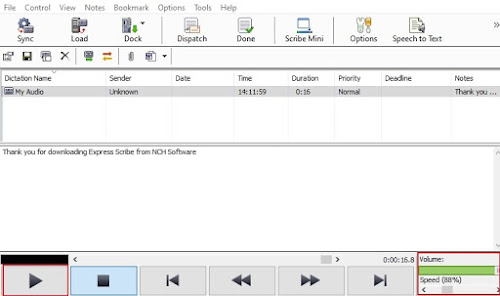
It’s transcription time! Select the loaded audio file and click the Play button to start. Open Microsoft Word or any other word processor to type the text. Alternatively, you can also use the note section in Express Scribe, under the main interface to type your text. If needed, you can slow down or speed up the playback using the speed control tool in the bottom right corner. Additionally, you can also adjust the volume of the playback. 


5. Share Transcription

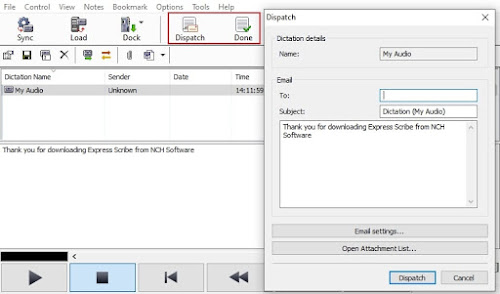
After you have finished transcribing your audio file to text, you can either select the “Done” button which will remove the file from your list, or select Dispatch to email your transcription along with your text attachment and remove the file from your list. 


So, there you have it. You have successfully transcribed an audio file to text in 5 easy steps. Whether you're an independent typist working for a Medical or Legal business, the Head of Marketing working on internal communication videos, or a secretary or needing to transcribe a recorded interview, Express Scribe has you covered. 


Tuesday, April 12, 2016

Most Common Medical Shorthand Abbreviations for Medical Transcriptionists

Software Tips and Tricks: Abbreviations to Use in Text Expander Programs for Medical Transcriptionists


Text Expander programs like FastFox have made it into part of the core toolkit used by medical transcribers next to dictation software and foot pedals.

Such macro software has shown to improve output as well as reduce the number of mistakes, something highly important in an environment where minor typos can affect a patient's medical history and assistance from spell check/autocorrect tools is nearly non-existent.

Below is a list of the most commonly used medical abbreviations, organized by usage type and alphabetically. This list has been optimized for Medical Transcriptionists to use in FastFox Shorthand Software.

How to use this list:
  • Read the How-To article on using FastFox for Medical Transcription, and add the shortcuts/words accordingly.
  • Remember that usage of terms changes drastically based upon the specialty of the doctor; these are just the most common medical phrases in use. Use the save/load list function of FastFox to change your abbreviation list quickly and easily to match your client's needs.

Anatomy/Physiology

  • CNS central nervous system
  • CSF cerebrospinal fluid
  • ECF extracellular fluid
  • ENT ear nose and throat
  • GI gastrointestinal
  • GU genitourinary
  • ICF intracellular fluid
  • IM intramuscular(ly)
  • RBC red blood cell
  • SC subcutaneous(ly)
  • WBC white blood cell

Compound/Chemical

  • HLA human leukocyte antigen
  • PMN polymorphonuclear leukocyte
  • ACE angiotensin-converting enzyme
  • ACTH adrenocorticotropic hormone
  • ADH antidiuretic hormone
  • ALT alanine aminotransferase 
  • AST aspartate aminotransferase 
  • ATP adenosine triphosphate
  • BCG bacille Calmette-GuĂ©rin
  • Ca calcium
  • cAMP cyclic adenosine monophosphate
  • CK creatine kinase
  • Cl chloride; chlorine
  • CO2 carbon dioxide
  • CPK creatine phosphokinase
  • CPK-MB creatine phosphokinase muscle bandisoenzyme
  • DNA deoxyribonucleic acid
  • D/W dextrose in water
  • G6PD glucose-6-phosphate dehydrogenase
  • Hb hemoglobin
  • HCl hydrochloric acid; hydrochloride
  • HCO3 bicarbonate
  • Hg mercury
  • HMG-CoA hydroxymethyl glutaryl coenzyme A
  • IgA immunoglobin A
  • IL interleukin
  • K potassium
  • LDH lactic dehydrogenase
  • Mg magnesium
  • N nitrogen
  • Na sodium
  • NaCl sodium chloride
  • NSAID nonsteroidal anti-inflammatory drug
  • O2 oxygen
  • P phosphorus
  • PPD purified protein derivative 
  • RNA ribonucleic acid
  • soln solution

Disease/Diagnosis

  • ABG arterial blood gas
  • AIDS acquired immunodeficiency syndrome
  • BPD borderline personality disorder
  • COPD chronic obstructive pulmonary disease
  • DTP diphtheria-tetanus-pertussis(toxoids/vaccine)
  • FUO fever of unknown origin
  • GVHD Graft-versus-host disease
  • HIV human immunodeficiency virus
  • MI myocardial infarction
  • RA rheumatoid arthritis
  • SBE subacute bacterial endocarditis
  • SIDS sudden infant death syndrome
  • SLE systemic lupus erythematosus
  • TB tuberculosis
  • URI upper respiratory infection
  • UTI urinary tract infection

Measurement/Test/Dosage

  • bid 2 times a day
  • BMR basal metabolic rate
  • BP blood pressure
  • BSA body surface area
  • BUN blood urea nitrogen
  • C Celsius; centigrade; complement
  • CBC complete blood count
  • cGy centigray
  • Ci curie
  • cm centimeter
  • CT computed tomography
  • Cu cubic
  • dL deciliter
  • ECG electrocardiogram
  • EEG electroencephalogram
  • ERCP endoscopic retrograde cholangiopancreatography
  • ESR erythrocyte sedimentation rate
  • F Fahrenheit
  • Ft foot; feet
  • G gram
  • GFR glomerular filtration rate
  • H hour
  • Hct hematocrit
  • Hz hertz 
  • INR international normalized ratio
  • IU international unit
  • IVU intravenous urography
  • Kcal kilocalorie
  • Kg kilogram
  • L liter
  • lb pound
  • M molar
  • MCH mean corpuscular hemoglobin
  • MCHC mean corpuscular hemoglobin concentration
  • mCi millicurie
  • MCV mean corpuscular volume
  • mEq Milliequivalent
  • mg milligram
  • MIC minimum inhibitory concentration
  • mIU milli-international unit
  • mL milliliter
  • mm millimeter
  • mmol millimole
  • mo month
  • mol molecular weight
  • mOsm Milliosmole
  • MRI magnetic resonance imaging
  • Ng nanogram 
  • Nm nanometer 
  • Nmol nanomole
  • oz ounce
  • PAco2 alveolar carbon dioxide partial pressure
  • PAo2 alveolar oxygen partial pressure
  • PAS periodic acid-Schiff
  • Pco2 carbon dioxide partial pressure
  • PCR polymerase chain reaction
  • PET positron emission tomography
  • pg picogram
  • pH hydrogen ion concentration
  • Po2 oxygen partial pressure 
  • ppm parts per million
  • PT prothrombin time
  • PTT partial thromboplastin time
  • q every
  • Sao2 arterial oxygen saturation
  • SI International System of Units
  • spgr specific gravity
  • STS serologic test(s) for syphilis
  • wt weight

Treatment/Care

  • BR bedside rounds
  • CPR cardiopulmonary resuscitation
  • D&C dilation and curettage
  • ICU intensive care unit
  • IPPB intermittent positive pressure breathing
  • IV intravenous(ly)
  • Npo nothing by mouth
  • OTC over-the-counter 
  • po orally
  • prn as needed
  • qid 4 times a day
  • SSRI selective serotonin reuptake inhibitor
  • tid 3 times a day
  • TPN total parenteral nutrition
Click on the link to download or purchase:

Thursday, March 24, 2016

How Text Expander Software Can Save You 100's of Hours a Year

How keyboard macro programs can increase productivity through typing shortcuts

If you work as a legal/medical transcriptionist, eBay reseller, customer relations manager, data entry clerk, programmer, or web designer - a simple text expander program can help you save many hours a week by creating text typing shortcuts to fill in common phrases or code strings in your workflow. Text expansion is a bit like auto-complete on a cell phone/Google — it allows you to enter a long string of text with a shorter string. When you’re using a text expansion app, it monitors your typing, and whenever you type a specific sequence of letters, it will replace those letters with a predefined piece of text. It could be your name, your address, or a full paragraph that you’ve saved.

Think of how many things you type over and over on a regular basis and the number of seconds it takes to write each phrase - text expansion allows me to type a few letters instead of that whole string of characters. Do the math - if you are in the medical transcription field, you are often typing long words that are hard to spell (and often don't register correctly with spell check). With a short setup period with the software, you can have several common diagnoses and descriptive sentences ready to go - a paragraph that would have taken a minute or two to type up can now be written in a few seconds!

With transcription usage covered, a couple of other examples:

eBay Seller:

Have a couple of different templates or common descriptions for your items? Save each one with a different string, and halve the time needed to make each listing and get more products up and running.

Customer Relations (CRM):

If you manage support emails or a business Facebook/Twitter account, you can have frequently used responses (Thank you for the comment, please leave us a review here; Sorry to hear about your issue with our product! For technical support, please go here; etc) saved and ready to go. It will certainly make qualifying for the Facebook Page Responsiveness Badge easier for your business page!

Data Entry/Programming/Web Design:

Have a particular formula, recursive loop, file location, or coding template that is referred to multiple times in your project? Text expanders don't just store letters, you can have common code snippets saved as well to save on development time.

Give our highly rated text expander a try: FastFox Text Expander for Windows and Mac

Features:

Text Expansion and Image Insertion
  • Expand keyboard shortcuts into words or phrases
  • Create an unlimited number of text shortcuts
  • No limit on expanded text length
  • Save plain text or formatted rich text expansions
  • Create a shortcut to insert images 
Shortcut and Macro Creation
  • Define macros for actions using special keys
    (i.e., Ctrl, Alt, and Shift)
  • Create shortcuts from multiple key commands
  • Use keyboard macros within any program
  • Utilize a shared shortcut file on a network to standardize stock text across your business
  • Back up and restore shortcut data and groups 
Intuitive Autocomplete
  • FastFox learns your most commonly typed phrases and suggests them to you as you type, so you can select and insert text on the fly.
For a quick lesson on using FastFox, read this tutorial from WikiHow

Click on the link to download or purchase:

Monday, February 1, 2016

Encrypting Medical Dictation for HIPAA Compliance

How to Use Express Dictate to Meet Federal HIPAA Security Rules in Your Medical Dictation Recordings


From the Health Insurance Portability and Accountability Act of 1996 (HIPAA):
A covered entity must, in accordance with §164.306… Implement a mechanism to encrypt and decrypt electronic protected health information.” (45 CFR § 164.312(a)(2)(iv))
HIPAA and HITECH address the security and privacy of PHI (patient health information) with more of a policy and procedures-oriented approach with no strict parameters for what type of technology to use, but encryption is typically considered a best practice when it comes to protecting sensitive data.

Using Express Dictate to Encrypt Medical Dictation Recordings

Follow these steps to send an existing dictation with Express Dictate using 256-bit encryption:
  1. First, you will need to purchase the Medical Legal User license and register Express Dictate to encrypt recordings. Once you have done that, close and restart the program.
  2. Drag-and-drop your audio file into the Express Dictate window.
  3. Next, open Options and go to the ‘Sending’ tab to create a Recipient
  4. Click the Create button to open the Recipient Properties Wizard. Enter the Recipient Name, then click Next.
  5. Select a send method (e-mail, LAN, FTP) and enter the required details, then click Next.
  6. This brings you to the File Format window of the Wizard. Select DCT as your file format.
  7. Finally, you need to select the checkbox labeled "Encrypt recordings for additional security and privacy". Enter the encryption key and click the Finish button.
  8. Click OK to close the Options dialog.
  9. Make sure that the dictation file is highlighted in the dictation window, then click the Send button on the toolbar.

Express Dictate Digital Dictation Software

Express Dictate software is a voice recording program that works like a dictaphone. It lets you use your PC or Mac to send dictation to your typist by email, Internet, or over the computer network.

Some of Express Dictate’s features include:
  • Digital audio recording with superb signal processing quality 
  • Ability to prompt for patient or file data before a recording starts 
  • Supports HIPAA compliant secure encryption for sending secure patient or client data 
  • Attach additional files or notes for your transcriptionist with the recordings 


Click on the link to download or purchase  

For more information on HIPAA Compliant Software, read:

Friday, October 11, 2013

Pocket Dictate for Android is Officially Here

new android dictation app It has been asked for repeatedly, and some of you may have started to lose hope, but the brand new Android version of Express Dictate has finally arrived.

Doctors, Lawyers, and other professionals will be glad to have the easy dictation-recording app on their Android phone, complete with HIPPA compliant encryption for keep client information safe when you send recordings off to be transcribed.

Transcriptionists too will want to take note of this wonderful new portable option for recording to recommend to clients.

We are really excited to have this Android dictation app available and we are only sad that we didn't get it into your hands sooner.

Wednesday, February 20, 2013

Making Fast & Accurate Transcriptions from Audio Files

Guest post by Danielle McAnn of Smartdocs

People Make Fast Accurate Transcription Transcription work requires close attention to detail. Every transcription should be assessed individually, as each one will depend on length, quality of recording and turnaround time. There are large companies such as Smartdocs dedicated purely to the transcription of audio files into text documents. We all know that while machine and audio transcription technology has come a long way, it is still useless compared with the keen ear and eye of a human when it comes to decoded human voices and interpreting human speech. Especially when there is more complex terminology being used as is the case in most medical and legal transcriptions. In other words, if you want a high quality, accurate transcription, you need a human to so it. That doesn't mean that you can't use technological aides to help you with professional transcription.

Tools like Express Scribe offer things like variable speed playback of both audio and video files, and transcription file management, making high quality, human transcription much much easier. And, with digital dictation software you can record and send dictation straight to someone else, whether a fellow typist or the document owner. It doesn't matter whether you are using a Mac or PC operating system, you still need a reliable audio software that you can control and manipulate with an effective user interface, because this will make the entire transcription process more efficient and more importantly, produce accurate transcribed files.

Tuesday, December 18, 2012

Speed Up Typing Using Keyboard Shortcut Software

FastFox text expander software used to insert your most commonly used text quickly and easily. Expand words, phrases, images, and more to avoid typing things repeatedly and improve your typing speed and productivity.

FastFox is perfect for everyone whether you are saving shortcuts for the correct spelling of complex terminology, storing email templates and answers to FAQs, or even save your address to fill in online forms more quickly. To help you get started we just put together a tutorial video to walk you through setting up your own keyboard shortcuts and introduce you to the autocomplete text suggestion tool.


Download the free trial today. Once you get started using FastFox shorthand text expander to speed up your typing, you'll wonder what you ever did without it.

Wednesday, June 13, 2012

Amazing Tools for Transcription

Guest post by EQ Trans UK

Amazing Transcription Software ToolsAs a transcription services provider which caters to clients all across the UK, we believe in the importance of using technology that enables our transcriptionists to perform at their optimum, while simultaneously benefiting our clients as well. Using the appropriate software while working on a transcript can help a transcriptionist do a better thorough job of transcribing and, of course, help in meeting deadlines faster, too.

We have been using various NCH software for a while and they are now form basics of what we do. If you are new in the transcription industry, here is what minimum you need to have to get going:

Express Scribe – This audio player which can be used on both PCs and Macs comes loaded with many features, such as support for foot pedals, variable speed playback, as well as speech-to-text integration. This software does a great job of supporting all the popular file formats. It also gives a transcriptionist better control over the audio playback through the use of a foot pedal and even keyboard shortcuts. Express Scribe does not take up too much screen space, unlike other software, and runs quietly in the background while a transcriptionist is at work.

Switch Sound File Converter - Although there are plenty of file converters available, this software wins hands down for its simplicity. Our clients often send us digital audio files in other formats and we use this software to convert them into an mp3 format using 128 bit mono encoding. This makes it easier for uploading files on our secured server so that our transcriptionists can get to work. Switch also gives users an additional option of configuring up to 3 right-click options which make the conversion process faster, too.

Prism Video Converter - This video file converter converts files from any format to the most commonly used formats, either in singles or in batches, and can even convert files directly from DVDs and other multimedia devices. We use this software mainly for converting large video files into mp3 file format so that they can be uploaded on our server easily. Prism also has another option of resizing a video file format and customising it in terms of the frame rate, brightness, and contrast, as well as text and caption addition.

WavePad Editing Software - One factor which can be detrimental to the process of transcribing itself is the presence of background noise in an audio file. The WavePad Audio Editing Software works on both PCs and Macs, allowing the user to cut and paste specific sections of the recording, besides adding features like noise reduction. This software supports a large number of file formats and has a remarkably easy-to-use interface as well.


EQ Trans UK is a transcription agency based in the UK. We have a well-trained and certified team of transcriptionists to address any client requirement.

Thursday, May 3, 2012

What Dictation Can Do For You

What Dictation Software Can Do For YouDictation and transcription are common practices in various fields, including the medical profession, law, court reporting, even insurance. However many of us have never considered what dictation or transcription is, much less how it might be able to help us in our careers.

When you have many different reports, letters, memos, or even articles to write, dictation can be a better use of your time than writing them all out yourself. With digital dictation software, you create an audio file with what you want those documents to say. If you need to add something, or go back, you can easily go to any point in the dictation to insert or even overwrite sections. When you are done editing your audio dictation the only thing left for you to do is send it off to your transcriptionist.

At this point all you need to do is wait for the transcriptionist to type up the document from for you. Express Scribe is a very popular transcription software allowing you to play, fast forward, rewind, stop, and slow down dictations to make transcribing faster and easier. And professional transcriptionists are well versus in their areas of expertise giving that extra insurance of complicated medical or legal terminology is correct. Accuracy is doubly important in the professional world and fast, accurate documents sent back to you is exactly what you will get.

Professionals everywhere can become more efficient freeing up time for other tasks by taking advantage of dictation and transcription. Consider what you do at your job, what you type, and how long it takes to create these documents. There is undoubtedly some aspect of your day to day activities that could benefit. Download Express Dictate and Express Scribe and see how it can help you.

Wednesday, February 1, 2012

D is for Dictation

NCH Software ABCs Series

D is for Dictation SoftwareDictation is still a reality in many industries. While automatic voice-to-text applications may be on the rise, and can be wonderful for the casual user, in professions like medicine and law, a mis-translated term or phrase is a costly error. In the past we have talked to professionals who have benefited from the streamlined efficiency of a digital dictation process for getting their medical reports, correspondence or case notes documented. We aim to provide a wide range of solutions to fit anyone that needs to record dictations. These flexible options allow recordings to be made from anywhere then sent off for transcription instantly, saving you time.

NCH Dictation Solutions include:


<<< Previous: C is for Converting
Next: E is for Easy >>>

Friday, November 11, 2011

Express Scribe Pro for Mac

Express Scribe Pro for MacFollowing the September announcement of the new professional version of Express Scribe, we are pleased to say that now the Mac version of our extremely popular transcription software has followed suit and now there are both free and professional versions of Express Scribe available for Mac OS X as well. Features of the professional version include video playback and support for proprietary audio file formats including dss, ds2 and mvf for those professionals working in legal or medical transcription.

Friday, October 14, 2011

HIPAA Compliant Dictation Software

HIPAA Health Insurance Portability and Accountability Privacy ComplianceWith HIPAA, the Health Insurance Portability and Accountability Act, in effect, medical dictators and transcriptionists have to be wary with the use or exchange of patients' Protected Health Information (PHI) in their dictation transmissions. As a medical transcriptionist (MT), they have to maintain the privacy of every patient record being transcribed.

To protect patient confidentiality, it is recommended that your computer comes with at least the following:
  • Firewall protection with solid password protection for user accounts
  • Regular Windows or MAC updates for computer security
  • Up-to-date antivirus software
  • File encryption software (e.g., Dial Dictate, Web Dictate, or Express Dictate)
The recent stimulus plan (or American Recovery and Reinvestment Act of 2009) included a specific act — called the HITECH Act (or the Health Information Technology for Economic and Clinical Health Act) which has specific requirements for the electronic transmission of patients' health information. For this reason, NCH Software has created a medical user version for its dictation software applications which integrate seemlessly with Express Scribe on the transcription side to maintain patient privacy through the transcription process.
Dial Dictate: HIPAA-compliant encryption to secure medical patient data when recording as .dct files.
Express Dictate: Supports HIPAA-compliant encryption, perfect to secure patient or client data for transmission over the Internet.
Web Dictate: Recording can be HIPAA-compliant encrypted for privacy and security.
Given that medical transcriptionists receive, send, and store confidential patient data, it's vital they recognize and adhere to HIPAA rules on privacy, security, and confidentiality. If this is accomplished, patient records are secured, data efficiency is obtained, and more importantly customer confidence is increased.

HIPAA offers a set of strict guidelines for protecting patients' privacy and information. Seeing as a lot of health organizations utilize NCH Software for dictating and transcribing medical records, we have carefully considered the best way to sustain these guidelines. MTs can rest assured that NCH Software will assist them in paving the way to a HIPAA-compliant future.

Monday, October 10, 2011

Growing A Quality Transcription Business With Express Scribe

Guest Post by Annalisa Holmes, Director of The Transcription People

We have been using Express Scribe transcription software in our Australian-based outsource transcription business for years and we love it. Why? I have a list, so here goes:

Cost Effective
You can't get more cost effective than free software. For as long as I can remember Express Scribe has been free. This continues to be the case with a free version still being offered alongside a new paid Pro version.

In my business I employ a mix of transcriptionists; we have some work onsite in our office but the majority are work-from-home micro-businesses. Included in that mix are a wealth of "old school" typists and "wannabe" transcriptionists. Old school typists are used to the cassette tape days of micro and mini cassette dictation and are very experienced at transcription. Wannabe typists have time on their hands, want to learn a new job skill and possibly work from home or for an employer.

Express Scribe is perfect for both these dynamics, experienced typists can very quickly switch their mindset to the digital way of doing things and with the option of a USB foot control, can make the transition very quickly from tape to digital transcription with a free download and a low-cost foot pedal. Those new to transcription can have the software installed in minutes and have the flexibility of training themselves using the configurable control keys. For a zero dollar outlay Express Scribe is a very attractive tool to those looking to start a career in transcription.

Multiple Use Scenario
Most people think of Express Scribe as just a tool for transcription typists. That is true for the majority of people, but in my business we also utilise Express Scribe for our proofreading team. My company is renowned for producing high quality, accurate transcription and the way that we do that is with a two-step quality assurance process. Step one is the traditional transcription typist who listens and transcribes. Step two is where the quality and consistency across clients is provided by our proof-reading team. The proofreaders do not transcribe, their role is to apply customer-specific formatting and act as a second set of eyes over the transcript, ensuring the highest quality.

My proofreading team use Express Scribe to play back audio whilst reading through the transcripts. Typically they prefer the control key functionality and love the variable speed playback, one of the many features in Express Scribe.

Very Easy To Set Up, Install and Use
Express Scribe can be installed and up and running in minutes. For users of all technical levels we have found Express Scribe to be a breeze to get working and get used to. People of all transcription abilities get used to Express Scribe very quickly. As we all use the same software throughout my business, we have a pool of experts within our own teams who can help each other out with any questions.

From a business point of view, all my staff are on the same page when it comes to transcription and proofreading software. We don't need to waste time supporting various vendors' software. Consistency across the team makes for a smoother transcription and proofreading workflow.

The Future
I really can't see my business moving away from Express Scribe, there is no need. It has served us well for years and will continue to do so for years to come. We are particularly excited about the new Pro version of Express Scribe which can now process the DSS Pro audio files created on the latest Olympus and Philips digital dictaphones. Before the Pro version came along we had to include an extra file conversion step from .ds2 to .dss. Now NCH has that covered.

Thank you NCH for your excellent software, which has helped my business get to where it is today.

Annalisa Holmes is the director of The Transcription People Pty Ltd, one of Australia's largest outsource transcription services. Annalisa started as a transcription typist in the early years of forming her business and now oversees a large team of transcription typists across Australia and New Zealand. The Transcription People service clients from across Australia, the USA and the UK and boasts AMP, Holden, Ernst & Young as some of her clients.

Wednesday, September 14, 2011

New Express Scribe Professional Edition

Express Scribe Professional Transcription SoftwareExpress Scribe, one of NCH's most successful products and a favorite among transcriptionists worldwide, is going Pro. With the extreme popularity of the program, we have decided to offer some of the functionality in a professional version for a nominal fee that will help us better support users, fix problems, and implement new features and improvements. The free version of this popular transcription software isn't going away, but advanced features like video playback and support for proprietary audio file formats (e.g., dss, ds2, mvf) will now be supported in the professional version.

Friday, August 26, 2011

Transcription Foot Pedal or Hotkeys?

Transcribe with Express Scribe transcription software and a foot pedalOne of our programs popular with transcriptionists worldwide is Express Scribe Free Transcription Software. Express Scribe, an invaluable tool to transcriptionists, helps control the playback of audio or video files during transcription with extremely helpful features, including variable speed playback, and can be controlled either with a transcription foot pedal or with assigned 'hotkeys' on the keyboard. Most transcriptionists rave about foot pedals, but have you ever wondered if they really make transcription more efficient or if their use is really just a matter of preference?

Well here's your answer. Chris Beamish at HoT Virtual Assistant Resources recently crunched the numbers on if you should use hot keys or a foot pedal for transcription and, based on his estimates, you could potentially save yourself over 11 hours-worth of typing in a week by using a foot pedal instead of hotkeys where he has found the potential for hitting the wrong command to be much more likely.

What do you think? Do you use a foot pedal or hotkeys with Express Scribe? And if you invested in a foot pedal did you see an increase in your productivity once you got into the swing of things?

Monday, July 18, 2011

Express Scribe Gets DS2 Support

Express Scribe Transcription Software DS2 SupportExpress Scribe users rejoice! One of your most requested features has arrived: support for .ds2 (DSS Pro Voice) audio dictation files. Express Scribe Transcription Software Version 5.30 for Windows is the first version to include support for both dss and ds2 dictation file formats, so the time of workarounds and training your clients to back-save is now a thing of the past. And ds2 support for the Mac version of Express Scribe will be on the way soon.

Friday, September 24, 2010

Stop Typing the Same Things Over and Over Again

Have you ever noticed that there are some things that you type all of the time? Some of the most common things that I find myself typing all of the time include the company description of NCH Software, a signature for when I leave comments on blogs or forums, and even a couple of answers to FAQs that seem to be constantly popping up in my email inbox, just to name a few. Being able to store these pieces of text with FastFox Text Expander is a huge help. Instead of looking up the information from the last time I answered a question, or wasting the time to write the whole thing I've typed a million times before all over again, I just need to type a couple characters and FastFox automatically expands that keyboard shortcut I chose into the complete answer/description/signature that I stored. Then I can quickly move on, or make minor edits to the text for the specific situation, and still be done in a fraction of the time.

Text Expansion Software is often sold to transcriptionists because of the boost it provides in typing efficiency. It really is an invaluable tool for helping medical and legal transcriptionists transcribe faster and reduce errors with long or complex terms and jargon, but truth be told, almost anyone can find things that they themselves type repeatedly and can benefit from having an application like FastFox to reduce this constant repetition in typing.

Wednesday, April 28, 2010

New Practice Transcription Audio Files

practice typing transcriptionOne of the questions I have seen asked several times in transcription forums in the past is from people new to the field looking for audio files to practice transcribing. I've always thought it would be great to provide some practice files to the next generation of Express Scribe transcriptionists to use as they are learning and gaining experience in transcription. Half the battle at the start of a transcriptionist’s career is getting fully acquainted with transcription playback software or practicing using a transcription foot pedal for that extra edge of hands-free audio control that can be such a huge efficiency boost.

With that said, I am really excited that, with the help of our friends at Accuro Transcription Services, we have pooled together a new resource for transcription students, providing several sample audio files to use with Express Scribe transcription playback software to practice your transcribing skills. In addition to the audio files, we have also included final transcribed PDFs that you can check your work against after you've finished typing out the sample.

So if you are looking for some practice transcription files, or know someone else just starting out in transcription, be sure to check out this new Practice Transcription Resource available at NCH Software, and maybe stick around and look at some of our other software for typists while you're there.

Thursday, January 21, 2010

Express Dictate Software helps a Medical Practice Find More Time for Patients

You’ve got to love it when someone calls what you’re offering “a revelation.”

Those are the words of Dr. Sam Rodgers, general practitioner at the London-based Marven Medical Center, which treats 5,000 patients.

On an average day, each physician at Marven Medical dictates between 8 and 12 letters using Express Dictate to make their recordings at a computer set up with a microphone. Combined, that makes for a lot of letters that need to be sent out.

medical dictation softwareExpress dictate has been a revelation,” Dr. Rodgers said. “We used to use tapes and dictaphones to record our letters. We now dictate the letters on to our desktop machines as we see the patient.”

Rodgers and his staff have found that in working with digital audio they have had improved audio quality, reducing the number of questions from the administrative staff about what the doctor was saying. They also love the backup feature, because they can recover recordings if there are any queries after the letter has been typed and sent. And the office’s workflow is much more efficient, as the letters are typed as soon as they are sent to the typist—no waiting for a tape to be filled with dictation before being given to the receptionist.

And those are just a few of the benefits to using Express Dictate Dictation Software. The software also allows for assigning priority to dictations, keeping track of transcription progress and the expected completion times, as well as having HIPAA compliant encryption capabilities.

If your office or firm is in need of its own “revelation,” give Express Dictate a try. Or take a look at our full range of dictation software to find more ways set up a dictation solution to meet your individual needs; including dictating on the go from your Pocket PC, Palm or iPhone.

Friday, November 6, 2009

Video File Transcription Support in Express Scribe is Ready for Primetime

transcribe video files
I am happy to say Express Scribe version 5.00 has been released. Express Scribe now has full video file support so you can load both audio or video files for transcription. And best of all it is still completely free.

Lately, I've seen requests for transcription programs with video support on twitter, in transcription forums and other places. So I’m wondering what types of videos people are transcribing. Share the ways in which you are using, or would like to use, video in transcription tasks.

With Express Scribe transcription software installed on their computer, a typist can control audio and video playback using a transcription keyboard with 'hot' keys, or a foot pedal for hands free control. This computer transcriber application has long offered typists features such as variable speed playback, multi-channel control, file management and more. The main thing is that now video now works just as seamlessly as digital audio always has.

We are keeping Scribe free in the hopes that you will also try and recommend our digital dictation software to your transcription customers. Our entire dictation Suite is designed to work seamlessly with Express Scribe, improving efficiency of the entire transcription process.

Two other great utilities that NCH offers for typists and transcriptionists that complement Express Scribe are FastFox Typing Expander and TexTally Word and Line Counter. FastFox brings new meaning to the phrase speed-typing. FastFox is a dynamic text expansion program with shortcut keys that expand to phrases, sentences, paragraphs, or even entire documents. Then when it comes to billing, TexTally can be used to count lines, words, or characters, and you can enter a formula to calculate the billing amount of typing job for you.