Showing posts with label transcription. Show all posts

Wednesday, September 9, 2020

Want to Transcribe Audio to Text in 5 Easy Steps?


Imagine if you have been tasked to transcribe a large audio file to text and you were hoping to open a word processor, play the audio file, and start typing away. Unfortunately, you would end up spending most of your time rewinding the audio, constantly switching tabs, or checking to see if you missed anything. Luckily the transcription process does not have to be this tedious.

With the help of professional transcription software, you can significantly reduce the time it takes to convert audio to text and make your life much easier in the process. Express Scribe is the most comprehensive audio transcription software and has everything you need to help you transcribe audio to text faster.

How to Transcribe Audio using Express Scribe

1. Download and Install Express Scribe

Download and install Express Scribe. It is free to download for PC and Mac and installation should only take less than a couple of minutes. 


2. Adjust Settings

Click on Options in the main menu bar to set and change all your transcribing settings. Set the audio playback to suit your typing skills or the quality of the recording. Additionally, you can also configure your foot pedal controller, hot-keys, speech-to-text software, and more. 


3. Load Dictation(s)

Once your settings have been configured, it is time to load your dictation file.  Load your audio file(s) by either uploading your file from your local machine, through an FTP server, LAN or even directly from a portable dictation recorder. 



4. Start Transcribing Audio to Text! 

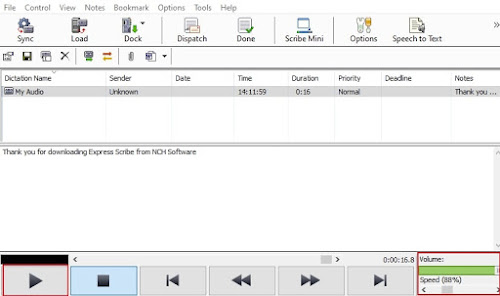
It’s transcription time! Select the loaded audio file and click the Play button to start. Open Microsoft Word or any other word processor to type the text. Alternatively, you can also use the note section in Express Scribe, under the main interface to type your text. If needed, you can slow down or speed up the playback using the speed control tool in the bottom right corner. Additionally, you can also adjust the volume of the playback. 


5. Share Transcription

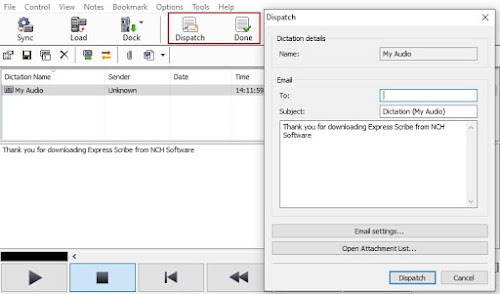
After you have finished transcribing your audio file to text, you can either select the “Done” button which will remove the file from your list, or select Dispatch to email your transcription along with your text attachment and remove the file from your list. 


So, there you have it. You have successfully transcribed an audio file to text in 5 easy steps. Whether you're an independent typist working for a Medical or Legal business, the Head of Marketing working on internal communication videos, or a secretary or needing to transcribe a recorded interview, Express Scribe has you covered. 


Tuesday, April 12, 2016

Most Common Medical Shorthand Abbreviations for Medical Transcriptionists

Software Tips and Tricks: Abbreviations to Use in Text Expander Programs for Medical Transcriptionists


Text Expander programs like FastFox have made it into part of the core toolkit used by medical transcribers next to dictation software and foot pedals.

Such macro software has shown to improve output as well as reduce the number of mistakes, something highly important in an environment where minor typos can affect a patient's medical history and assistance from spell check/autocorrect tools is nearly non-existent.

Below is a list of the most commonly used medical abbreviations, organized by usage type and alphabetically. This list has been optimized for Medical Transcriptionists to use in FastFox Shorthand Software.

How to use this list:
  • Read the How-To article on using FastFox for Medical Transcription, and add the shortcuts/words accordingly.
  • Remember that usage of terms changes drastically based upon the specialty of the doctor; these are just the most common medical phrases in use. Use the save/load list function of FastFox to change your abbreviation list quickly and easily to match your client's needs.

Anatomy/Physiology

  • CNS central nervous system
  • CSF cerebrospinal fluid
  • ECF extracellular fluid
  • ENT ear nose and throat
  • GI gastrointestinal
  • GU genitourinary
  • ICF intracellular fluid
  • IM intramuscular(ly)
  • RBC red blood cell
  • SC subcutaneous(ly)
  • WBC white blood cell

Compound/Chemical

  • HLA human leukocyte antigen
  • PMN polymorphonuclear leukocyte
  • ACE angiotensin-converting enzyme
  • ACTH adrenocorticotropic hormone
  • ADH antidiuretic hormone
  • ALT alanine aminotransferase 
  • AST aspartate aminotransferase 
  • ATP adenosine triphosphate
  • BCG bacille Calmette-GuĂ©rin
  • Ca calcium
  • cAMP cyclic adenosine monophosphate
  • CK creatine kinase
  • Cl chloride; chlorine
  • CO2 carbon dioxide
  • CPK creatine phosphokinase
  • CPK-MB creatine phosphokinase muscle bandisoenzyme
  • DNA deoxyribonucleic acid
  • D/W dextrose in water
  • G6PD glucose-6-phosphate dehydrogenase
  • Hb hemoglobin
  • HCl hydrochloric acid; hydrochloride
  • HCO3 bicarbonate
  • Hg mercury
  • HMG-CoA hydroxymethyl glutaryl coenzyme A
  • IgA immunoglobin A
  • IL interleukin
  • K potassium
  • LDH lactic dehydrogenase
  • Mg magnesium
  • N nitrogen
  • Na sodium
  • NaCl sodium chloride
  • NSAID nonsteroidal anti-inflammatory drug
  • O2 oxygen
  • P phosphorus
  • PPD purified protein derivative 
  • RNA ribonucleic acid
  • soln solution

Disease/Diagnosis

  • ABG arterial blood gas
  • AIDS acquired immunodeficiency syndrome
  • BPD borderline personality disorder
  • COPD chronic obstructive pulmonary disease
  • DTP diphtheria-tetanus-pertussis(toxoids/vaccine)
  • FUO fever of unknown origin
  • GVHD Graft-versus-host disease
  • HIV human immunodeficiency virus
  • MI myocardial infarction
  • RA rheumatoid arthritis
  • SBE subacute bacterial endocarditis
  • SIDS sudden infant death syndrome
  • SLE systemic lupus erythematosus
  • TB tuberculosis
  • URI upper respiratory infection
  • UTI urinary tract infection

Measurement/Test/Dosage

  • bid 2 times a day
  • BMR basal metabolic rate
  • BP blood pressure
  • BSA body surface area
  • BUN blood urea nitrogen
  • C Celsius; centigrade; complement
  • CBC complete blood count
  • cGy centigray
  • Ci curie
  • cm centimeter
  • CT computed tomography
  • Cu cubic
  • dL deciliter
  • ECG electrocardiogram
  • EEG electroencephalogram
  • ERCP endoscopic retrograde cholangiopancreatography
  • ESR erythrocyte sedimentation rate
  • F Fahrenheit
  • Ft foot; feet
  • G gram
  • GFR glomerular filtration rate
  • H hour
  • Hct hematocrit
  • Hz hertz 
  • INR international normalized ratio
  • IU international unit
  • IVU intravenous urography
  • Kcal kilocalorie
  • Kg kilogram
  • L liter
  • lb pound
  • M molar
  • MCH mean corpuscular hemoglobin
  • MCHC mean corpuscular hemoglobin concentration
  • mCi millicurie
  • MCV mean corpuscular volume
  • mEq Milliequivalent
  • mg milligram
  • MIC minimum inhibitory concentration
  • mIU milli-international unit
  • mL milliliter
  • mm millimeter
  • mmol millimole
  • mo month
  • mol molecular weight
  • mOsm Milliosmole
  • MRI magnetic resonance imaging
  • Ng nanogram 
  • Nm nanometer 
  • Nmol nanomole
  • oz ounce
  • PAco2 alveolar carbon dioxide partial pressure
  • PAo2 alveolar oxygen partial pressure
  • PAS periodic acid-Schiff
  • Pco2 carbon dioxide partial pressure
  • PCR polymerase chain reaction
  • PET positron emission tomography
  • pg picogram
  • pH hydrogen ion concentration
  • Po2 oxygen partial pressure 
  • ppm parts per million
  • PT prothrombin time
  • PTT partial thromboplastin time
  • q every
  • Sao2 arterial oxygen saturation
  • SI International System of Units
  • spgr specific gravity
  • STS serologic test(s) for syphilis
  • wt weight

Treatment/Care

  • BR bedside rounds
  • CPR cardiopulmonary resuscitation
  • D&C dilation and curettage
  • ICU intensive care unit
  • IPPB intermittent positive pressure breathing
  • IV intravenous(ly)
  • Npo nothing by mouth
  • OTC over-the-counter 
  • po orally
  • prn as needed
  • qid 4 times a day
  • SSRI selective serotonin reuptake inhibitor
  • tid 3 times a day
  • TPN total parenteral nutrition
Click on the link to download or purchase:

Tuesday, October 22, 2013

Make Digital Dictation Work for Your Business

Why Express Scribe is an Essential Component in a Virtual Assistant's Toolkit

Guest post by Suzanne Higham of Admin-Minded

A Virtual Assistant, as the name suggests, provides assistance to businesses remotely on a freelance and, therefore, flexible and affordable basis.

And if you hire the right Virtual Assistant, they will not only provide an extra pair of hands to ease the administrative burden, they will also be proactive and look for ways in which they can improve your efficiency, productivity, and, subsequently, your profitability.

One way this can be done is by realizing the huge potential in the use of transcription - which has been enhanced further with the introduction of digital dictation software.

Previously, the image conjured by the word 'transcription' would be old, overused cassettes of poor quality, and even couriers traveling across cities to get the aforementioned tapes to typists with looming deadlines. However, the introduction of digital recorders and audio players, such as Express Dictate and Express Scribe, has rendered these images obsolete.

Now it really is as easy as 'talking to your computer, clicking 'send', and your encrypted audio file will be transmitted immediately to your assistant, wherever in the world they may be. And if that wasn't easy enough, with Pocket Dictate, you can even convert your smartphone into a dictation-recorder, so you can dictate whilst on the move.

How This Technology Can Help Your Business
With just a little bit of imagination, you will find that transcription is not just for solicitors and doctors. It can be used successfully by sectors as diverse as trades and accountancy, IT, universities and market research agencies.

For instance, you can dramatically cut the time spent creating documents of a similar nature. Your assistant can prepare a template, and whenever you need to create a customized version, simply dictate the necessary edits, send the dictation file to your assistant, and the customized document can be produced without delay.

And to all tradespeople, estate agents, surveyors – in fact, anyone else who frequently finds themselves working away from their office or base – throw away your notepad! Whilst on-site, dictate your findings, and send them to your assistant to transcribe, ready for your arrival back in the office.

If you are attending a key meeting, consider recording the proceedings. You can be confident that all the information will be captured, and you avoid having to bring someone into the meeting purely to take minutes – freeing them up to make more valuable use of their time.

We also provide transcription services to businesses that already have their own in-house admin departments, as a helping hand during busy times and to cover staff absences. With digital transcription software, no exchange of cassettes is required, and handover is effortless.

And the benefits continue. These are just a few examples of how the use of digital transcription software can be incorporated into the daily operations of a small business to enhance efficiency and subsequently improve customer service. So why not give it a try?

Tips For Getting Started
  • When dictating, try to keep background noise to a minimum. Be aware of traffic, fans, and interference from mobile phones.
  • The first time you attempt dictation, do a test run with your transcriptionist so any problems can be highlighted.
  • Finally, take time to source the right transcriptionist. A transcriptionist is not 'just a typist. They need to have a sound understanding of language, grammar, and punctuation. A transcriptionist needs to be able to 'think whilst they type'.


Suzanne Higham founded Admin-Minded with one goal - to provide high-quality administrative and PA services to businesses and solopreneurs to enable them to achieve their full potential. It has grown into a team of fabulous assistants with a diverse client base, including award-winning businesses and celebrities. To learn more or ask questions about ways in which transcription could help your business you can contact Suzanne at www.admin-minded.co.uk or the Admin-Minded Facebook page

Friday, October 11, 2013

Pocket Dictate for Android is Officially Here

new android dictation app It has been asked for repeatedly, and some of you may have started to lose hope, but the brand new Android version of Express Dictate has finally arrived.

Doctors, Lawyers, and other professionals will be glad to have the easy dictation-recording app on their Android phone, complete with HIPPA compliant encryption for keep client information safe when you send recordings off to be transcribed.

Transcriptionists too will want to take note of this wonderful new portable option for recording to recommend to clients.

We are really excited to have this Android dictation app available and we are only sad that we didn't get it into your hands sooner.

Friday, March 22, 2013

Smart Text Auto Complete Software

FastFox Smart Auto Complete Text Expander Software With FastFox instant text expander you can improve your typing speed and productivity not only with personalized keyboard shortcuts and shorthand abbreviations, but FastFox also learns what you type the most often and will make suggestions for completing phrases as you type with a popup alert in the corner of your screen. Just like the regular hotkey shortcuts, the auto complete feature will work while you type in any application, so you can select, insert and finish text phrases on the fly.

Bring the power of auto complete to all your typing with FastFox word expander software.

Wednesday, February 20, 2013

Making Fast & Accurate Transcriptions from Audio Files

Guest post by Danielle McAnn of Smartdocs

People Make Fast Accurate Transcription Transcription work requires close attention to detail. Every transcription should be assessed individually, as each one will depend on length, quality of recording and turnaround time. There are large companies such as Smartdocs dedicated purely to the transcription of audio files into text documents. We all know that while machine and audio transcription technology has come a long way, it is still useless compared with the keen ear and eye of a human when it comes to decoded human voices and interpreting human speech. Especially when there is more complex terminology being used as is the case in most medical and legal transcriptions. In other words, if you want a high quality, accurate transcription, you need a human to so it. That doesn't mean that you can't use technological aides to help you with professional transcription.

Tools like Express Scribe offer things like variable speed playback of both audio and video files, and transcription file management, making high quality, human transcription much much easier. And, with digital dictation software you can record and send dictation straight to someone else, whether a fellow typist or the document owner. It doesn't matter whether you are using a Mac or PC operating system, you still need a reliable audio software that you can control and manipulate with an effective user interface, because this will make the entire transcription process more efficient and more importantly, produce accurate transcribed files.

Tuesday, December 18, 2012

Speed Up Typing Using Keyboard Shortcut Software

FastFox text expander software used to insert your most commonly used text quickly and easily. Expand words, phrases, images, and more to avoid typing things repeatedly and improve your typing speed and productivity.

FastFox is perfect for everyone whether you are saving shortcuts for the correct spelling of complex terminology, storing email templates and answers to FAQs, or even save your address to fill in online forms more quickly. To help you get started we just put together a tutorial video to walk you through setting up your own keyboard shortcuts and introduce you to the autocomplete text suggestion tool.


Download the free trial today. Once you get started using FastFox shorthand text expander to speed up your typing, you'll wonder what you ever did without it.

Thursday, October 11, 2012

T is for Typing

NCH Software ABCs Series

typing software for typists Typing is a part of life. The written word is more frequently typed than penned these days and there is no turning back. We've gone from having scribes to copy documents, spending their days putting ink to paper, to having professions like medical or legal transcription that focus on typing words instead. Strong typing skills are required in many other professions as well. So it should come as no surprise that we provide typing software to help you learn how to touch type, testing your typing speed, speed up transcription and making typing more efficient. Check out all of these typing software solutions:
<<< Previous: S is for Sharing Next: U is for Utilities >>>

Wednesday, June 13, 2012

Amazing Tools for Transcription

Guest post by EQ Trans UK

Amazing Transcription Software ToolsAs a transcription services provider which caters to clients all across the UK, we believe in the importance of using technology that enables our transcriptionists to perform at their optimum, while simultaneously benefiting our clients as well. Using the appropriate software while working on a transcript can help a transcriptionist do a better thorough job of transcribing and, of course, help in meeting deadlines faster, too.

We have been using various NCH software for a while and they are now form basics of what we do. If you are new in the transcription industry, here is what minimum you need to have to get going:

Express Scribe – This audio player which can be used on both PCs and Macs comes loaded with many features, such as support for foot pedals, variable speed playback, as well as speech-to-text integration. This software does a great job of supporting all the popular file formats. It also gives a transcriptionist better control over the audio playback through the use of a foot pedal and even keyboard shortcuts. Express Scribe does not take up too much screen space, unlike other software, and runs quietly in the background while a transcriptionist is at work.

Switch Sound File Converter - Although there are plenty of file converters available, this software wins hands down for its simplicity. Our clients often send us digital audio files in other formats and we use this software to convert them into an mp3 format using 128 bit mono encoding. This makes it easier for uploading files on our secured server so that our transcriptionists can get to work. Switch also gives users an additional option of configuring up to 3 right-click options which make the conversion process faster, too.

Prism Video Converter - This video file converter converts files from any format to the most commonly used formats, either in singles or in batches, and can even convert files directly from DVDs and other multimedia devices. We use this software mainly for converting large video files into mp3 file format so that they can be uploaded on our server easily. Prism also has another option of resizing a video file format and customising it in terms of the frame rate, brightness, and contrast, as well as text and caption addition.

WavePad Editing Software - One factor which can be detrimental to the process of transcribing itself is the presence of background noise in an audio file. The WavePad Audio Editing Software works on both PCs and Macs, allowing the user to cut and paste specific sections of the recording, besides adding features like noise reduction. This software supports a large number of file formats and has a remarkably easy-to-use interface as well.


EQ Trans UK is a transcription agency based in the UK. We have a well-trained and certified team of transcriptionists to address any client requirement.

Thursday, May 3, 2012

What Dictation Can Do For You

What Dictation Software Can Do For YouDictation and transcription are common practices in various fields, including the medical profession, law, court reporting, even insurance. However many of us have never considered what dictation or transcription is, much less how it might be able to help us in our careers.

When you have many different reports, letters, memos, or even articles to write, dictation can be a better use of your time than writing them all out yourself. With digital dictation software, you create an audio file with what you want those documents to say. If you need to add something, or go back, you can easily go to any point in the dictation to insert or even overwrite sections. When you are done editing your audio dictation the only thing left for you to do is send it off to your transcriptionist.

At this point all you need to do is wait for the transcriptionist to type up the document from for you. Express Scribe is a very popular transcription software allowing you to play, fast forward, rewind, stop, and slow down dictations to make transcribing faster and easier. And professional transcriptionists are well versus in their areas of expertise giving that extra insurance of complicated medical or legal terminology is correct. Accuracy is doubly important in the professional world and fast, accurate documents sent back to you is exactly what you will get.

Professionals everywhere can become more efficient freeing up time for other tasks by taking advantage of dictation and transcription. Consider what you do at your job, what you type, and how long it takes to create these documents. There is undoubtedly some aspect of your day to day activities that could benefit. Download Express Dictate and Express Scribe and see how it can help you.

Wednesday, February 29, 2012

Transcription City Makes Their First Instructional Video

Guest post by Transcription City, specialist transcription services

As most transcriptionists know, NCH Software makes some pretty awesome dictation and transcription software. Most of our transcriptionists use Express Scribe for their transcription work, and it is the programme I always recommend when anyone asks for advice on transcription software because of its simplicity and ease of use with pretty much any audio or video file. At the office, I also use Switch audio file converter from time to time, usually because somebody has sent me a file in an unusual audio or video format. I also use Switch to compress large files, which can save so much time when a transcriptionist needs to download a file for quick turnaround. In my opinion, NCH make some of the best software around, so when we decided to make some instructional videos for our clients, NCH VideoPad was our first choice for video editing.

Watch all the Transcription City videos on YouTube at youtube.com/transcriptioncity
Transcription City is an up-and-coming company, and we want our clients to be able to get to know us as a trusted and professional brand. This is why we came up with the idea of making a few videos to help our clients to get to grips with our website, as well as learn a few tips on recording a high-quality audio or video file. In theory, it was simple: make an informative video and then post it to YouTube. As Company Director, I felt the responsibility should lie on me to introduce potential clients to our company, but the problem was once the camera was pointed at me, I would instantly forget what I was going to say or burst into fits of laughter due to my embarrassment; after all, I’m no Angelina Jolie! We needed a solution so we could cut out the guff and get our point across to our clients clearly and informatively.

Enter VideoPad. After downloading VideoPad from the NCH website (which took us less than a few minutes) we began editing our video. VideoPad was so user friendly that we had a fully edited video in around half an hour, without even watching the tutorials. We were so impressed with the software because we could easily edit and upload video from any camcorder or even an iPhone. VideoPad will accept any video file and it can easily be uploaded to YouTube or transferred to DVD (great if you have made a lot of home movies). You can easily add music or narration, stabilise a shaky video or add photos and captioning to your film.

I can honestly say that by using NCH VideoPad, we have created professional, informative videos that our clients can really benefit from. Now, if we could just get them to arrange George Clooney to star in our next video...

TranscriptionTranscription City offers specialist transcription services to businesses and individuals around the world. They provide a cost effective way of getting work done quickly and faultlessly for large and small companies alike.

Wednesday, February 15, 2012

NCH at the Heart of Transcript Divas Transcription Services

Guest post by Transcript Divas Transcription Services

NCH Software is at the heart of our business process at Transcript Divas Transcription Services. We use three of their programs to edit, convert and transcribe audio and video dictation files.
express scribe transcription software
NCH Software is key in solving two problems we often have to deal with, even before our typists get to work. Obscure recording formats can be problematic–although Express Scribe handles most common formats, clients do send us files that are difficult to handle, especially large video files. So to save time at the typist's end, we batch-convert these problem files to the smaller and more compatible MP3 audio file format using NCH's Switch File Converter.

The second key difficulty we often encounter is how to deal with poor-quality recordings. A surprisingly large number of interviews take place in noisy cafes, with hissing coffee machines and clunking cups almost drowning out the speech. We also receive poorly-recorded group sessions, where the participants farthest from the microphone are practically inaudible, while the closest voices are deafening. In these situations Transcript Divas employ WavePad sound editor to process recordings before they go out to typists. Functions we find particularly useful are 'normalize,' 'amplify volume,' and 'remove noise or hiss.'

Almost all of our 30 Divas use NCH Software's Express Scribe, which is free–though there's also a paid version, Express Scribe Pro, which has more functionality. Express Scribe's user-friendliness makes it the preferred choice when compared with other transcription software packages, and this is something it shares with all of NCH's programs. As one Diva put it, "I especially like the fact that you don't need to be a technical whiz-kid to use it!" Key features that Divas mention are its ability to handle most common file types, the essential functions of speed adjustment, rewind and fast-forward, and the 'volume boost' for quiet files–which saves typists having to go into WavePad for a small poorly-recorded Express Scribe Pro also plays video files–an ability our 'Video Divas' put to good use. To maximize typing speed, many of our typists also use a foot-pedal.

Another key feature our typists have highlighted is Express Scribe's ability to insert time-coding. This is seen as a real gem by the typists, and can save countless hours of inserting them by hand! For the uninitiated, go to Options → Display–this allows you to set the required combination of hours, minutes and seconds. Once you have chosen, simply go to 'Notes,' 'Insert' and 'Time' each time you need to put in a time code, or press Ctrl+Shift+T to save even more time.

Transcript Divas Transcription Services is a transcription agency with offices in London, New York, Toronto and Sydney.

Wednesday, February 1, 2012

D is for Dictation

NCH Software ABCs Series

D is for Dictation SoftwareDictation is still a reality in many industries. While automatic voice-to-text applications may be on the rise, and can be wonderful for the casual user, in professions like medicine and law, a mis-translated term or phrase is a costly error. In the past we have talked to professionals who have benefited from the streamlined efficiency of a digital dictation process for getting their medical reports, correspondence or case notes documented. We aim to provide a wide range of solutions to fit anyone that needs to record dictations. These flexible options allow recordings to be made from anywhere then sent off for transcription instantly, saving you time.

NCH Dictation Solutions include:


<<< Previous: C is for Converting
Next: E is for Easy >>>

Tuesday, January 24, 2012

Dictation Software On the Go: Four Ways to Save Time

Dictation software for people on the goIf dictations are a major part of your practice or business, you know how it feels to be tied down to devices and software set up on a limited number of computers. We've anticipated the times you can't use your regular dictation setup, or when you're looking to add flexibility to the ways you can make dictations. No matter where you are, or what kind of device/computer/laptop you are or aren't carrying with you, we have dictation solutions for you to make your medical, law, or business dictations and send to your transcriptionist securely.

Pocket Dictate
This iPhone app gives you ultimate freedom to make dictations away from the office. Record into your phone, then send directly to your transcription service or typist.
Download Pocket Dictate free

Express Dictate
If you already have a dictation device, make sure you're familiar with the Express Dictate Dock feature to load dictations you record away from your desk. Express Dictate also makes it easy to send dictations to your transcriptionist and monitor the status of dictation jobs.
Download Express Dictate

Web Dictate
This program allows you to make your dictations over a web application and disburse them to any typist immediately. That means it doesn't matter where you are, as long as you have a microphone and a computer with web access, you can make and send dictations.
Download Web Dictate

Dial Dictate
When computers are out of reach for creating and sending dictations, this dictation program is a great solution. You can phone in your dictations from any phone or cell phone, and have it sent to your typist for transcription.
Download Dial Dictate

For more on the go solutions see business software on the go to learn how the web access feature in our business software programs can help you keep your business running smoothly no matter where you are.

Friday, November 11, 2011

Express Scribe Pro for Mac

Express Scribe Pro for MacFollowing the September announcement of the new professional version of Express Scribe, we are pleased to say that now the Mac version of our extremely popular transcription software has followed suit and now there are both free and professional versions of Express Scribe available for Mac OS X as well. Features of the professional version include video playback and support for proprietary audio file formats including dss, ds2 and mvf for those professionals working in legal or medical transcription.