Showing posts with label Express Scribe. Show all posts

Wednesday, September 9, 2020

Want to Transcribe Audio to Text in 5 Easy Steps?


Imagine if you have been tasked to transcribe a large audio file to text and you were hoping to open a word processor, play the audio file, and start typing away. Unfortunately, you would end up spending most of your time rewinding the audio, constantly switching tabs, or checking to see if you missed anything. Luckily the transcription process does not have to be this tedious.

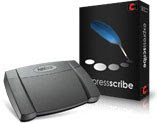
With the help of professional transcription software, you can significantly reduce the time it takes to convert audio to text and make your life much easier in the process. Express Scribe is the most comprehensive audio transcription software and has everything you need to help you transcribe audio to text faster.

How to Transcribe Audio using Express Scribe

1. Download and Install Express Scribe

Download and install Express Scribe. It is free to download for PC and Mac and installation should only take less than a couple of minutes. 


2. Adjust Settings

Click on Options in the main menu bar to set and change all your transcribing settings. Set the audio playback to suit your typing skills or the quality of the recording. Additionally, you can also configure your foot pedal controller, hot-keys, speech-to-text software, and more. 


3. Load Dictation(s)

Once your settings have been configured, it is time to load your dictation file.  Load your audio file(s) by either uploading your file from your local machine, through an FTP server, LAN or even directly from a portable dictation recorder. 



4. Start Transcribing Audio to Text! 

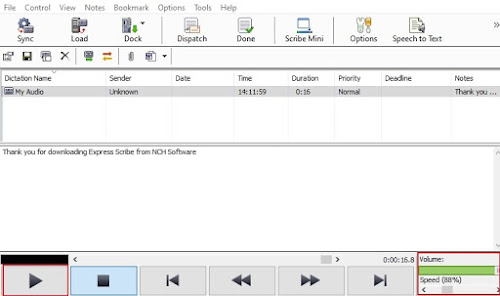
It’s transcription time! Select the loaded audio file and click the Play button to start. Open Microsoft Word or any other word processor to type the text. Alternatively, you can also use the note section in Express Scribe, under the main interface to type your text. If needed, you can slow down or speed up the playback using the speed control tool in the bottom right corner. Additionally, you can also adjust the volume of the playback. 


5. Share Transcription

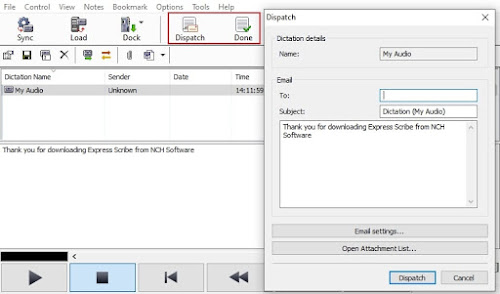
After you have finished transcribing your audio file to text, you can either select the “Done” button which will remove the file from your list, or select Dispatch to email your transcription along with your text attachment and remove the file from your list. 


So, there you have it. You have successfully transcribed an audio file to text in 5 easy steps. Whether you're an independent typist working for a Medical or Legal business, the Head of Marketing working on internal communication videos, or a secretary or needing to transcribe a recorded interview, Express Scribe has you covered. 


Tuesday, October 22, 2013

Make Digital Dictation Work for Your Business

Why Express Scribe is an Essential Component in a Virtual Assistant's Toolkit

Guest post by Suzanne Higham of Admin-Minded

A Virtual Assistant, as the name suggests, provides assistance to businesses remotely on a freelance and, therefore, flexible and affordable basis.

And if you hire the right Virtual Assistant, they will not only provide an extra pair of hands to ease the administrative burden, they will also be proactive and look for ways in which they can improve your efficiency, productivity, and, subsequently, your profitability.

One way this can be done is by realizing the huge potential in the use of transcription - which has been enhanced further with the introduction of digital dictation software.

Previously, the image conjured by the word 'transcription' would be old, overused cassettes of poor quality, and even couriers traveling across cities to get the aforementioned tapes to typists with looming deadlines. However, the introduction of digital recorders and audio players, such as Express Dictate and Express Scribe, has rendered these images obsolete.

Now it really is as easy as 'talking to your computer, clicking 'send', and your encrypted audio file will be transmitted immediately to your assistant, wherever in the world they may be. And if that wasn't easy enough, with Pocket Dictate, you can even convert your smartphone into a dictation-recorder, so you can dictate whilst on the move.

How This Technology Can Help Your Business
With just a little bit of imagination, you will find that transcription is not just for solicitors and doctors. It can be used successfully by sectors as diverse as trades and accountancy, IT, universities and market research agencies.

For instance, you can dramatically cut the time spent creating documents of a similar nature. Your assistant can prepare a template, and whenever you need to create a customized version, simply dictate the necessary edits, send the dictation file to your assistant, and the customized document can be produced without delay.

And to all tradespeople, estate agents, surveyors – in fact, anyone else who frequently finds themselves working away from their office or base – throw away your notepad! Whilst on-site, dictate your findings, and send them to your assistant to transcribe, ready for your arrival back in the office.

If you are attending a key meeting, consider recording the proceedings. You can be confident that all the information will be captured, and you avoid having to bring someone into the meeting purely to take minutes – freeing them up to make more valuable use of their time.

We also provide transcription services to businesses that already have their own in-house admin departments, as a helping hand during busy times and to cover staff absences. With digital transcription software, no exchange of cassettes is required, and handover is effortless.

And the benefits continue. These are just a few examples of how the use of digital transcription software can be incorporated into the daily operations of a small business to enhance efficiency and subsequently improve customer service. So why not give it a try?

Tips For Getting Started
  • When dictating, try to keep background noise to a minimum. Be aware of traffic, fans, and interference from mobile phones.
  • The first time you attempt dictation, do a test run with your transcriptionist so any problems can be highlighted.
  • Finally, take time to source the right transcriptionist. A transcriptionist is not 'just a typist. They need to have a sound understanding of language, grammar, and punctuation. A transcriptionist needs to be able to 'think whilst they type'.


Suzanne Higham founded Admin-Minded with one goal - to provide high-quality administrative and PA services to businesses and solopreneurs to enable them to achieve their full potential. It has grown into a team of fabulous assistants with a diverse client base, including award-winning businesses and celebrities. To learn more or ask questions about ways in which transcription could help your business you can contact Suzanne at www.admin-minded.co.uk or the Admin-Minded Facebook page

Tuesday, February 12, 2013

Software Sweethearts

With so much software, what's not to love?

VideoPad & Express Burn
This dynamic duo will guide you faithfully from beginning to end of any video project. Use VideoPad video editing software to capture, import, edit and add effects to your videos. Finish up by burning the video to DVD with Express Burn. Create a heartfelt video recording for your beau this Valentine's Day.

Sound Software Sweethearts
WavePad & MixPad
This pair is the audio software dream team. Use WavePad audio editor to record and edit a song first, then incorporate with other tracks with MixPad for your multi-track mixing needs. They work together seamlessly to help you create your own love song for your valentine this year.

Express Dictate & Express Scribe
If ever there was a practical match, it's this one. Express Dictate digital dictation software allows you to record dictation, and send to a transcriptionist, while Express Scribe makes transcription easy with features like variable speed playback, and file management.

Looking for the perfect match? Save by bundling related programs pairs and purchasing them together.

Friday, December 7, 2012

X is for eXpress Software

NCH Software ABCs Series

Express Software to get things done fast Express might not be the best 'X' word, but there is no questioning its relevance as a descriptor for NCH Software. NCH has several products with "Express" right in their names. When I think of express, many connotations come to mind including speed and efficiency. So think of these as software programs to streamline the processes that they are designed for, and help you sail through tasks, not unlike being in the express lane.
<<< Previous: W is for Web AccessNext: Y is for YouTube >>>

Thursday, October 11, 2012

T is for Typing

NCH Software ABCs Series

typing software for typists Typing is a part of life. The written word is more frequently typed than penned these days and there is no turning back. We've gone from having scribes to copy documents, spending their days putting ink to paper, to having professions like medical or legal transcription that focus on typing words instead. Strong typing skills are required in many other professions as well. So it should come as no surprise that we provide typing software to help you learn how to touch type, testing your typing speed, speed up transcription and making typing more efficient. Check out all of these typing software solutions:
<<< Previous: S is for Sharing Next: U is for Utilities >>>

Wednesday, September 5, 2012

Q is for Quick

NCH Software ABCs Series

Q is for Quick SoftwareIf you are looking for a fast solution you have come to the right place. Just like our efforts to provide you with easy-to-use software, we are constantly striving to improve our programs so that they can get you up and running quickly. From speedy downloads, fast installations, quick start guides and wizards a lot of thought goes into getting you as close to the solution you were looking for in three minutes. For example, you can download any of our file converters and go from download to converted in minutes, if not seconds, because who has time to waste learning a program when what you really want is a file in a different format?

If you are not just looking for a fast solution but something that will speed up other day to day tasks we have a few programs that fit that bill as well. Take FastFox Text Expander Software, which allows you to set up your own shortcuts and macros to help you zip through typing or repeated tasks on your computer. Or any transcriptionist can tell you how much time they can save by using Express Scribe Transcription Playback Software when typing from an audio file, and that is just scratching the surface. For more Quick Software solutions be sure to check out the entire NCH Software collection.

<<< Previous: P is for PDFNext: R is for Recording >>>

Wednesday, August 15, 2012

NCH Software Packages Fully Accessible to the Blind and Visually Impaired

Guest post by Craig Faris, President of Seeds of Promise International Child Welfare

Accessible Software for the Blind and Visually Impaired This information does not apply to everyone, but for the blind and/or those using screen-reading software, I can save you a bit of time. I myself am totally blind, live in Canada, use Window-Eyes 7.5 as my screen-reader of choice, and recently tried Express Scribe. Much to my immense surprise and considerable delight, the software package is fully accessible to the blind, as every single option can be selected from ordinary text-based menus! In addition, the software uses ordinary dialogue boxes which can be fully read aloud with a screen-reader, and generally the software is fast and easy to use.

This simple fact is a rarity in today's graphics-based computing environment, where custom dialogue boxes, photo buttons, and other generally inaccessible programming methods are commonly employed to make the screen busy and appealing to sighted folks.

I have since tried some of NCH Software's business point-of-sale software, such as Copper, Inventoria, and Barillo, and these packages are all also easily used by a totally blind individual like myself!

Hats off to NCH Software for, perhaps inadvertently, making their lightning-fast, user-friendly software packages fully accessible to blind computer users.

Now all we need is for the POS software packages to somehow be linked together, or at least use a common database, and I can open my own storefront with 100% accessible software!

Wednesday, June 13, 2012

Amazing Tools for Transcription

Guest post by EQ Trans UK

Amazing Transcription Software ToolsAs a transcription services provider which caters to clients all across the UK, we believe in the importance of using technology that enables our transcriptionists to perform at their optimum, while simultaneously benefiting our clients as well. Using the appropriate software while working on a transcript can help a transcriptionist do a better thorough job of transcribing and, of course, help in meeting deadlines faster, too.

We have been using various NCH software for a while and they are now form basics of what we do. If you are new in the transcription industry, here is what minimum you need to have to get going:

Express Scribe – This audio player which can be used on both PCs and Macs comes loaded with many features, such as support for foot pedals, variable speed playback, as well as speech-to-text integration. This software does a great job of supporting all the popular file formats. It also gives a transcriptionist better control over the audio playback through the use of a foot pedal and even keyboard shortcuts. Express Scribe does not take up too much screen space, unlike other software, and runs quietly in the background while a transcriptionist is at work.

Switch Sound File Converter - Although there are plenty of file converters available, this software wins hands down for its simplicity. Our clients often send us digital audio files in other formats and we use this software to convert them into an mp3 format using 128 bit mono encoding. This makes it easier for uploading files on our secured server so that our transcriptionists can get to work. Switch also gives users an additional option of configuring up to 3 right-click options which make the conversion process faster, too.

Prism Video Converter - This video file converter converts files from any format to the most commonly used formats, either in singles or in batches, and can even convert files directly from DVDs and other multimedia devices. We use this software mainly for converting large video files into mp3 file format so that they can be uploaded on our server easily. Prism also has another option of resizing a video file format and customising it in terms of the frame rate, brightness, and contrast, as well as text and caption addition.

WavePad Editing Software - One factor which can be detrimental to the process of transcribing itself is the presence of background noise in an audio file. The WavePad Audio Editing Software works on both PCs and Macs, allowing the user to cut and paste specific sections of the recording, besides adding features like noise reduction. This software supports a large number of file formats and has a remarkably easy-to-use interface as well.


EQ Trans UK is a transcription agency based in the UK. We have a well-trained and certified team of transcriptionists to address any client requirement.

Thursday, May 3, 2012

What Dictation Can Do For You

What Dictation Software Can Do For YouDictation and transcription are common practices in various fields, including the medical profession, law, court reporting, even insurance. However many of us have never considered what dictation or transcription is, much less how it might be able to help us in our careers.

When you have many different reports, letters, memos, or even articles to write, dictation can be a better use of your time than writing them all out yourself. With digital dictation software, you create an audio file with what you want those documents to say. If you need to add something, or go back, you can easily go to any point in the dictation to insert or even overwrite sections. When you are done editing your audio dictation the only thing left for you to do is send it off to your transcriptionist.

At this point all you need to do is wait for the transcriptionist to type up the document from for you. Express Scribe is a very popular transcription software allowing you to play, fast forward, rewind, stop, and slow down dictations to make transcribing faster and easier. And professional transcriptionists are well versus in their areas of expertise giving that extra insurance of complicated medical or legal terminology is correct. Accuracy is doubly important in the professional world and fast, accurate documents sent back to you is exactly what you will get.

Professionals everywhere can become more efficient freeing up time for other tasks by taking advantage of dictation and transcription. Consider what you do at your job, what you type, and how long it takes to create these documents. There is undoubtedly some aspect of your day to day activities that could benefit. Download Express Dictate and Express Scribe and see how it can help you.

Wednesday, February 29, 2012

Transcription City Makes Their First Instructional Video

Guest post by Transcription City, specialist transcription services

As most transcriptionists know, NCH Software makes some pretty awesome dictation and transcription software. Most of our transcriptionists use Express Scribe for their transcription work, and it is the programme I always recommend when anyone asks for advice on transcription software because of its simplicity and ease of use with pretty much any audio or video file. At the office, I also use Switch audio file converter from time to time, usually because somebody has sent me a file in an unusual audio or video format. I also use Switch to compress large files, which can save so much time when a transcriptionist needs to download a file for quick turnaround. In my opinion, NCH make some of the best software around, so when we decided to make some instructional videos for our clients, NCH VideoPad was our first choice for video editing.

Watch all the Transcription City videos on YouTube at youtube.com/transcriptioncity
Transcription City is an up-and-coming company, and we want our clients to be able to get to know us as a trusted and professional brand. This is why we came up with the idea of making a few videos to help our clients to get to grips with our website, as well as learn a few tips on recording a high-quality audio or video file. In theory, it was simple: make an informative video and then post it to YouTube. As Company Director, I felt the responsibility should lie on me to introduce potential clients to our company, but the problem was once the camera was pointed at me, I would instantly forget what I was going to say or burst into fits of laughter due to my embarrassment; after all, I’m no Angelina Jolie! We needed a solution so we could cut out the guff and get our point across to our clients clearly and informatively.

Enter VideoPad. After downloading VideoPad from the NCH website (which took us less than a few minutes) we began editing our video. VideoPad was so user friendly that we had a fully edited video in around half an hour, without even watching the tutorials. We were so impressed with the software because we could easily edit and upload video from any camcorder or even an iPhone. VideoPad will accept any video file and it can easily be uploaded to YouTube or transferred to DVD (great if you have made a lot of home movies). You can easily add music or narration, stabilise a shaky video or add photos and captioning to your film.

I can honestly say that by using NCH VideoPad, we have created professional, informative videos that our clients can really benefit from. Now, if we could just get them to arrange George Clooney to star in our next video...

TranscriptionTranscription City offers specialist transcription services to businesses and individuals around the world. They provide a cost effective way of getting work done quickly and faultlessly for large and small companies alike.

Wednesday, February 15, 2012

NCH at the Heart of Transcript Divas Transcription Services

Guest post by Transcript Divas Transcription Services

NCH Software is at the heart of our business process at Transcript Divas Transcription Services. We use three of their programs to edit, convert and transcribe audio and video dictation files.
express scribe transcription software
NCH Software is key in solving two problems we often have to deal with, even before our typists get to work. Obscure recording formats can be problematic–although Express Scribe handles most common formats, clients do send us files that are difficult to handle, especially large video files. So to save time at the typist's end, we batch-convert these problem files to the smaller and more compatible MP3 audio file format using NCH's Switch File Converter.

The second key difficulty we often encounter is how to deal with poor-quality recordings. A surprisingly large number of interviews take place in noisy cafes, with hissing coffee machines and clunking cups almost drowning out the speech. We also receive poorly-recorded group sessions, where the participants farthest from the microphone are practically inaudible, while the closest voices are deafening. In these situations Transcript Divas employ WavePad sound editor to process recordings before they go out to typists. Functions we find particularly useful are 'normalize,' 'amplify volume,' and 'remove noise or hiss.'

Almost all of our 30 Divas use NCH Software's Express Scribe, which is free–though there's also a paid version, Express Scribe Pro, which has more functionality. Express Scribe's user-friendliness makes it the preferred choice when compared with other transcription software packages, and this is something it shares with all of NCH's programs. As one Diva put it, "I especially like the fact that you don't need to be a technical whiz-kid to use it!" Key features that Divas mention are its ability to handle most common file types, the essential functions of speed adjustment, rewind and fast-forward, and the 'volume boost' for quiet files–which saves typists having to go into WavePad for a small poorly-recorded Express Scribe Pro also plays video files–an ability our 'Video Divas' put to good use. To maximize typing speed, many of our typists also use a foot-pedal.

Another key feature our typists have highlighted is Express Scribe's ability to insert time-coding. This is seen as a real gem by the typists, and can save countless hours of inserting them by hand! For the uninitiated, go to Options → Display–this allows you to set the required combination of hours, minutes and seconds. Once you have chosen, simply go to 'Notes,' 'Insert' and 'Time' each time you need to put in a time code, or press Ctrl+Shift+T to save even more time.

Transcript Divas Transcription Services is a transcription agency with offices in London, New York, Toronto and Sydney.

Wednesday, February 1, 2012

D is for Dictation

NCH Software ABCs Series

D is for Dictation SoftwareDictation is still a reality in many industries. While automatic voice-to-text applications may be on the rise, and can be wonderful for the casual user, in professions like medicine and law, a mis-translated term or phrase is a costly error. In the past we have talked to professionals who have benefited from the streamlined efficiency of a digital dictation process for getting their medical reports, correspondence or case notes documented. We aim to provide a wide range of solutions to fit anyone that needs to record dictations. These flexible options allow recordings to be made from anywhere then sent off for transcription instantly, saving you time.

NCH Dictation Solutions include:


<<< Previous: C is for Converting
Next: E is for Easy >>>

Friday, November 11, 2011

Express Scribe Pro for Mac

Express Scribe Pro for MacFollowing the September announcement of the new professional version of Express Scribe, we are pleased to say that now the Mac version of our extremely popular transcription software has followed suit and now there are both free and professional versions of Express Scribe available for Mac OS X as well. Features of the professional version include video playback and support for proprietary audio file formats including dss, ds2 and mvf for those professionals working in legal or medical transcription.

Friday, October 14, 2011

HIPAA Compliant Dictation Software

HIPAA Health Insurance Portability and Accountability Privacy ComplianceWith HIPAA, the Health Insurance Portability and Accountability Act, in effect, medical dictators and transcriptionists have to be wary with the use or exchange of patients' Protected Health Information (PHI) in their dictation transmissions. As a medical transcriptionist (MT), they have to maintain the privacy of every patient record being transcribed.

To protect patient confidentiality, it is recommended that your computer comes with at least the following:
  • Firewall protection with solid password protection for user accounts
  • Regular Windows or MAC updates for computer security
  • Up-to-date antivirus software
  • File encryption software (e.g., Dial Dictate, Web Dictate, or Express Dictate)
The recent stimulus plan (or American Recovery and Reinvestment Act of 2009) included a specific act — called the HITECH Act (or the Health Information Technology for Economic and Clinical Health Act) which has specific requirements for the electronic transmission of patients' health information. For this reason, NCH Software has created a medical user version for its dictation software applications which integrate seemlessly with Express Scribe on the transcription side to maintain patient privacy through the transcription process.
Dial Dictate: HIPAA-compliant encryption to secure medical patient data when recording as .dct files.
Express Dictate: Supports HIPAA-compliant encryption, perfect to secure patient or client data for transmission over the Internet.
Web Dictate: Recording can be HIPAA-compliant encrypted for privacy and security.
Given that medical transcriptionists receive, send, and store confidential patient data, it's vital they recognize and adhere to HIPAA rules on privacy, security, and confidentiality. If this is accomplished, patient records are secured, data efficiency is obtained, and more importantly customer confidence is increased.

HIPAA offers a set of strict guidelines for protecting patients' privacy and information. Seeing as a lot of health organizations utilize NCH Software for dictating and transcribing medical records, we have carefully considered the best way to sustain these guidelines. MTs can rest assured that NCH Software will assist them in paving the way to a HIPAA-compliant future.

Monday, October 10, 2011

Growing A Quality Transcription Business With Express Scribe

Guest Post by Annalisa Holmes, Director of The Transcription People

We have been using Express Scribe transcription software in our Australian-based outsource transcription business for years and we love it. Why? I have a list, so here goes:

Cost Effective
You can't get more cost effective than free software. For as long as I can remember Express Scribe has been free. This continues to be the case with a free version still being offered alongside a new paid Pro version.

In my business I employ a mix of transcriptionists; we have some work onsite in our office but the majority are work-from-home micro-businesses. Included in that mix are a wealth of "old school" typists and "wannabe" transcriptionists. Old school typists are used to the cassette tape days of micro and mini cassette dictation and are very experienced at transcription. Wannabe typists have time on their hands, want to learn a new job skill and possibly work from home or for an employer.

Express Scribe is perfect for both these dynamics, experienced typists can very quickly switch their mindset to the digital way of doing things and with the option of a USB foot control, can make the transition very quickly from tape to digital transcription with a free download and a low-cost foot pedal. Those new to transcription can have the software installed in minutes and have the flexibility of training themselves using the configurable control keys. For a zero dollar outlay Express Scribe is a very attractive tool to those looking to start a career in transcription.

Multiple Use Scenario
Most people think of Express Scribe as just a tool for transcription typists. That is true for the majority of people, but in my business we also utilise Express Scribe for our proofreading team. My company is renowned for producing high quality, accurate transcription and the way that we do that is with a two-step quality assurance process. Step one is the traditional transcription typist who listens and transcribes. Step two is where the quality and consistency across clients is provided by our proof-reading team. The proofreaders do not transcribe, their role is to apply customer-specific formatting and act as a second set of eyes over the transcript, ensuring the highest quality.

My proofreading team use Express Scribe to play back audio whilst reading through the transcripts. Typically they prefer the control key functionality and love the variable speed playback, one of the many features in Express Scribe.

Very Easy To Set Up, Install and Use
Express Scribe can be installed and up and running in minutes. For users of all technical levels we have found Express Scribe to be a breeze to get working and get used to. People of all transcription abilities get used to Express Scribe very quickly. As we all use the same software throughout my business, we have a pool of experts within our own teams who can help each other out with any questions.

From a business point of view, all my staff are on the same page when it comes to transcription and proofreading software. We don't need to waste time supporting various vendors' software. Consistency across the team makes for a smoother transcription and proofreading workflow.

The Future
I really can't see my business moving away from Express Scribe, there is no need. It has served us well for years and will continue to do so for years to come. We are particularly excited about the new Pro version of Express Scribe which can now process the DSS Pro audio files created on the latest Olympus and Philips digital dictaphones. Before the Pro version came along we had to include an extra file conversion step from .ds2 to .dss. Now NCH has that covered.

Thank you NCH for your excellent software, which has helped my business get to where it is today.

Annalisa Holmes is the director of The Transcription People Pty Ltd, one of Australia's largest outsource transcription services. Annalisa started as a transcription typist in the early years of forming her business and now oversees a large team of transcription typists across Australia and New Zealand. The Transcription People service clients from across Australia, the USA and the UK and boasts AMP, Holden, Ernst & Young as some of her clients.

Thursday, September 29, 2011

Scribe Excels at Thesis Transcription

Guest post by Clara Bianchini

Student Saves Time Transcribing Interviews for Thesis with Express Scribe Transcription SoftwareI was transcribing the interviews for my master thesis and, like every student in this situation, I didn’t have enough time! I was using the software that my teacher recommended, but it was still taking too long and it wasn’t pleasant to use. To listen and type at the same time I had to reduce the speed, but the voice got distorted to the point that some of the transcribed sentences didn’t make any sense when you read them back. I had already transcribed two interviews and I had 17 more to go. Since quality and timing were crucial to my work, I decided to ask Google about better software.

On the first organic result that Google gave to me I came across a comment that caught my attention. I am normally the type of person that is a little skeptical and will investigate at least three options, but when I read the comment that essentially said, "Express Scribe made my transcribing work 5 times faster, without distorting voices. You should try!" I stopped. It was later than 10 P.M.; I was tired and frustrated with my teacher’s software so I decided to give it a try.

I Googled for where I could download Express Scribe, and in few short seconds, it was in my computer. I opened it, and the first impression was already better: it looked MUCH better than the other software. I opened one of my audio files there, changed the speed from 100% to 50%, crossed my fingers and waited to hear what the sound would be like. To my surprise, the voice was totally clear, almost without distortions, and there was a typing box right there, almost smiling at me and waiting for me to have fun.

The next day alone I transcribed two more interviews, at an incredibly fast pace. I was so happy that I shared my discovery with all my classmates. I am pretty sure that without target="_blank"Express Scribe I would be still transcribing interviews right now. It really made all my work much faster and easier.

Clara Bianchini is a student of Imagineering, a Master's degree in Strategic Business Innovation from the experience perspective, a new program about how to design companies towards co-creation of value. In a more participatory approach, business is done together with stakeholders and value and experience are co-created. Some people might say that this is the next stage of Marketing. In order to understand how to design the participation of stakeholders during her thesis research, Bianchini conducted qualitative research which included one-on-one interviews that were transcribed for analysis.

Wednesday, September 14, 2011

New Express Scribe Professional Edition

Express Scribe Professional Transcription SoftwareExpress Scribe, one of NCH's most successful products and a favorite among transcriptionists worldwide, is going Pro. With the extreme popularity of the program, we have decided to offer some of the functionality in a professional version for a nominal fee that will help us better support users, fix problems, and implement new features and improvements. The free version of this popular transcription software isn't going away, but advanced features like video playback and support for proprietary audio file formats (e.g., dss, ds2, mvf) will now be supported in the professional version.

Friday, August 26, 2011

Transcription Foot Pedal or Hotkeys?

Transcribe with Express Scribe transcription software and a foot pedalOne of our programs popular with transcriptionists worldwide is Express Scribe Free Transcription Software. Express Scribe, an invaluable tool to transcriptionists, helps control the playback of audio or video files during transcription with extremely helpful features, including variable speed playback, and can be controlled either with a transcription foot pedal or with assigned 'hotkeys' on the keyboard. Most transcriptionists rave about foot pedals, but have you ever wondered if they really make transcription more efficient or if their use is really just a matter of preference?

Well here's your answer. Chris Beamish at HoT Virtual Assistant Resources recently crunched the numbers on if you should use hot keys or a foot pedal for transcription and, based on his estimates, you could potentially save yourself over 11 hours-worth of typing in a week by using a foot pedal instead of hotkeys where he has found the potential for hitting the wrong command to be much more likely.

What do you think? Do you use a foot pedal or hotkeys with Express Scribe? And if you invested in a foot pedal did you see an increase in your productivity once you got into the swing of things?

Wednesday, August 10, 2011

Practice Typing from Audio Dictation

Practice transcription audio added to KeyBlaze typing tutor
Last year we added a great resource for transcriptionists in training by posting several practice transcription audio files for use with Express Scribe transcription software so you could practice typing and using your foot pedal or hotkeys to control the audio with sample dictations that were provided to us by Accuro Transcription Services.

To add another tier of options to practicing typing from audio or dictation files, we have now also added several audio samples as dictation exercises in another NCH typing software, KeyBlaze typing tutor (version 1.22). This new addition allows you to listen to a dictation file and practice typing along. You can pause the recording at any time and compare your typing to the completed transcription side-by-side, so you can check for formatting, spelling, and other elements inherent to the dictation process. So, if you are looking for training to be a transcriptionist or know someone who is, you'll want to try KeyBlaze for practice transcription and typing from audio files.

Monday, July 18, 2011

Express Scribe Gets DS2 Support

Express Scribe Transcription Software DS2 SupportExpress Scribe users rejoice! One of your most requested features has arrived: support for .ds2 (DSS Pro Voice) audio dictation files. Express Scribe Transcription Software Version 5.30 for Windows is the first version to include support for both dss and ds2 dictation file formats, so the time of workarounds and training your clients to back-save is now a thing of the past. And ds2 support for the Mac version of Express Scribe will be on the way soon.